The time has come: in 2026, using AI to write DAX has started to be effective. Let me recap what has changed between 2023 and 2026, and what we are doing with our three new courses to best assist you through these changes.

I started my career as a developer: Basic, Assembler, Pascal, C, C++, Delphi, C#, and many other specific domain languages along the way. Writing code is magical and time-consuming. Over time, I shifted my focus to data analytics, but I never stopped coding. Much less, and with much less time, with many more compromises. In the last two years, the support of AI to improve developer productivity has been absolutely amazing, from completing one line of code to writing complete files and now managing entire repos. This should be the introduction to another article, because this one is about DAX: why does my second life as a developer matter?
The reason is that, while I adopted AI relatively early to write software, I was not enthusiastic about using AI to write DAX code. Fourteen months ago, in July 2025, I wrote a post for the 300th edition of our Newsletter to clarify the position of SQLBI on AI. The message was that AI speeds up specific tasks, that the end-to-end time savings were smaller than what you would have expected from faster prototype creation, and that we would write about AI only when we saw clear, measurable benefits.
You might think that it was a conflict-of-interest type of situation: after all, I have been teaching DAX for a living for many years. But no, that was not the reason, because in teaching, my goal has always been to help people achieve their goals faster and more efficiently. Other topics simply become important as technology evolves. I waited, simply because AI was not ready for DAX. Hey, have you heard people say DAX is hard? Well, I don’t think it is hard; it’s just different, and AI learns by example, adapting and generalizing concepts across languages. But with DAX, that wasn’t entirely possible, because it’s unique (and beautiful!) in its own way.
Well, I have big news. The wait is over; the time has come. Writing DAX with AI started to make sense this year. The acceleration we’ve seen in DAX proficiency with the new frontier models released in the last six months has been incredible. We are not at the “perfect” level; performance could still be a weakness, but we are well past the point of considering it helpful. Today, we use AI every day to transform data, create and modify semantic models, and draft long, complex DAX code! We published two articles in August about using AI to write DAX.
So, I have news about our upcoming training and about clarifying our position at SQLBI on using AI to write DAX: long-time readers of this blog know that we have been cautious about using AI to write DAX. Clearly, something changed, and if you are interested, I want to recap the journey since the first experiments with AI in DAX and explain our current position. Sit down, relax, and enjoy the read.
The new courses
We recently created three courses for different steps in using AI to write DAX:
- AI for Power BI: Intro
 to understand the basics of AI in Power BI. This is not about Copilot; it is about using agents, skills, plugins, and MCP servers to manipulate Power BI models and reports. If you already use your Claude Code connected to Power BI, you probably already have this knowledge. If you are still using ChatGPT in a web browser by copying and pasting DAX code, you definitely need to learn the foundational concepts that apply to this new way of working, regardless of the specific tool. The tool choice doesn’t really matter, as long as it connects to MCP servers.
  DAX with AI: Essentials to learn how to read the DAX code generated by AI tools. If you already know DAX, you will see how to write correct prompts and how to actually use the agents to write measures. If you already know the AI tools but you are new to DAX, you will learn how to read DAX even if you are not able to write it.
 DAX with AI: Scenarios to deal with more complex scenarios where your work is mainly to control the direction of the development, which includes writing DAX code and modifying the model so that it generates the correct result for the business problem described. This course can be seen as a library of business scenarios you can use to create a specific solution or to learn generic techniques applied to different use cases. The course also includes foundational concepts (specific data modeling and DAX techniques) which you can apply to several scenarios. You can pick only the foundational concepts you need for the use case you are interested in, or you can just go through the whole course from A to Z. You have options.
The courses are built with two distinct profiles in mind. The first is someone who doesn’t know DAX, uses an LLM (or would like to), and wants better results; this person needs to learn enough DAX to understand what the model produces. The second is someone who already knows DAX and mainly uses AI to copy-and-paste DAX code from a chat window. Our new courses are more complete for the first profile, while they provide tremendous guidance on the right combination of tools and prompts to be more efficient and effective for the second profile. That profile will also use this as an opportunity to validate their DAX knowledge in a new context.
In these courses, we don’t teach AI tools because they change so often that a course can become obsolete before it is even published. This also means it doesn’t matter whether you use Visual Studio Code, Claude, Codex, other tools, or one day a chat integrated into Power BI (we all would like that, right?). We provide help installing it on separate pages that we’ll keep up to date, but the courses focus on using AI effectively for DAX development.
We focus on how you write the request, we offer reasoning about the problem, we give instructions, and we check the result. Many AI videos for Power BI assume you already know the tools or show what’s possible without explaining what matters when you use it for work. We focused on teaching without worrying about the demo effect.
But what about all the other courses? Are they still relevant? Yes, you will just use those skills in a different way. But let’s ask different AI models; I wrote the following prompt:
Is it worth attending a DAX training now that AI can write good DAX code?
Here are the answers from three frontier models – no cherry picking!
GPT-6 Astra Light
Editorial source note — not part of the AI response.
Yes—but the reason to attend DAX training in 2026 is different from what it was a few years ago.
AI has substantially reduced the value of learning DAX syntax by heart. It has not eliminated the value of understanding how DAX actually evaluates expressions.
Microsoft’s own current guidance reflects this. Copilot can generate DAX queries and measures, but Microsoft specifically warns that it can struggle with variables, calculation groups, newer DAX syntax, and other cases, and recommends understanding/reviewing generated code rather than blindly accepting it. Microsoft Learn
What AI changes
| Skill | Before AI | With good AI | Training value |
|---|---|---|---|
| Remembering function names | Important | Mostly unnecessary | Low |
| Writing routine measures | Important | AI is very good | Low–medium |
| Looking up syntax | Important | Nearly automated | Low |
| Filter context | Essential | Still essential | Very high |
| Context transition | Essential | AI can write it, but you must understand consequences | Very high |
| Data-model/DAX interaction | Essential | AI often lacks enough model intent | Very high |
| Debugging wrong totals | Difficult | AI helps, but doesn’t remove reasoning | High |
| Choosing between valid DAX patterns | Expert skill | AI can propose alternatives | High |
| Performance optimization | Expert skill | AI helps inconsistently | High |
| Reviewing AI-generated DAX | Didn’t exist | Increasingly important | Very high |
The key distinction is:
Writing DAX ≠ understanding DAX.
Suppose you ask AI:
“Calculate sales for customers whose lifetime sales exceed €10,000, preserving the product filter but ignoring the current customer selection.”
A modern model can probably produce plausible DAX immediately.
The difficult questions are now:
-
Is it computing customer lifetime sales in the intended context?
-
Should the customer filter be removed with
ALL,REMOVEFILTERS,ALLSELECTED, or something else? -
When is the measure evaluated?
-
Does context transition occur?
-
Will totals behave correctly?
-
What happens with many-to-many relationships?
-
Does the expression scale to a 500-million-row model?
Those aren’t primarily syntax questions. They are semantic-model reasoning questions.
Microsoft still describes understanding context as critical both for producing dynamic calculations and for troubleshooting formulas. Microsoft Learn And its intermediate DAX training continues to emphasize CALCULATE, filter context, filter modifiers and context transition rather than merely teaching function syntax. Microsoft Learn
So is a serious DAX course still worth the money?
I’d divide people into three groups.
| Your situation | Value of intensive DAX training |
|---|---|
| You make reports and mostly need SUM, ratios, YTD, basic comparisons | ★★☆☆☆ |
| You develop production Power BI semantic models | ★★★★☆ |
| You design complex models, troubleshoot DAX, optimize calculations, or advise other developers | ★★★★★ |
For the first group, I’d probably learn interactively with AI plus Microsoft Learn rather than spend several days in advanced classroom training.
For the second and third groups, the economics have arguably become better, not worse: AI lets you skip a lot of mechanical coding and spend more of your time understanding the difficult parts.
A course such as SQLBI’s current Mastering DAX reflects that distinction. The 2026 curriculum includes filter/row context, table functions, semi-additive calculations, calculation groups, advanced relationships, window functions, time intelligence and what happens “inside CALCULATE“—topics considerably deeper than simply learning how to type measures. SQLBI The new video course also explicitly spends significant time building an understanding of filter context from the ground up. SQLBI
The skill stack I think matters now
                    2020                         2026
             ─────────────────             ─────────────────
                 DAX syntax                    DAX semantics
               function recall                 filter context
              pattern knowledge               model reasoning
                   ↓                               ↓
             write the code               describe the intent
                                                ↓
                                           AI writes code
                                                ↓
                                      YOU verify correctness
                                                ↓
                                      YOU diagnose edge cases
The interesting consequence is that AI makes shallow DAX knowledge less valuable and deep DAX knowledge more valuable.
Someone who knows only syntax is increasingly replaceable by AI.
Someone who understands evaluation context, relationships, expanded tables, lineage, context transition and engine behavior can use AI as an extremely fast DAX assistant—and can recognize when it produces something subtly wrong.
So if the proposed training is essentially “here are 100 DAX functions”, I would be reluctant to invest much time in it.
If it is training in how DAX works, particularly something at the level of Mastering DAX, I think it remains highly relevant. The objective shouldn’t be “after three days I can write DAX without AI.” It should be:
“After three days I can tell AI what calculation I actually need, understand what it generated, and know when it is wrong.”
That is probably the more durable DAX skill now.
Fable 5.1 High
Editorial source note — not part of the AI response.
Yes, though the reason has shifted. AI has made the typing of DAX cheap, and that changes what training is for.
The part AI handles well is translating a clear intent into syntax: “total sales for the same period last year, only for products in the current filter” becomes a working measure in seconds. What it does not do is know whether that measure is the right one for your model, and you will not know either unless you understand the underlying mechanics.
A few things that still require you to actually understand DAX:
Evaluation context. Most wrong DAX is not syntactically wrong; it returns a plausible number that is subtly incorrect because of filter context, context transition, or an unexpected interaction with the relationship. AI-generated code fails this way just as often as human code, and the failure is invisible unless you can reason about what the engine is doing. Reviewing a measure is a skill, and it is the same skill as writing one.
Specification. To ask for the right thing, you have to know what “the right thing” is in DAX terms. “Same period last year” is ambiguous in a fiscal calendar with 53-week years; “ranking” hides a dozen decisions about ties and filters. The training gives you the vocabulary to ask precisely and to recognise when the answer solved a different problem.
Modeling and performance. Much of what looks like a DAX problem is a data model problem. AI will happily write a 40-line measure to work around a missing relationship or a badly shaped fact table, and it will run slowly. Knowing when to fix the model instead is judgment, not code generation.
Accountability. If the number in the CFO’s report is wrong, “the AI wrote it” is not an answer. Someone has to be able to verify it.
So the honest reframe is: training is now less about learning to produce code and more about learning to evaluate it, direct it, and know when to distrust it. That is arguably more valuable, not less, because the leverage is higher — one person who understands DAX plus an AI can do the work of several who don’t, while several who don’t plus an AI mostly produce confident errors faster.
Where I’d be more skeptical: a course that is mainly syntax drills and function reference is worth less than it was. Look for training built around how the engine evaluates expressions and how to reason about results, and ideally one that acknowledges AI as a tool you’ll be using alongside it.
Grok 4.6 Expert
Editorial source note — not part of the AI response.
Yes — if you will own models or numbers that matter. AI is a strong junior pair-programmer for DAX, not a replacement for understanding it.
AI (Power BI Copilot, ChatGPT, Claude, etc.) is now good at writing common DAX: simple aggregations, basic CALCULATE filters, standard time intelligence. That part of the job is cheaper than it was two years ago. What it is still weak at is the part that actually breaks reports. Lets-viz
What AI still gets wrong
Independent 2026 benchmarks are consistent:
- Copilot on structured DAX tests: about 62.5% fully reliable. The rest looks plausible and is wrong in a subtle way. Lets-viz
- Broader LLM tests: models often get the intent right and the DAX grammar or evaluation wrong. One large benchmark found far more syntax failures than logic failures;
RANKXalone caused a huge share of compile errors. Maxanatsko - The pattern that reliably breaks copilots is context transition — iterators like
SUMX/AVERAGEX/RANKXthat reference measures instead of columns. Custom fiscal calendars and messy many-to-many models are also frequent failure modes. Lets-viz
The dangerous cases are not red-error formulas. They are measures that total correctly on one visual and lie on another because grain, filter context, or a relationship was misunderstood.
Microsoft’s own docs say Copilot can use the wrong functions, mishandle variables, and that inexperienced authors must validate everything before using it. Learn.microsoft
Why that still justifies training
DAX is not Excel-with-funny-names. The hard skill is evaluation context: row context, filter context, context transition, grain, and how relationships change a number. That is also what AI is worst at.
SQLBI (Marco Russo and Alberto Ferrari) shipped a third edition of Mastering DAX in 2026 after LLMs arrived. Their reasons to still learn it: generated DAX still has to be validated; a short correct formula is often cheaper than a long prompt; knowing the language makes you write better prompts; and “the moment you stop thinking, you become disposable.” Your value is the corrections the model still needs — in DAX, often more than 5–10%, especially if you also care about performance. Sqlbi
The same pattern shows up across practitioner write-ups in 2026:
- Copilot quality tracks model quality. Clean names, relationships, and measure descriptions make AI useful. A messy model makes it confidently wrong. Towardsdatascience
- In Fabric, DAX and the semantic layer got more important, not less: Copilot, Direct Lake, and data agents all sit on measures you define. Bad DAX pollutes every AI feature downstream. Towardsdatascience
So the job is shifting from “type the formula” to:
- Specify the business rule precisely (grain, filters, what a blank means).
- Keep the model AI-readable.
- Check results at multiple grains (row, group, total).
- Catch inefficient iterators before they hit production.
- Know when the generated pattern is the wrong pattern.
You cannot do 3–5 if you only know how to paste.
When training is not worth much
Skip a multi-day DAX workshop if:
- You only build simple dashboards (
SUM,COUNT, basic YoY) and someone else owns the model. - You will never be the person who has to explain a number to finance or audit.
- The course is a function catalog (“here are 80 DAX functions”) rather than context and modeling.
For that profile, Copilot plus a good model and a short “how to verify a measure” habit is enough.
What is still worth paying for
Invest in training that covers the parts AI does not internalize:
- Filter context,
CALCULATE,KEEPFILTERS, context transition - Grain and why a measure can be right in the detail and wrong in the total
- Star-schema modeling (this multiplies AI accuracy more than any prompt trick)
- How to test a measure (DAX Query View, different slicer combinations, blank handling)
- Performance: when
SUMXis necessary vs lazy - How to use Copilot as a draft + review loop, not as an oracle
That is a different syllabus from “learn DAX because you cannot remember SAMEPERIODLASTYEAR.” Syntax training is largely obsolete. Conceptual training is not.
Practical rule: if a wrong number would change a decision, you still need enough DAX to distrust the model. AI made mediocre DAX cheaper. It made good DAX more valuable, because someone has to own the last 20%.
The classroom courses on DAX do not change. If you attend one, you will learn to write and read DAX, and you need to read it to check the code the AI writes. Of course, we are also integrating into the in-person courses how to use the AI tools in the context of DAX development.
And now, the full story behind this change.
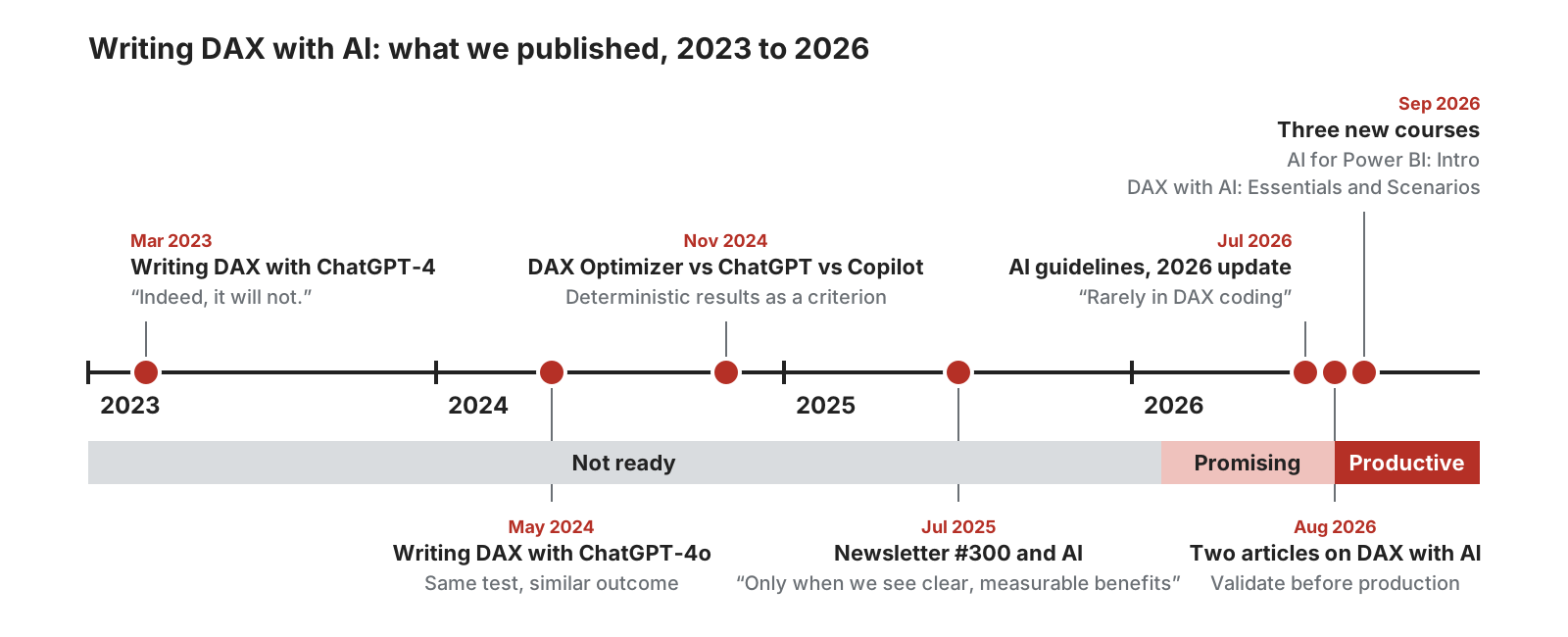
What we published about writing DAX with AI, 2023 to 2026, and our assessment by period. The details and the links are in the table at the end of the post.
What we said, and why we said it

In March 2023, we published an unplugged video where we wrote DAX measures with ChatGPT-4. A reader asked how ChatGPT could produce good DAX if most DAX on the internet is inaccurate, and my answer was that it wouldn't. In May 2024, we repeated the test with ChatGPT-4o. The result was interesting, but not ready for prime time.
The reason was never opposition to AI. I would not go back two years and write .NET code without Copilot. However, in 2023 and 2024, and for most of 2025, you couldn't think of writing DAX with AI without being able to read it well, which implies you could also write it. We did not want to suggest AI to write DAX: telling someone who cannot understand DAX (as many people were at the time) to blindly trust DAX measures generated by AI would have been a risk we did not want to promote.
In August 2025, we ran an experiment we did not publish: We tried to use AI to generate exercises for our courses. It gave ideas, it wrote good descriptive text, and the exercises were correct in their English. But they were also wrong. They repeated the example just shown instead of testing whether the student had understood the concept in a different scenario – and in several cases, they told the student to do the wrong thing.
That experiment fairly summarizes 2025. Productivity was low, given the time and skill required to get something usable. My logic is simple: if a tool saves me time, it works; if it doesn't, it doesn't make me more productive, it isn't ready, and I can wait for another version.
What changed in 2026

In February 2026, I saw the first sign. I sent Alberto a chat where a model asked for an example to explain a DAX concept and got it badly wrong. When I pointed out the error, it corrected it, corrected a second problem I hadn't noticed, and explained why. The correction showed that the AI had started to reason over the model rather than over the syntax. I like to say that AI failed the exam, but it was a very promising student.
Since Opus 4.8, we have seen big improvements, and the current generation of models (Opus 5, Fable, Sol, Astra, Grok 4.6, and others) reaches a level of DAX-writing quality we can no longer ignore. In my experience, two capabilities have changed. The first is generalization: the ability to abstract a concept and apply it to a different problem, which wasn't there two years ago and wasn't this refined six months ago. The second is the ability to work for one or two hours on a task without going off track. The sentence, "AI only repeats what it has read," could have been true in 2024, but it is definitely not true anymore. The latest models write DAX at a level above most of the students who leave our classroom courses. Not always, not for every problem, but the productivity improvement is definitely here.
Recently, we used AI to produce the exercises for the video courses, the task that had failed in August 2025. This time, we designed every exercise and let the model execute it; we reviewed everything before publishing. The result: more exercises, clearer descriptions, in less time. When I updated our generative AI guidelines on July 8, 2026, I wrote that we used AI for DAX analysis and "rarely in DAX coding". Two months later, that sentence was already outdated, which shows how fast things change.
Why we did not say this earlier

I expect the objection: "A year ago you said AI was not ready for DAX, and now you sell courses about it." All true, but there are no contradictions between this and our other statements. To make life easier for those looking for these statements, I included a table at the end of the article.
When there was a lot of hype and the tools did not work, we said it was too early. Now the tools are not perfect, but they are at a level where, if you check what they are doing, they save a lot of time. We kept applying the same rules for evaluating technologies, and the tools evolved. In July 2025, we said we would discuss AI to write DAX only when we saw clear, measurable benefits: we see them now.
Another reason is specific to training. A generic LLM course in 2025 would have filled a classroom, and it would have been obsolete within six months. It was too early for us to produce content about it. I don't know whether September 2026 is early, late, or on time, but it is the moment when we have something to teach that we expect to still be valid in a year or more.
I know, it looks like we made a U-turn instead of simply applying our judgment about the maturity of the tools. However, I stand by that, which was preferable than telling people to write DAX with AI too early. Today, it's not always 100% correct, and performance isn't always ideal. But the productivity gains are significant enough to justify its use. You should still be able to read DAX and validate the measures, but you probably don't have to be an advanced DAX expert as if you had to write all the code. That makes a big difference.
What works today
In August 2026, we published two articles that illustrate the capabilities of AI in DAX. The first is creating DAX functions with AI to remove duplicated code: when two measures share most of their code, in any language you move the common part into a function. With user-defined functions, you can do that in DAX too, and AI can write the function and replace the corresponding code in existing measures. Without AI, you can do this with some automated tools, but they stop at the first small difference between the two functions, whereas AI can handle those differences by moving parameters and adjusting the existing code to fit the new function.
When I write a measure, I have to look for the edge cases where the business rule could fail. This takes a lot of time, which is why almost nobody creates such tests. The AI connected to the semantic model finds the cases and writes the DAX queries in about ten minutes while I do something else. I have to check the expected values, because the tests must be validated at some point. In this case, the time saved doesn't shorten DAX writing, but it makes it possible to do validation work that was usually ignored.
These are two examples where we see clear and measurable benefits. When writing DAX code for an existing model, you have to be careful. When AI generates the model, the outcome is usually better. We are at the point where it can save time and money, depending on your skills. I can give many examples where writing a DAX formula takes less time than writing the prompt for it, at least for someone who knows DAX. At the same time, if I write complex calculations or transformations in DAX, it can save me time typing the formula if I review it carefully later. For someone who doesn't know DAX well, the quality of the DAX it produces usually addresses the question (if the requirements are clear), even if the code isn't ideal or bulletproof from a performance standpoint.
What still requires your attention
Nothing is perfect, neither are humans. We still have to pay attention to the prompt, the context, and, in particular, the model used in this work. There is a huge difference between the latest frontier models and what was released a year ago or more. Evaluating specific models is a topic for another article, and it will probably only be valid for a few weeks. So I prefer to focus on what you need to watch out for.
Set the goal, define the requirements clearly, identify edge cases, create tests, and make your model and measures more robust than what you would have done in the past: not because it was unnecessary, but because it was too expensive. We now have tools at our disposal that save us enough time to then focus on improving the quality of the solution we create. We will write more about this in future articles, and we have started incorporating these best practices into our new courses.
Conclusions

We have used the same rule for many years: we use a tool when it saves time in our work, we say what does not work as long as it does not work, and we say it works when it starts to work. When it comes to writing DAX with AI, that moment came in 2026: using AI today for DAX development is productive, and we can recommend it.
I also have another recommendation: Use AI to improve your productivity, but do not stop thinking. Your added value is in the corrections you apply to the output, and in DAX, they are probably more than the 5 to 10% that apply to other languages.
There has never been a better time to Enjoy DAX!
Timeline: what we published, and when
| When | What | What we said |
| March 2023 |
Writing DAX with ChatGPT-4 (Unplugged #50) | A reader asked how ChatGPT could produce good DAX if most DAX on the internet is inaccurate. My reply: "Indeed, it will not." |
| May 2024 |
Writing DAX with ChatGPT-4o (Unplugged #58) | The same test, one year later, with a similar outcome. |
| November 2024 |
Compare DAX Optimizer vs ChatGPT vs Copilot for Power BI | Feature-by-feature comparison; deterministic results as one of the criteria. |
| July 2025 |
A few thoughts about newsletter #300 and AI | "AI speeds up specific tasks dramatically, but the full end-to-end time savings aren't always as impressive as the initial prototypes suggest." |
| July 2026 |
Generative AI guidelines at SQLBI (2026 update) | "We can use AI for DAX analysis and rarely in DAX coding." And: "If you stop thinking, you become disposable." |
| August 2026 |
Creating DAX functions with AI to remove duplicated code | "AI is a great tool to author DAX code. Clearly, the code needs to be validated thoroughly before putting it in production." |
| August 2026 |
Testing DAX measures by using AI | "Use AI to explore the model and generate the repetitive code; keep the definition of what is correct behavior under human control." |
| September 2026 |
AI for Power BI: Intro DAX with AI: Essentials DAX with AI: Scenarios |
Launch three new courses about using AI with Power BI and DAX. |

Returns all the rows in a table, or all the values in a column, ignoring any filters that might have been applied.
ALL ( [<TableNameOrColumnName>] [, <ColumnName> [, <ColumnName> [, … ] ] ] )
Clear filters from the specified tables or columns.
REMOVEFILTERS ( [<TableNameOrColumnName>] [, <ColumnName> [, <ColumnName> [, … ] ] ] )
Returns all the rows in a table, or all the values in a column, ignoring any filters that might have been applied inside the query, but keeping filters that come from outside.
ALLSELECTED ( [<TableNameOrColumnName>] [, <ColumnName> [, <ColumnName> [, … ] ] ] )
Evaluates an expression in a context modified by filters.
CALCULATE ( <Expression> [, <Filter> [, <Filter> [, … ] ] ] )
Adds all the numbers in a column.
SUM ( <ColumnName> )
Returns the rank of an expression evaluated in the current context in the list of values for the expression evaluated for each row in the specified table.
RANKX ( <Table>, <Expression> [, <Value>] [, <Order>] [, <Ties>] )
Returns the sum of an expression evaluated for each row in a table.
SUMX ( <Table>, <Expression> )
Calculates the average (arithmetic mean) of a set of expressions evaluated over a table.
AVERAGEX ( <Table>, <Expression> )
Counts the number of rows in the table where the specified column has a non-blank value.
COUNT ( <ColumnName> )
Changes the CALCULATE and CALCULATETABLE function filtering semantics.
KEEPFILTERS ( <Expression> )
Returns a set of dates in the current selection from the previous year.
SAMEPERIODLASTYEAR ( <Dates> )