 Marco Russo & Alberto Ferrari
Contract. As a DAX developer, you will use this term frequently; indeed, when developing code with an AI assistant, defining the contract is the most important task you need to complete to obtain a useful semantic model.
First things first: what is a contract? In simple terms, it is a text that identifies the rules at work in a specific semantic model. It is not just an algorithm definition: a contract can define multiple measures and multiple algorithms at the same time. However, it is not even a vague description of the model in terms of entities and relationships. It sits somewhere between the two: documentation that defines how to perform calculations in a specific model.
To describe what a contract is, let me indulge for a bit in the evolution of what happened in the world of Business Intelligence over the years. We promise it will be just a few paragraphs, but we feel it is important to properly introduce the contract and put it in the correct perspective.
How business logic is hidden in code
 Once upon a time, there were users and developers. Users wanted reports, but they did not know how to build the models and calculations. Developers could build models and calculations, but they did not know the business details or the specific requirements for calculating over user data. Developers needed precise instructions to write the calculations, and this led to an insane number of endless meetings between users and developers, with the (mostly vain) goal of clearly defining how to compute measures. Developers kept bringing up edge cases where the calculation defined so far would fail, and users got bored by all the details developers were asking for. Eventually it worked, but the friction was real.
Sometimes, young developers (including ourselves!) believed that writing proper documentation upfront would help solve the problem. Therefore, developers wrote insanely complex documentation, and users read it, mostly five minutes before the meeting, because it was just complex and considered unnecessary. Eventually, models were in place, and the real documentation on how the model computed values ended up hidden in DAX (or MDX, at the time) and SQL code. Any update, as you may well imagine, turned into a nightmare.
 With the advent of self-service BI, many users became developers. They no longer needed any documentation because they know the business; instead, they now write Power Query transformations, calculated columns, and complex DAX code to make the semantic model work. Again, the business logic remains hidden in many measures and transformations that often contain serious levels of complexity. The model works for a while but, after a couple of months, nobody knows exactly how it computes the numbers.
The outcome is the same: the business logic remains hidden; the only difference is that the number of models grew immensely.
This scenario is not unique to Business Intelligence: most IT businesses work the same way. Documentation is boring to write, boring to read, mostly non-existent, and, when it exists, it is never up to date. We are pretty sure you know a few Excel files that nobody can understand or modify, but that are crucial to your (or your customer's) business.
AI changes the role of documentation
Now that AI assistants are a thing, the scenario is likely to change again, and not for the better. Users will remain users; they no longer need to become expert developers. The AI agent covers the role of developers by writing DAX code, Power Query, or SQL transformations based on the users’ prompts. The number of reports will grow again, and knowledge of how they work will be hidden even further.
 However, there is some good news. Developers hate writing documentation. Users hate reading documentation, not to mention writing it. But… You know who loves both writing and reading documentation? Your AI agent. An agent is not bored by documentation details, and it is also great at taking partial information and correcting the documentation on the fly, keeping information about how a model computes values up to date. An agent is also very good at finding small inconsistencies in your specifications and providing clear examples of when and how they manifest. Finally, agents are extremely good at guiding users through writing concise documentation and verifying that all the code in your semantic model follows the rules defined in the documentation.
The documentation the agent creates is the contract. A contract does not contain anything obvious (like “The customer table contains customers”); it speaks the language of the business, and it defines clear rules to compute values over your data. Those rules need not be defined up-front through meetings. They can be derived by trial and error, and they can be adjusted at any time: every time you discover a behavior that you did not consider in the beginning, you change the measure by changing the contract and asking AI to review the DAX code.
When you write DAX with an AI assistant, the measure is not the most important part of the work. The contract is.
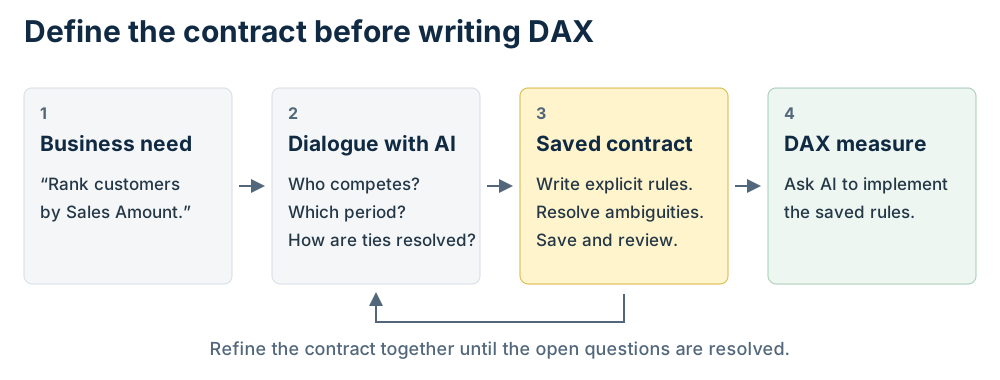
Defining a customer ranking contract
Let me show you a very practical example of how to change your mindset when working with AI. Imagine you want to create a measure to compute the ranking of a customer. The most obvious prompt is something like: “Create a measure to compute the ranking of a customer”, right? Wrong. This is not the right way to approach creating a measure.
Before anything else, you start with the contract, and you use AI to define it through a simple dialogue:
I want to compute a customer ranking based on Sales Amount. What questions do we need to answer before we can proceed?
The agent answers by asking the most relevant questions you need to answer before even approaching the measure. For example, ChatGPT Astra produces these questions:
Before writing the DAX measure, we need to define what “customer rank” means:
These answers define the measure’s contract: the results it must produce as filters and visual context change. |
Answering all these questions defines the contract. That is why your next prompt should define the contract, not the measure. We are not going to elaborate on the type of ranking that we want to create. The definition is in the contract, despite our personal way of ranking being quite exotic:
Save this contract for the ranking of customers:
- A customer competes with all the customers that purchased at the time of the analysis. For example, if the report shows March 2026 and the first sale is on January 1st 2026, the customer cohort includes all customers who purchased between Jan 1st and March 31st.
- Customers with no sales are automatically excluded from the ranking because of the previous rule
- All filters need to be considered for the ranking, except for any filter on customers.
- The customer with the highest sales is ranked 1. Ties need to be removed by adding the customer key to the ranking.
- Customers are identified by Customer[CustomerKey]. However, on the matrix, users will use the customer name. In case of ambiguity (multiple customers visible), show a blank.
You may think the contract is complete. It is not; unanswered questions remain because we asked the agent to consider the competitor cohort as the list of all customers who purchased anything up to now. This leads to further questions, and the agent highlights them:
| Saved in [customer-ranking-contract.md].
Also recorded three unresolved details: selected-period versus cumulative sales for ordering, customer-key tie-break direction, and treatment of historical buyers with no sales in the selected period. |
Therefore, the next prompt solves the three open issues:
Modify the contract for the ranking of customers, and add these rules:
- use the cumulative sales to produce the ranking
- customer key is added in ascending order to the rank order
- historical buyers with no sales in the selected period participate in the ranking
Please note: so far, we asked it to save the contract, not just use it for the measure. The agent will save its own version of the contract, whose wording is likely to differ from mine and be organized differently. It is always a good idea to show the contract once it has been digested by the agent:
Show me the contract used to rank customers
In our experience, AI-written contracts are clearer and less ambiguous than what we provided, and you can see that in the answer.
| Customer ranking contract
Customer cohort
Filter behavior
Ranking and ties
Customer identity and display
|
Now that the contract is well defined, we have obtained several benefits:
- We have clear, concise documentation of the measure’s behavior. This behavior is easy to understand without even looking at the DAX code, and it can be shared with both AI and humans to discuss the algorithm;
- AI has a precise set of instructions to write the DAX code for the measure;
- If we must modify this measure in the future, we do not have to review the code; we can speed up development by reading and modifying the contract, then ask AI to modify the measure to adhere to the new contract.
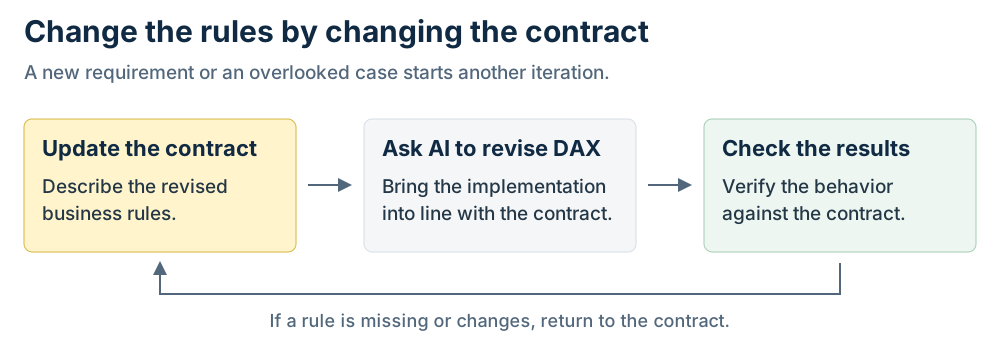
The last prompt is what we thought should have been the first:
Create a measure to compute the ranking of a customer
To this last prompt, we obtain the desired measure, which is not trivial:
Customer Rank =
VAR HasOneCustomer = HASONEVALUE ( Customer[CustomerKey] )
VAR CurrentCustomerKey = SELECTEDVALUE ( Customer[CustomerKey] )
VAR LastVisibleDate = MAX ( 'Date'[Date] )
VAR CustomersWithSales =
    CALCULATETABLE (
        ADDCOLUMNS (
            SUMMARIZE ( Sales, Customer[CustomerKey] ),
            "@CumulativeSales", [Sales Amount]
        ),
        REMOVEFILTERS ( Customer ),
        FILTER (
            ALL ( 'Date' ),
            'Date'[Date] <= LastVisibleDate
        )
    )
VAR CurrentCustomer =
    FILTER (
        CustomersWithSales,
        Customer[CustomerKey] = CurrentCustomerKey
    )
VAR CurrentSales = MAXX ( CurrentCustomer, [@CumulativeSales] )
VAR Result =
    IF (
        HasOneCustomer && COUNTROWS ( CurrentCustomer ) = 1,
        1
            + COUNTROWS (
                FILTER (
                    CustomersWithSales,
                    [@CumulativeSales] > CurrentSales
                        || (
                            [@CumulativeSales] = CurrentSales
                                && Customer[CustomerKey] < CurrentCustomerKey
                        )
                )
            )
    )
RETURN
    Result
The measure is far from perfect; it can probably be written more efficiently using RANK, and, most importantly, it should be carefully validated before going into production. However, these tasks are outside the scope of this article. Here we only wanted to show the process of defining the contract.
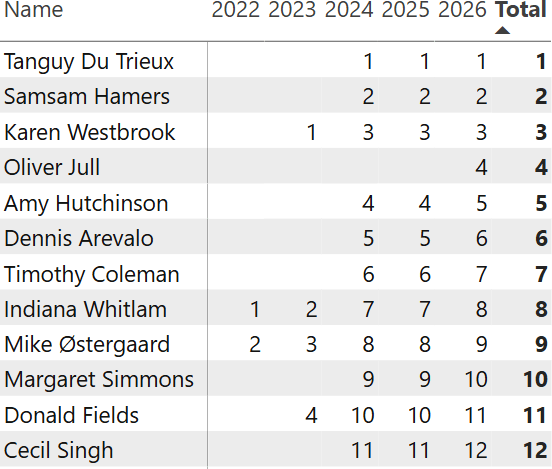
You can see the measure at work in the following matrix: Karen Westbrook, for example, ranked first in 2023 but moved to third in 2024 because new customers appeared who purchased more than she did.
You can easily see how much easier it is to read the contract than the measure.
Conclusions
When developing semantic models, contracts are key to creating calculations successfully. Although it is tempting to do so, you should refrain from creating any measure, no matter how simple, without first creating a contract.
Contracts can be very simple or very complex, but they offer a compact way to store and share details about your semantic model, how values are computed, and any peculiarities in your calculations.
Start getting used to it. Contracts are the new first-class citizens in the BI world; they bring many benefits and, to our knowledge so far, no drawbacks.

Returns the rank for the current context within the specified partition sorted by the specified order or on the axis specified.
RANK ( [<Ties>] [, <Relation>] [, <OrderBy>] [, <Blanks>] [, <PartitionBy>] [, <MatchBy>] [, <Reset>] )