 Marco Russo & Alberto Ferrari
Computing values in DAX is all about understanding how to manipulate the filter context to obtain the desired output. DAX offers a wide variety of functions to manipulate the filter context, including a rich set designed to remove filters. Among the many, four are used the most: ALL, ALLSELECTED, ALLEXCEPT, and REMOVEFILTERS. Choosing the right one can be tough.
In this article, we do not want to dive into too many details; the goal is to let our readers understand when to use which function. Whenever needed, we provide links to deepen your knowledge about specific topics. Make sure to read the additional content if you want to know more about some specific behaviors.
Table functions or CALCULATE modifiers?
You probably have noticed that we introduced the goal of the functions as functions to remove filters. However, ALL, ALLSELECTED, and ALLEXCEPT are generally described as table functions; they return a table rather than remove a filter. Unfortunately, this adds confusion to the narrative. These functions are, at the same time, filter removal functions and table functions. Deciding when to use them, and in which of their dual form, is not a simple task.
If you want to deepen your knowledge about the difference between ALL-prefixed functions being used as CALCULATE modifiers or as table functions, you should read the following article: Managing “all” functions in DAX: ALL, ALLSELECTED, ALLNOBLANKROW, ALLEXCEPT.
As concerns this article, the important fact is that any function whose name starts with ALL can be used either as a CALCULATE modifier or as a table function. When used as CALCULATE modifiers, these functions do not return a table; instead, they simply remove filters from the filter context. Over time, this dual behavior of ALL* functions created some confusion. This is why, in August 2019, Microsoft introduced the new REMOVEFILTERS function. REMOVEFILTERS is just an alias for ALL, and it can only be used as a CALCULATE modifier. There is no difference between REMOVEFILTERS and ALL when used in CALCULATE. Therefore, these two CALCULATE expressions produce the very same result:
CALCULATE ( [Sales Amount], ALL ( Product[Category] ) )

CALCULATE ( [Sales Amount], REMOVEFILTERS ( Product[Category] ) )
REMOVEFILTERS is the only alias that exists for the set of ALL* functions. As you may easily imagine, an alias for ALLSELECTED would be REMOVEFILTERSSELECTED, not a cute alias at all! It would only add confusion to an already complex topic.
The good news is that this simple consideration reduces the number of differences to learn, from four to three: there is no need to distinguish between REMOVEFILTERS and ALL. We use ALL when we need the function to return a table; we can choose between REMOVEFILTERS and ALL when we want a CALCULATE modifier. In our opinion, REMOVEFILTERS provides a better idea of the modifier goal.
To remove or to ignore filters, that is the question
ALL, ALLEXCEPT, and ALLSELECTED perform a slightly different operation depending on how we use them. When used as table functions, they ignore certain filters in the filter context and return a table computed without them. When used as CALCULATE modifiers, these functions instruct CALCULATE to modify the filter context by removing some filters. The difference is subtle.
In the following code snippet, we use ALL to ignore the filter context and return all the products, despite the filter context filtering only red products:
CALCULATE (
    COUNTROWS (
        ALL ( Product )
    ),
    Product[Color] = "Red"
)
ALL is used as a table function; it returns all products, regardless of the filter. An alternative, more verbose and less understandable way of expressing the same code is the following:
CALCULATE (
    CALCULATE (
        COUNTROWS ( Product ),
        ALL ( Product )
    ),
    Product[Color] = "Red"
)
In this example, ALL (we could have used REMOVEFILTERS) instructs CALCULATE to remove any filter from the Product table. Therefore, when Product is evaluated in COUNTROWS, the filter context is different: any filter on Product is removed.
The difference is not very relevant in most scenarios. However, when learning DAX, it is important to understand the subtle difference between removing and ignoring, as it greatly helps clarify the filter context in specific areas of your formula.
Choosing when to use what: the short answer
Before diving into more detailed descriptions, here is how you choose when to use what:
- Use REMOVEFILTERS when the intent is simply to clear filters in CALCULATE
- Use ALL when a table expression is needed, or when using legacy patterns that rely on the dual nature of ALL.
- Use ALLSELECTED when computing visual totals that keep outer selections.
- Use ALLEXCEPT when the goal is to preserve one grouping grain and remove the rest; however, you should prefer the REMOVEFILTERS/VALUES combination, instead of ALLEXCEPT.
You can use this short set of rules as a reference. In the remainder of the article, we provide a short explanation of these rules, with pointers to additional content for a more complete description.
When to use ALL and REMOVEFILTERS
ALL is useful whenever one needs to ignore filters present in the filter context. For example, the following measure computes the sales amount of all the brands, regardless of any filter existing on the Product[Brand] column:
All Brands Sales =
CALCULATE (
    [Sales Amount],
    REMOVEFILTERS ( 'Product'[Brand] )     -- You can use ALL, with no differences
)
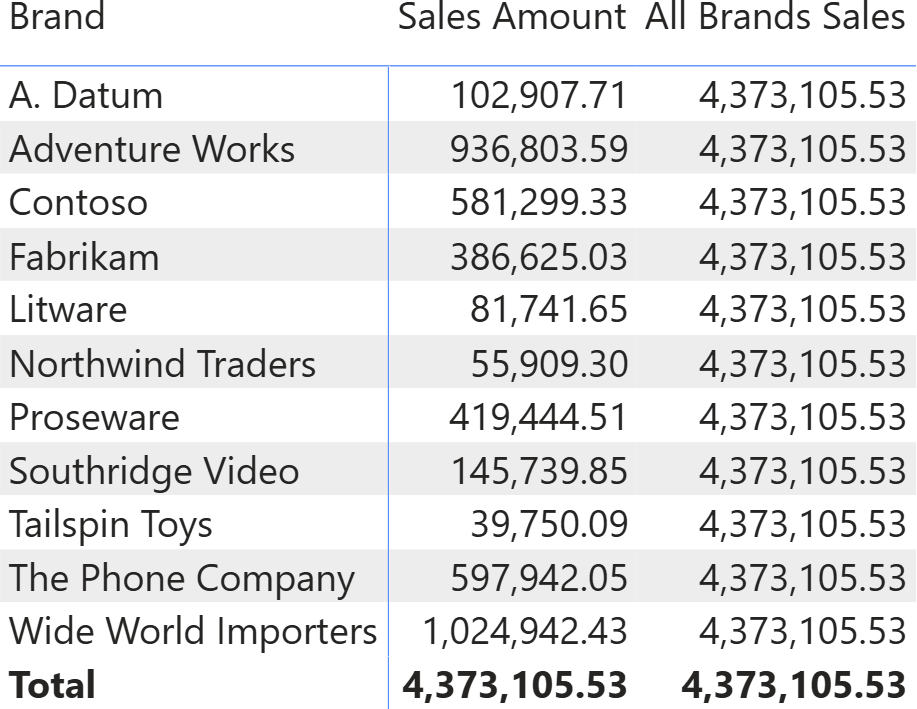
When used in a matrix that slices by Product[Brand], this measure always produces the total.
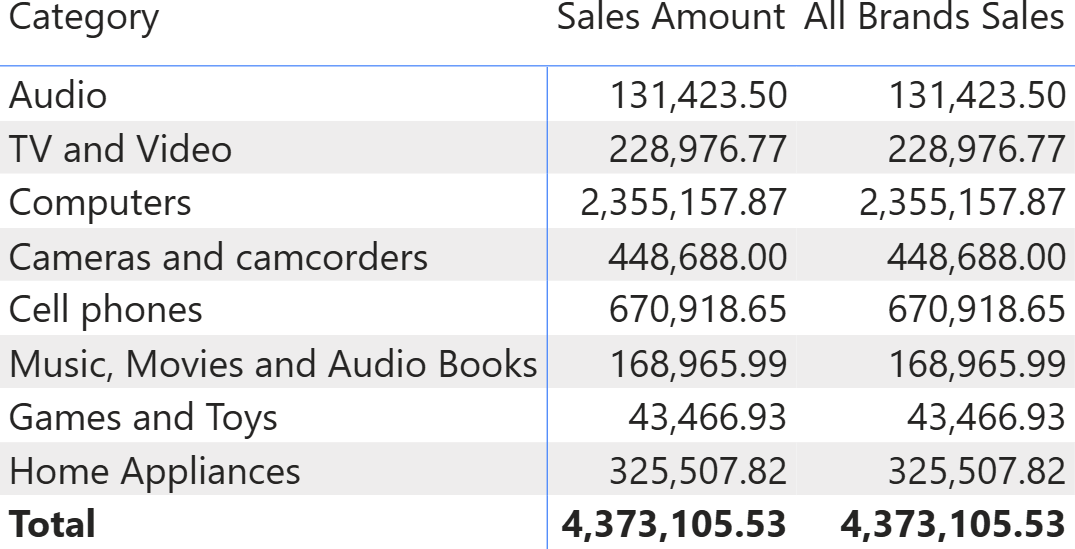
If the matrix is not sliced by Product[Brand], then REMOVEFILTERS has no effect, because there is no filter on Product[Brand] to remove.
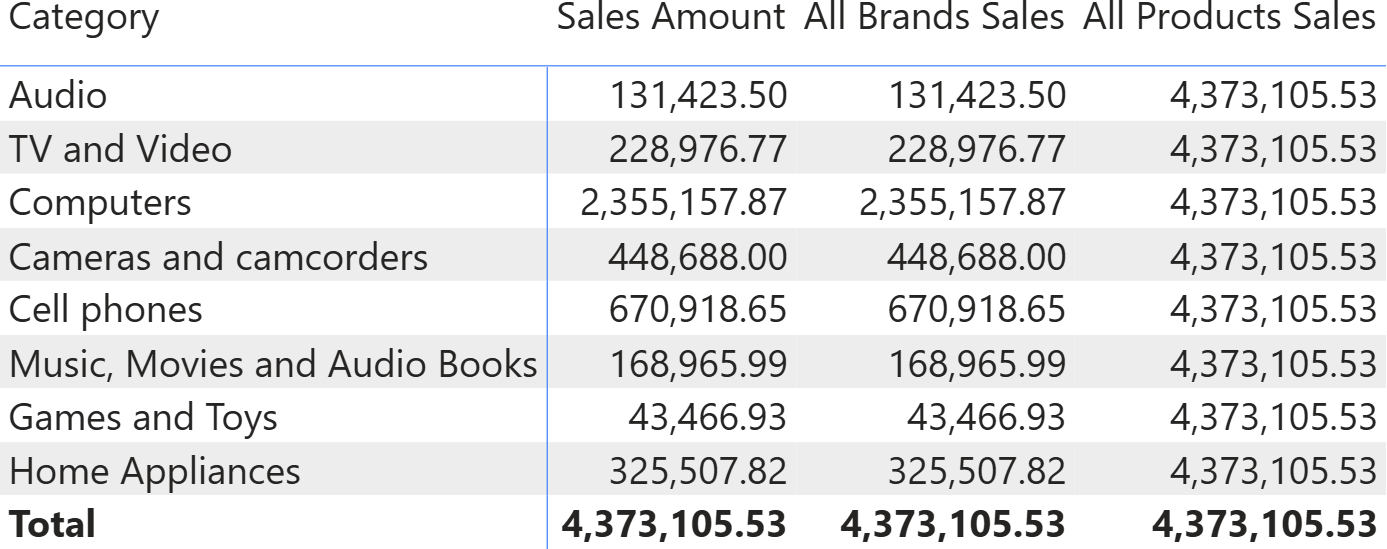
REMOVEFILTERS can be used with a column, as in the example, or with a table as an argument. When used with a table, it removes (or ignores!) filters on any table column. Indeed, the All Products Sales measure that uses REMOVEFILTERS on Product, produces the grand total even when slicing by Product[Category]:
All Products Sales =
CALCULATE (
    [Sales Amount],
    REMOVEFILTERS ( 'Product' )     -- You can use ALL, with no differences
)
Here is the result, with the two measures side-by-side.
A third, less frequently-used version of REMOVEFILTERS takes no argument. One can use REMOVEFILTERS() or ALL () to remove any filter from any table in the entire model.
In short, we use REMOVEFILTERS (or ALL) when we want to explicitly remove (or ignore) filters from columns in the model. The goal is almost always to obtain the grand total of a matrix (or any visual).
One scenario where we must use ALL rather than REMOVEFILTERS is when we need a table and not a filter modifier in CALCULATE: in that case, REMOVEFILTERS is not allowed. For example, the following code does not work, because REMOVEFILTERS is not a table function:
Sum All Products = SUMX ( REMOVEFILTERS ( Product ), [Sales Amount] )
Indeed, SUMX requires a table to iterate, and REMOVEFILTERS is not a table function. The code runs correctly when we use ALL:
Sum All Products = SUMX ( ALL ( Product ), [Sales Amount] )
The other functions described in this article do not have this distinction, so we can use them as both modifiers and table functions.
When to use ALLSELECTED
Sometimes REMOVEFILTERS (or ALL) is overkill. REMOVEFILTERS ignores all filters in the filter context, including not only the filters from the current visual but also those from other visuals. Look what happens with the matrix if we add a slicer that filters certain brands.
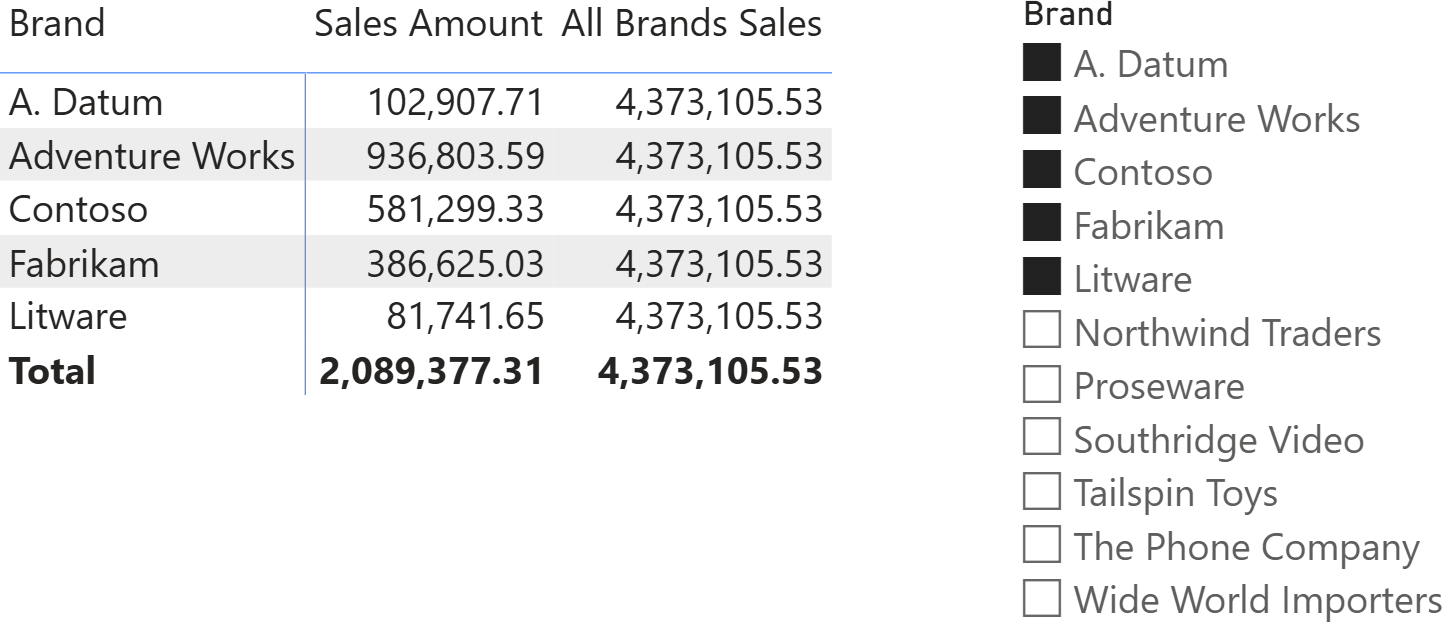
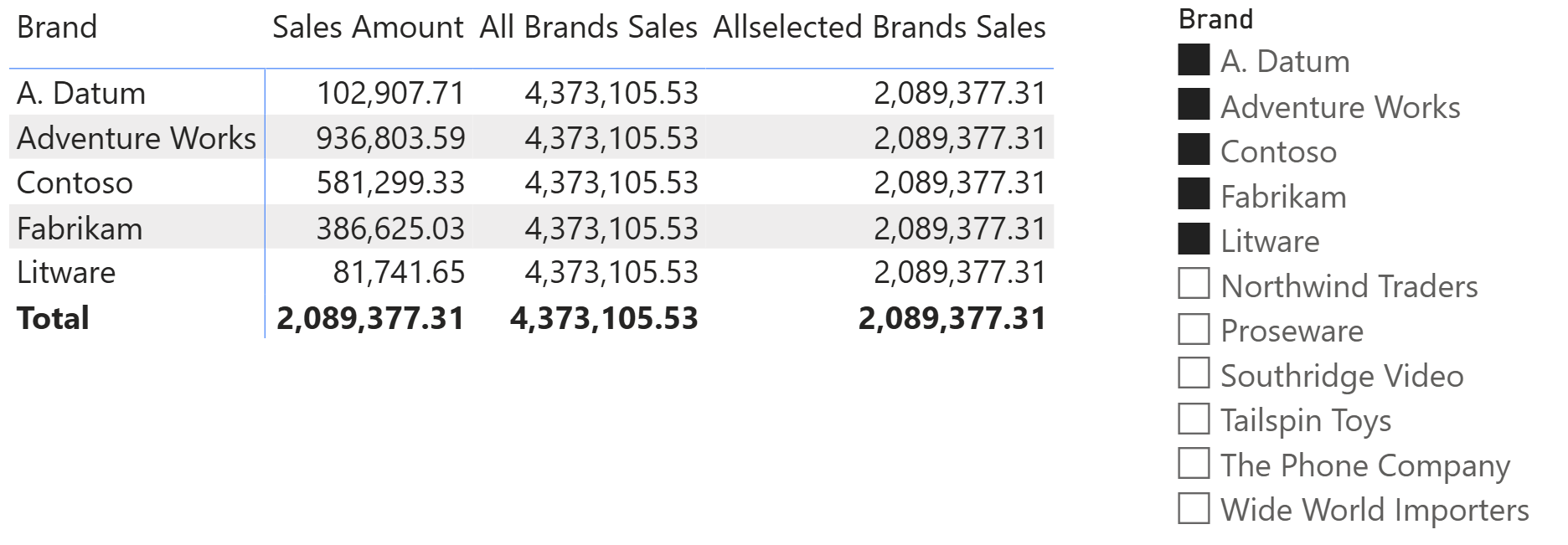
The slicer is filtering five brands. However, the measure still reports the grand total of 4,373,105.53 because REMOVEFILTERS is removing any filters on the Product[Brand] column, regardless of which visual created the filter. In the example, there are two filters. One is created by the slicer and one is created by the current visual; both filters operate on the Product[Brand] column. REMOVEFILTERS is ignoring both.
The requirement to remove the filter from the current visual while keeping filters on other visuals is very common, and it is often referred to as “visual totals”. You can see that the total shown in the matrix right now has no visual explanation. We know it is the grand total of all products, but a user looking at the report may be confused. On the other hand, a visual total produces a total that is strongly connected to the numbers already present in the visual.
The DAX function used to achieve visual totals is ALLSELECTED. ALLSELECTED ignores filters from the current visual, but it maintains filters from other visuals:
Allselected Brands Sales =
CALCULATE (
    [Sales Amount],
    ALLSELECTED ( 'Product'[Brand] )
)
Looking at the result, you can appreciate that the total considers the filter on the five brands selected with the slicer, but it ignores the filter on the brand on the current row of the matrix.
ALLSELECTED is a very commonly-used function in DAX. That said, it is also very dangerous if you do not follow best practices. You can read about the best practices of ALLSELECTED in the article, ALLSELECTED best practices. For the bravest among our readers, a complete explanation of how ALLSELECTED works with shadow filter contexts can be found here: The definitive guide to ALLSELECTED. This latter article is not for the faint of heart; we strongly recommend following the best practices, as this makes it unnecessary to read the most complex topics, while still living a happy life as a DAX developer.
When to use ALLEXCEPT
ALLEXCEPT is a variation of REMOVEFILTERS (or ALL). It produces the same effect as REMOVEFILTERS, except for some columns. It is a very tempting function, because it is short and sweet, but it hides some level of complexity. ALLEXCEPT removes (or it ignores) filters from any column of a table, except the ones specifically provided as further arguments:
AllExcept Brand Sales =
CALCULATE (
    [Sales Amount],
    ALLEXCEPT ( 'Product', 'Product'[Brand] )
)
In this example, the measure ignores all filters on the Product table, except those on the Product[Brand] column. It is very useful when we need to compute subtotals in a matrix, like in the following report.
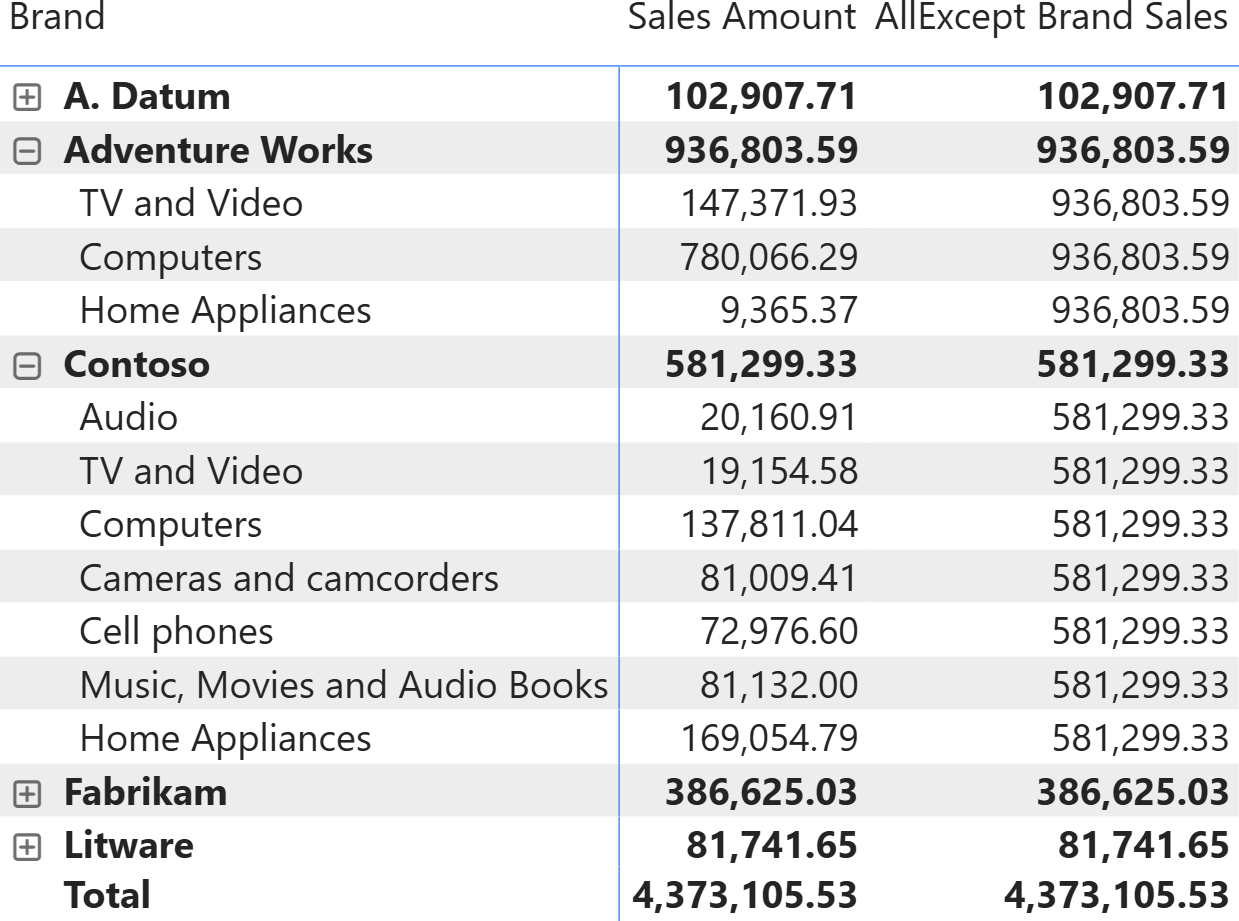
As you can see, AllExcept Brand Sales produces the subtotal at the Product[Brand] level. It produces the subtotal by removing all filters from the Product table, except for the Product[Brand] column. By using ALLEXCEPT, one can use any column from Product as the second level of the matrix, while still producing the subtotal as the measure result. It is mostly used when there is a need to compute the ratio of the current selection against the brand total.
Despite ALLEXCEPT being tempting, we suggest that our readers use the REMOVEFILTERS/VALUES combination to obtain the same result:
AllValues Brand Sales =
CALCULATE (
    [Sales Amount],
    REMOVEFILTERS ( 'Product' ),
    VALUES ( 'Product'[Brand] )
)
This last measure produces the same result as the one using ALLEXCEPT, but it works smoothly even when no filter is explicitly applied to the Product[Brand] column. If you want to understand more about why this is relevant, you can read the following article: Using ALLEXCEPT versus ALL and VALUES.
Conclusions
Choosing which function to use to remove filters from the filter context is a simple topic for DAX experts. However, if you are unsure about which function to use, then you are in very good hands. Many DAX developers are still unsure about when to use what.
Let us conclude with the set of rules again:
- Use REMOVEFILTERS when the intent is simply to clear filters in CALCULATE.
- Use ALL when a table expression is needed, or when using legacy patterns that rely on its dual nature.
- Use ALLSELECTED when computing visual totals that keep outer selections.
- Use ALLEXCEPT when the goal is to preserve one grouping grain and remove the rest; however, you should prefer the REMOVEFILTERS/VALUES combination over ALLEXCEPT.
After you have read the article, and properly digested the rationale behind each rule, this set should guide you in choosing the right function for your task.

Returns all the rows in a table, or all the values in a column, ignoring any filters that might have been applied.
ALL ( [<TableNameOrColumnName>] [, <ColumnName> [, <ColumnName> [, … ] ] ] )
Returns all the rows in a table, or all the values in a column, ignoring any filters that might have been applied inside the query, but keeping filters that come from outside.
ALLSELECTED ( [<TableNameOrColumnName>] [, <ColumnName> [, <ColumnName> [, … ] ] ] )
Returns all the rows in a table except for those rows that are affected by the specified column filters.
ALLEXCEPT ( <TableName>, <ColumnName> [, <ColumnName> [, … ] ] )
Clear filters from the specified tables or columns.
REMOVEFILTERS ( [<TableNameOrColumnName>] [, <ColumnName> [, <ColumnName> [, … ] ] ] )
Evaluates an expression in a context modified by filters.
CALCULATE ( <Expression> [, <Filter> [, <Filter> [, … ] ] ] )
Counts the number of rows in a table.
COUNTROWS ( [<Table>] )
Returns the sum of an expression evaluated for each row in a table.
SUMX ( <Table>, <Expression> )