 Marco Russo & Alberto Ferrari
A DAX user-defined function, also known as a UDF, is expected to return a scalar or a table. However, because functions are fundamentally macro-expansion of DAX code, it is possible to return CALCULATE modifiers if the function is to be called only as a filter argument of CALCULATE.
To show a practical example of when the feature proves to be useful, we debug a measure that fails because some calendar filters are not being removed correctly. Fixing the measure elegantly requires creating a function that removes filters rather than returning a value.
Introducing the scenario
We wrote a measure that computes the running total for the last three months, using basic time intelligence functions and calendar-based time intelligence:
Measure 3 Months =
VAR RefDate = MAX ( 'Date'[Date] )
RETURN
    CALCULATE (
        [Sales Amount],
        DATESINPERIOD ( 'Gregorian', RefDate, -3, MONTH, ENDALIGNED )
    )
Please note that we used ENDALIGNED in DATESINPERIOD to ensure the calculation aligns the time period with its end. If you are not familiar with the behavior of ENDALIGNED, you should read Understanding DATEADD parameters with calendar-based time intelligence. A thorough understanding of the particular behavior of ENDALIGNED is key in order to fully appreciate the problem to fix, so we strongly recommend checking out that article before or after reading this one.
To verify that the measure computes the correct value, we also authored a visual calculation that computes the same value, with the visual calculation technique:
Visual 3 Months =
    CALCULATE (
        SUM ( [Sales Amount] ),
        RANGE ( -2, TRUE, ROWS )
    )
It is worth noting that we had to use -2 in RANGE rather than -3, because the current row is included in the range.
The two measures produce different results at the quarter and year levels because of the different techniques they use.
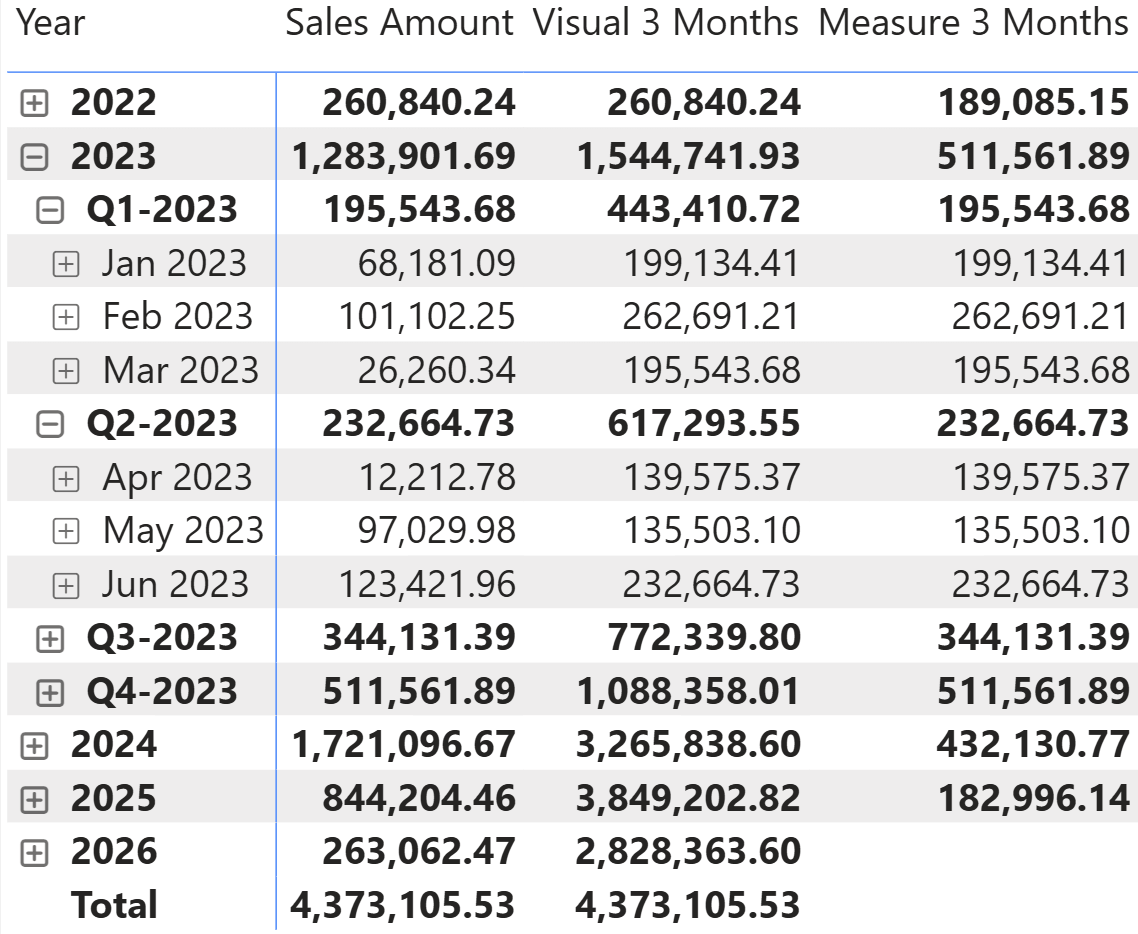
However, we are mainly interested in the measure, and we use the visual calculation only for debugging purposes. If you want to better understand how RANGE and visual calculations work, make sure to check out this mini-course in SQLBI+: Understanding visual calculations in DAX. From now on, we will focus only on the month level.
Spotting the glitch in the measure
Right now, all the numbers look correct. However, because there may be many rows to check, a simple visual calculation helps in focusing on the presence of errors:
Test = IF ( [Measure 3 Months] - [Visual 3 Months] <> 0, "Error" )
The calendar table includes, among the many columns, one column indicating the weekday. One of the requirements is that the measure should work if users decide to focus on specific weekdays. In technical terms, we call such columns filter-keep columns, that is, columns whose filter needs to be maintained when the filter on the Date table is changed. You can find more information about filter-keep columns here: Introducing calendar-based time intelligence in DAX. Luckily, the calendar-based time-intelligence functions treat filter-keep columns in a sweet and safe way. Unfortunately, as we will discover, our measure does not. To demonstrate this, we add a slicer for the weekday and the test column to the report, focusing on Wednesday only.
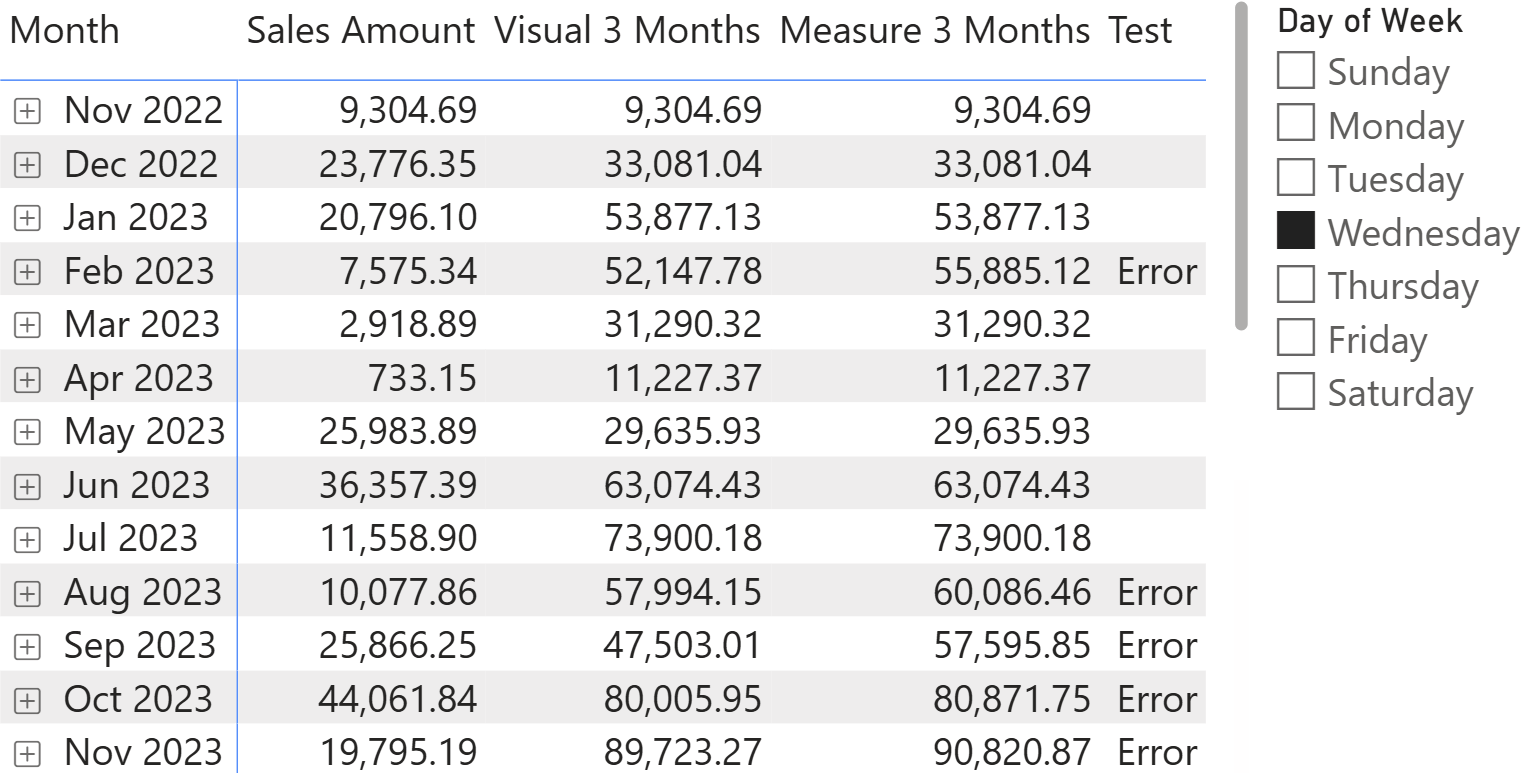
You can see that several months show an error: the visual calculation does not compute the same value as the measure. We will spare you the math: the visual calculation works smoothly, whereas the measure fails to compute the correct result.
In the video, we outline the full debugging process to explain how to find the issue. Here, we go straight to the solution.
When the measure is computing the reference date, it uses this expression:
VAR RefDate = MAX ( 'Date'[Date] )
MAX is being computed in the current filter context, which includes the weekday. Therefore, it finds the last Wednesday in the month. For some months, this will be the end of the month. For some others, it will be very close to the end of the month, while for several other months it will be a few days before the end of the month. Because of this, it will happen pretty frequently that the value of RefDate is not close enough to the end of the month to trigger the behavior of ENDALIGNED. As a consequence, the dates returned by DATESINPERIOD will include periods from subsequent months, thus producing an incorrect result.
Therefore, we need to ensure that the reference date ignores the weekday filter.
Fixing the bug
To fix the problem, we could add REMOVEFILTERS on the Date[Weekday] column (as well as weekday number) because the sort-by-column feature is being used. While focusing on the columns we want to remove the filter from, we may also notice that the table includes not only the weekday, but also its short version (Mon, Tue, and so on). We need to remove the filters from these columns as well to provide more flexibility for our users.
In general, we need to remove filters from any column that is not already included in the calendar (either as a level or as a time-related column) and that we want to consider as a filter-keep column. The list is known today, but it may grow later, when the semantic model is further developed.
Therefore, we decided to consolidate the list of columns into a function that removes the filter from any filter-keep column in the specific calendar.
The thing is: we need to remove filters, not return a table. When we think about a function, we think about a DAX expression that has a return value. In our case, the function needs to perform an action (removing the filter) rather than returning a table. However, because functions will be expanded inside the code, we can make a function “return” REMOVEFILTERS, thereby leveraging the fact that its code will be replaced when the function is being invoked:
Gregorian.RemoveFilterKeepColumns = () =>
REMOVEFILTERS (
    'Date'[Day of Week],
    'Date'[Day of Week Number],
    'Date'[Day of Week Short]
)
The function can work only when it is being used as a CALCULATE argument, as we do in the measure:
Measure 3 Months =
VAR RefDate =
    CALCULATE (
        MAX ( 'Date'[Date] ),
        Gregorian.RemoveFilterKeepColumns()
    )
RETURN
    CALCULATE (
        [Sales Amount],
        DATESINPERIOD ( 'Gregorian', RefDate, -3, MONTH, ENDALIGNED )
    )
Because the function body will be expanded in the code, at execution time, this is the actual measure being executed:
Measure 3 Months =
VAR RefDate =
    CALCULATE (
        MAX ( 'Date'[Date] ),
        REMOVEFILTERS (
            'Date'[Day of Week],
            'Date'[Day of Week Number],
            'Date'[Day of Week Short]
        )
    )
RETURN
    CALCULATE (
        [Sales Amount],
        DATESINPERIOD ( 'Gregorian', RefDate, -3, MONTH, ENDALIGNED )
    )
The function will not work if called differently, because its result is not a table; it is a CALCULATE modifier. However, as long as developers call the function from inside CALCULATE, it works just fine.
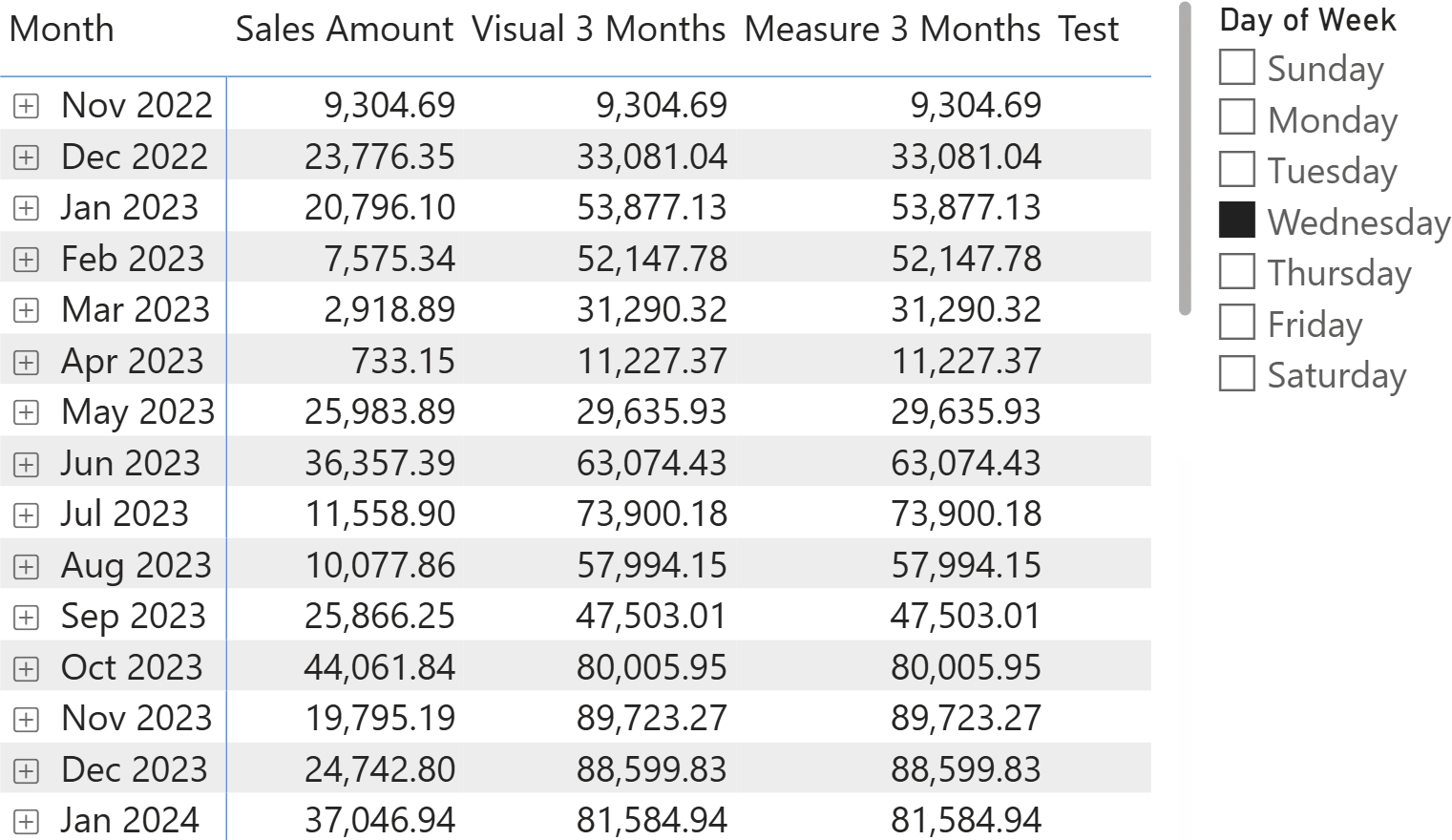
Now that the measure has been verified and debugged, we can remove the visual calculation and proceed with further development of the model.
An alternative, a very valid alternative, is to use an EXPR parameter and embed the CALCULATE call inside the function:
Gregorian.ComputeRemovingFilterKeepColumns = ( formulaExpr : EXPR ) =>
CALCULATE (
    formulaExpr,
    REMOVEFILTERS (
        'Date'[Day of Week],
        'Date'[Day of Week Number],
        'Date'[Day of Week Short]
    )
)
Conclusions
Functions use macro-expansion in DAX. This opens up the possibility of using code in functions that would not work as standalone code, but will work when executed in the proper environment. Specifically, in this article, we outlined how you can make a function “return” REMOVEFILTERS if the function is being used in CALCULATE only.
As a bonus takeaway from the article, we outlined a specific behavior of filter-keep columns in calendar-based time intelligence by debugging a measure that is incorrect when filters are applied through slicers.

Evaluates an expression in a context modified by filters.
CALCULATE ( <Expression> [, <Filter> [, <Filter> [, … ] ] ] )
Returns the dates from the given period.
DATESINPERIOD ( <Dates>, <StartDate>, <NumberOfIntervals>, <Interval> [, <EndBehavior>] )
Retrieves a range of rows within the specified axis, relative to the current row.
RANGE ( <Step> [, <IncludeCurrent>] [, <Axis>] [, <OrderBy>] [, <Blanks>] [, <Reset>] )
Returns the largest value in a column, or the larger value between two scalar expressions. Ignores logical values. Strings are compared according to alphabetical order.
MAX ( <ColumnNameOrScalar1> [, <Scalar2>] )
Clear filters from the specified tables or columns.
REMOVEFILTERS ( [<TableNameOrColumnName>] [, <ColumnName> [, <ColumnName> [, … ] ] ] )