 Marco Russo & Alberto Ferrari
In a previous article, Introducing user-defined functions in DAX, we described the syntax for creating user-defined functions, including the two passing modes (VAL and EXPR) and the fundamental parameter types SCALAR and TABLE. In this article, we build on that foundation and focus on the complete type system, with particular attention to the reference types introduced in March 2026 that provide better documentation, stronger validation, and improved IntelliSense support.
Before diving into the new types, let us briefly recap the full picture of parameter types and passing modes available in DAX user-defined functions.
Parameter types and passing modes
Each parameter of a user-defined function has two properties: a type, which describes what kind of value the parameter accepts, and a passing mode, which describes how the value is transferred from the caller to the body of the function. The following table summarizes all the valid combinations.
| Type | Passing mode |
| ANYVAL | VAL / EXPR |
| SCALAR (*) | VAL / EXPR |
| TABLE | VAL / EXPR |
| ANYREF | EXPR |
| MEASUREREF | EXPR |
| COLUMNREF | EXPR |
| TABLEREF | EXPR |
| CALENDARREF | EXPR |
| SCALAR (*) Subtype |
| VARIANT |
| INT64 |
| DECIMAL |
| DOUBLE |
| STRING |
| DATETIME |
| BOOLEAN |
| NUMERIC |
SCALAR and TABLE are the two types that work with both VAL and EXPR. When no passing mode is specified, the default is VAL for both. ANYVAL is an abstract type for SCALAR and TABLE. Despite the name, it does not exactly restrict the passing mode. You could use ANYVAL as a shortcut for VAL for any data type; we discourage using ANYVAL with EXPR because of the confusion it could generate. All the remaining types (ending with “REF”) force the EXPR passing mode. The passing mode keyword can be omitted for these types because only EXPR is valid.
The types in the lower part of the Type/Passing Mode table (MEASUREREF, COLUMNREF, TABLEREF, and CALENDARREF) are specializations of ANYREF. They share the same passing mode, but they restrict the kind of expression the caller can provide. These are the types we focus on in the rest of this article.
ANYREF and its limitations
ANYREF declares a parameter that accepts any expression and is always passed as an expression. It is the most permissive reference type: the function accepts whatever expression the caller provides: a measure reference, a column reference, a table reference, or an arbitrary DAX calculation. The expression provided is substituted into the body of the function wherever the parameter appears. It is important to highlight that a DAX formula is accepted by ANYREF as a valid argument: ANYREF should not be interpreted as “a reference to any existing object” but rather “a reference to any expression”. Writing ANYREF implies EXPR: writing ANYREF with or without EXPR has the same meaning and produces the same effects.
This flexibility comes at a cost. Because ANYREF accepts anything, the function author cannot make assumptions about the nature of the expression. Is it a measure that triggers a context transition? Is it a simple column reference? Is it an arbitrary calculation? With ANYREF, the answer could be any of these. The function code must therefore be defensive: whether the expression may or may not trigger a context transition, the function author should use an explicit CALCULATE to ensure consistent behavior if a context transition is needed – something that would not be necessary if the parameter passed were a measure reference.
The lack of specificity also affects the caller’s experience. IntelliSense and other development tools cannot provide meaningful guidance when the parameter accepts just any expression. The developer who calls the function must rely on documentation, or on reading the function body, to understand what is expected.
When a parameter is declared as ANYREF, we recommend using the suffix Expr in the parameter name: for example, amountExpr or targetExpr.
For example, here is a model-dependent function that filters customers whose purchase amount (provided as ANYREF) is greater than a minimum value (lowerAmount):
Local.TopCustomersAnyRefA = (
    amountExpr : ANYREF,
    lowerAmount : DOUBLE
) =>
    FILTER (
        Customer,
        amountExpr > lowerAmount
    )
The Local.TopCustomersAnyRefA function can be used in three different versions of the AnyRef A measure: as a measure reference, as an expression, and as an expression embedded in CALCULATE, respectively. The expression used is the same as that defined in the Total Quantity measure:
Total Quantity =
SUM ( Sales[Quantity] )
AnyRef-A 1 =
CALCULATE (
    [Sales Amount],
    Local.TopCustomersAnyRefA ( [Total Quantity], 20 )
)
AnyRef-A 2 =
CALCULATE (
    [Sales Amount],
    Local.TopCustomersAnyRefA ( SUM ( Sales[Quantity] ), 20 )
)
AnyRef-A 3 =
CALCULATE (
    [Sales Amount],
    Local.TopCustomersAnyRefA ( CALCULATE ( SUM ( Sales[Quantity] ) ), 20 )
)
The second version of AnyRef A, which has an expression not embedded in CALCULATE, returns the same values as Sales Amount because the Local.TopCustomerAnyRefA function returns all customers: the result of the amountExpr argument is evaluated without filtering the iterated customer, since the context transition is missing.
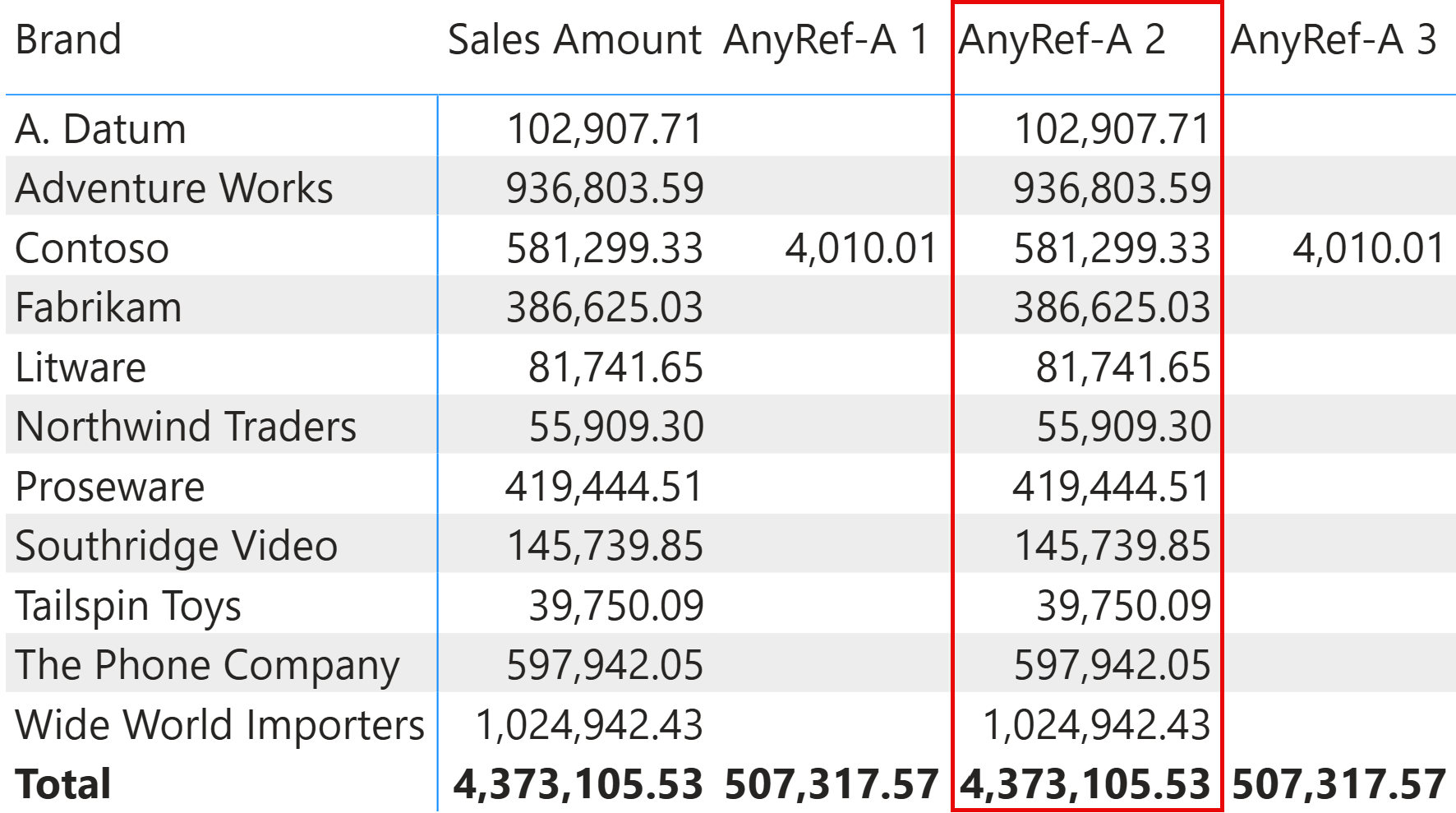
We can fix the function by embedding the amountExpr parameter in a CALCULATE, which is redundant but harmless when the argument is a measure reference. However, this would prevent using a column reference if the developer wanted to provide a Customer column as the argument of amountExpr. Not that it would have been a good idea, but ANYREF does not impose any restrictions on the argument to use:
Local.TopCustomersAnyRefB = (
    amountExpr : ANYREF,
    lowerAmount : DOUBLE
) =>
    FILTER (
        Customer,
        CALCULATE ( amountExpr ) > lowerAmount
    )
AnyRef-B 2 =
CALCULATE (
    [Sales Amount],
    Local.TopCustomersAnyRefB ( SUM ( Sales[Quantity] ), 20 )
)
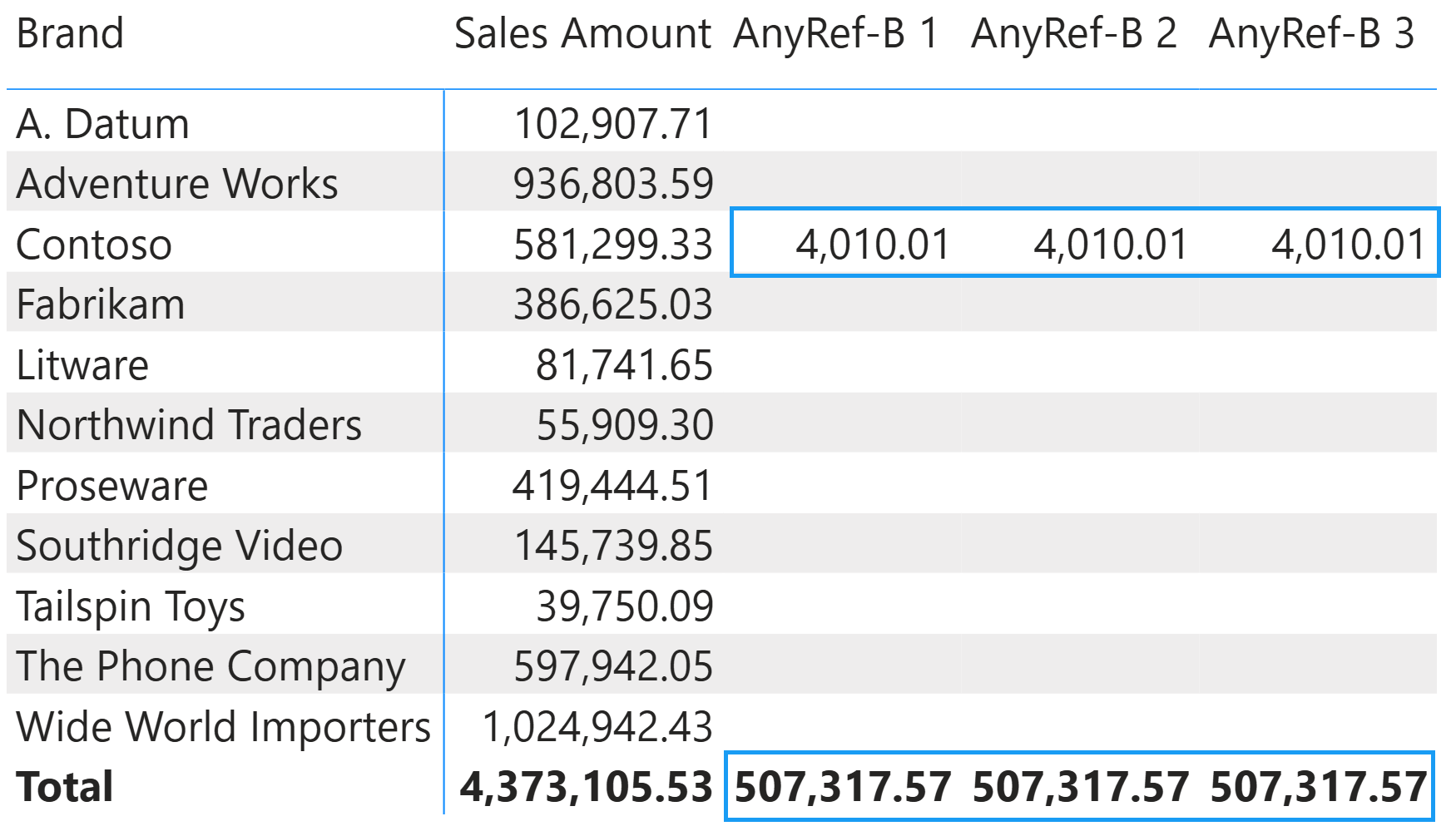
This way, all the versions of the measure AnyRef-B return the same value.
MEASUREREF
A MEASUREREF parameter accepts only a reference to a measure defined in the semantic model. The caller must provide the name of an existing measure; arbitrary DAX expressions are not accepted.
This restriction has an important semantic implication. A measure reference always triggers a context transition when evaluated in a row context. When we declare a parameter as MEASUREREF, we inform the reader of the function code that a context transition will occur wherever this parameter is used within an iterator. This makes the code easier to think about because the parameter’s behavior is predictable.
With ANYREF, the function author should wrap the parameter in an explicit CALCULATE to guarantee context transition, because the caller might provide an expression that does not trigger it on its own, as we illustrated with the previous examples for ANYREF. With MEASUREREF, CALCULATE is redundant for this purpose, though it causes no harm. The constraint imposed by the MEASUREREF type guarantees the behavior.
When a parameter is declared as MEASUREREF, we recommend using the suffix Measure in the parameter name: for example, salesMeasure or targetMeasure.
For this example, we created a version of the function we used in the previous ANYREF example, this time specifying MEASUREREF as the type of the amountMeasure parameter:
Local.TopCustomersMeasureRef = (
    amountMeasure : MEASUREREF,
    lowerAmount : DOUBLE
) =>
    FILTER (
        Customer,
        amountMeasure > lowerAmount
    )
MeasureRef 1 =
CALCULATE (
    [Sales Amount],
    Local.TopCustomersMeasureRef ( [Total Quantity], 20 )
)
There is only one version of the measure we can use: the one that provides Total Quantity as an argument.
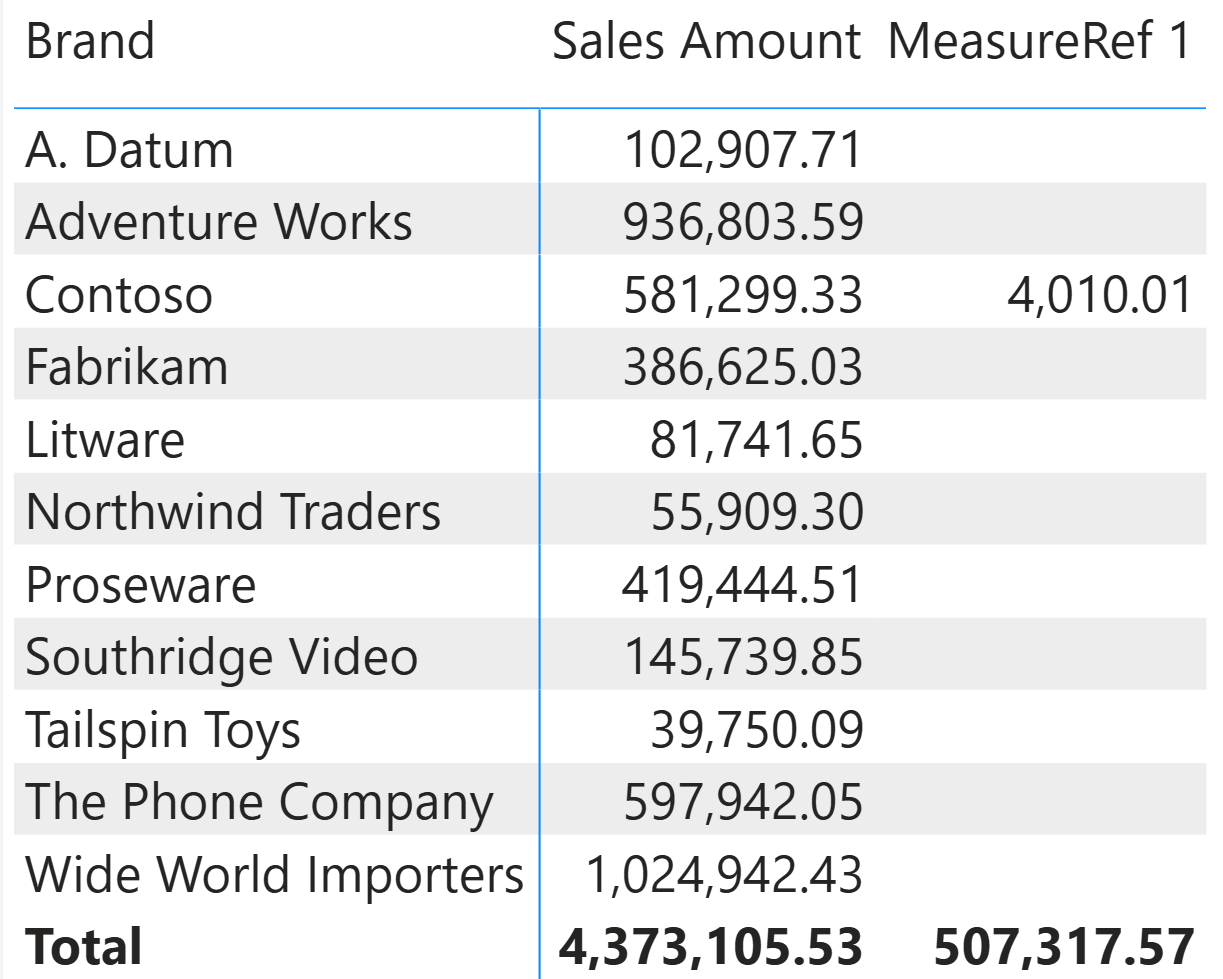
Indeed, trying to provide an expression as the argument for amountMeasure generates a syntax error:
MeasureRef 2 =
CALCULATE (
    [Sales Amount],
    Local.TopCustomersMeasureRef ( SUM ( Sales[Quantity] ), 20 )
)
The declaration of MeasureRef 2 would return the following error: An invalid argument type was passed into parameter ‘amountMeasure’ of the user-defined function. Expected ‘MEASUREREF’ but got ‘SCALAR’.
The error message mentions SCALAR because the expression SUM ( Sales[Quantity] ) could be evaluated before executing the Local.TopCustomersMeasureRef function, and its result would be a scalar in that case. However, the important part is that the expected argument should have been MEASUREREF, and it is not.
COLUMNREF
A COLUMNREF parameter accepts only a reference to a column defined in a table in the semantic model. The caller must provide a qualified column reference, such as Sales[Unit Price] or Product[Unit Price]; arbitrary expressions are not accepted.
COLUMNREF is particularly useful when writing model-independent functions. Instead of hardcoding column names in the function body (which would create a dependency on the model structure), we declare the columns as COLUMNREF parameters and let the caller specify which columns to use. This design makes the function portable across models with different table and column names.
COLUMNREF parameters work well in combination with two DAX functions designed for inspecting reference parameters, TABLEOF and NAMEOF:
- TABLEOF retrieves the table where a given column is defined: if the caller passes Sales[Unit Price] as the priceColumn parameter, then TABLEOF ( priceColumn ) returns the Sales This combination allows us to reduce the number of parameters in the function signature. Instead of asking the caller for both a table and a column from that table, we can ask for only the column and from there, derive the table by using TABLEOF.
- NAMEOF returns the name of a column reference as a string, which can be useful for dynamic operations that require the column name in text form.
When a parameter is declared as COLUMNREF, we recommend using the suffix Column in the parameter name: for example, priceColumn or dateColumn.
We start with an educational example, SumProduct, which just multiplies two columns row-by-row and sums the result:
SumProduct = (
    quantityColumn: COLUMNREF,
    priceColumn: COLUMNREF
) =>
    SUMX (
        TABLEOF ( quantityColumn ),
        quantityColumn * priceColumn
    )
Total Cost =
SumProduct ( Sales[Quantity], Sales[Unit Cost] )
The result of the Total Cost measure computed this way is identical to SUMX ( Sales, Sales[Quantity] * Sales[Unit Cost] ). However, this first example is meant to be merely educational to show that by using TABLEOF, it is possible to obtain the table from a column reference parameter without an additional parameter for the table reference.
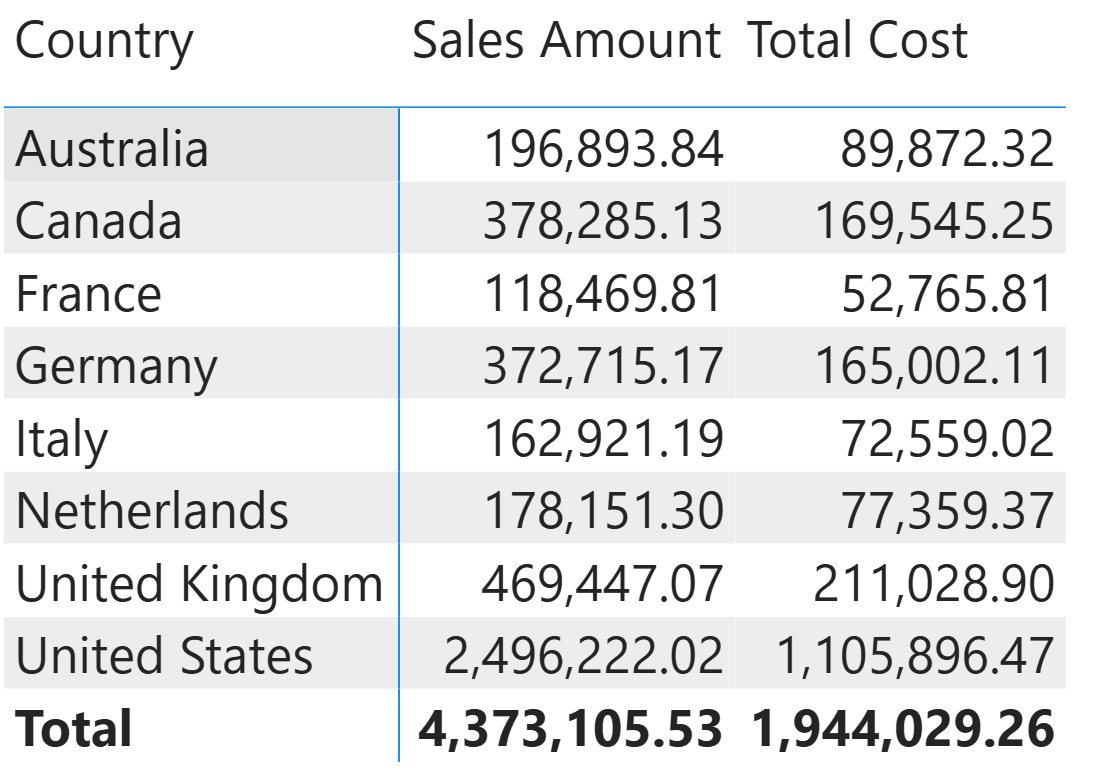
However, this simple example already shows an important limitation: the formula inside the function assumes that the two columns belong to the same table. If this condition is not true, the error could be misleading. For example, the following measure generates a syntax error and is not valid:
Total Cost Mismatch =
SumProduct ( Sales[Quantity], 'Product'[Unit Cost] )
The syntax error is: A single value for column ‘Unit Cost’ in table ‘Product’ cannot be determined. This error is not very clear because it is generated by the SUMX function used in SumProduct when referencing columns from two different tables. Unfortunately, the current version of UDFs in preview comes with limitations in what we are going to describe now, but validating the parameters is something we want to introduce in this article. Ideally, we would like to customize the error message by validating that the two arguments belong to the same table. We achieve this by using the following code:
SumProductSafe = (
    quantityColumn: COLUMNREF,
    priceColumn: COLUMNREF
) =>
    IF (
        NAMEOF ( TABLEOF ( quantityColumn ) ) == NAMEOF ( TABLEOF ( priceColumn ) ),
        SUMX (
            TABLEOF ( quantityColumn ),
            quantityColumn * priceColumn
        ),
        ERROR ( "All the column references must belong to the same table" )
    )
Total Cost Safe Mismatch =
SumProduct ( Sales[Quantity], 'Product'[Unit Cost] )
In this case, the error message should be: All the column references must belong to the same table. Unfortunately, the current implementation does not support this kind of validation before execution. We hope that Microsoft will support such validation before the user-defined functions are generally available, by using the syntax in this example, or equivalent.
The result of the Total Cost measure computed by SumProduct is identical to SUMX ( Sales, Sales[Quantity] * Sales[Unit Cost] ). However, this first example is meant to be merely educational.
For a more meaningful example, consider a scenario in which a PriceRange-disconnected table in the model defines price ranges (a more complete coverage of this scenario is available in the DAX Pattern, Static segmentation).
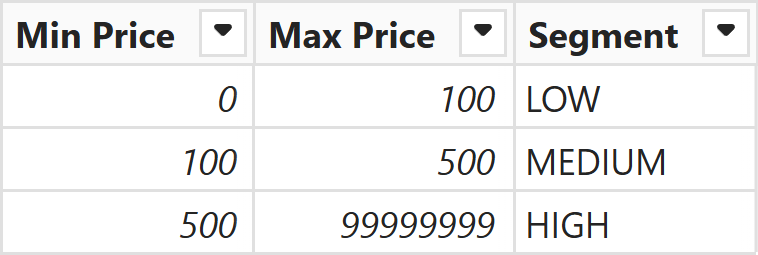
We can create a model-independent function that retrieves the segment corresponding to a specified value. In order to be model-independent, the function exposes all the model dependencies as parameters, which in this case are all column references:
RangeLookupUnchecked = (
    search        : SCALAR VAL,
    minColumn     : COLUMNREF,
    maxColumn     : COLUMNREF,
    targetColumn  : COLUMNREF
) =>
    SELECTCOLUMNS (
        FILTER (
            TABLEOF ( minColumn ),
            minColumn <= search && maxColumn > search
        ),
        "@Result", targetColumn
    )
The RangeLookupUnchecked function does not validate that the three columns belong to the same table. An error in the arguments provided to the function might be difficult to interpret. Therefore, we would like to create a safer version of the function that verifies that all the column references do belong to the same table, and returns a specific error otherwise:
RangeLookup = (
    search        : SCALAR VAL,
    minColumn     : COLUMNREF,
    maxColumn     : COLUMNREF,
    targetColumn  : COLUMNREF
) =>
    IF (
        NAMEOF ( TABLEOF ( minColumn ) ) == NAMEOF ( TABLEOF ( maxColumn ) )
            && NAMEOF ( TABLEOF ( minColumn ) ) == NAMEOF ( TABLEOF ( targetColumn ) ),
        SELECTCOLUMNS (
            FILTER (
                TABLEOF ( minColumn ),
                minColumn <= search && maxColumn > search
            ),
            "@Result", targetColumn
        ),
        ERROR ( "All the column references must belong to the same table" )
    )
Currently, the syntax error from an invalid column reference occurs before the code that generates the customized error, but we hope to make this check possible in the future. We could also define a version of the function for the dynamic segmentation pattern, which returns a table and can be used as a CALCULATE filter in a measure (with the same disclaimer for the validation code that might not be executed as we would like in the current preview of UDFs):
ValuesInSegment = (
    filterColumn  : COLUMNREF,
    minColumn     : COLUMNREF,
    maxColumn     : COLUMNREF,
    targetColumn  : COLUMNREF
) =>
    GENERATE (
        TABLEOF ( targetColumn ),
        FILTER (
            VALUES ( filterColumn ),
            IF (
                NAMEOF ( TABLEOF ( minColumn ) ) == NAMEOF ( TABLEOF ( maxColumn ) )
                    && NAMEOF ( TABLEOF ( minColumn ) ) == NAMEOF ( TABLEOF ( targetColumn )
),
                minColumn <= filterColumn && maxColumn > filterColumn,
                ERROR ( "minColumn, maxColumn, and targetColumn arguments must belong to the same table" )
            )
        )
    )
Segmented Sales =
CALCULATE (
    [Sales Amount],
    ValuesInSegment (
        Sales[Net Price],
        PriceRange[Min Price], PriceRange[Max Price], PriceRange[Segment]
    )
)
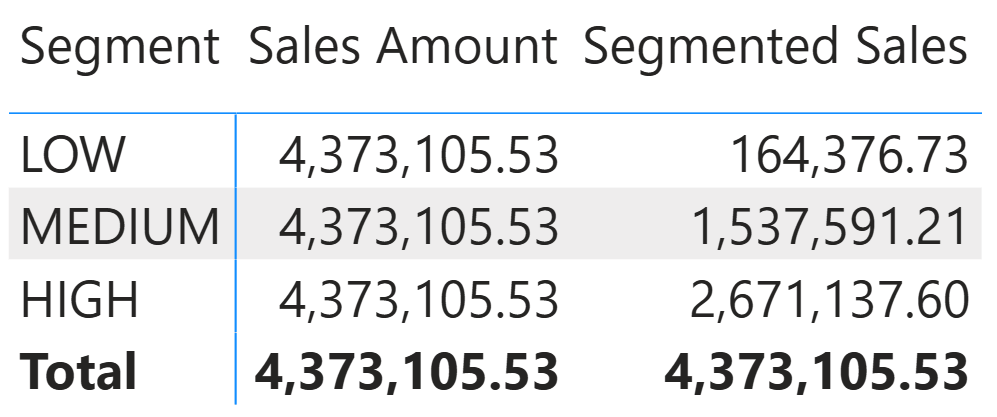
The result of Segmented Sales filters Sales Amount only for the segment grouped in the visual, whereas the original Sales Amount measure ignores that filter because it comes from a disconnected table.
TABLEREF
A TABLEREF parameter accepts only a reference to a table defined in the semantic model. The caller must provide the name of an existing table; table expressions such as FILTER or SELECTCOLUMNS are not accepted.
This type is useful when the function needs to operate on a model table and must guarantee that the provided argument is an actual table from the model, not a derived or filtered table expression. By us constraining the parameter to a table reference, the function can rely on the table having the full set of columns and relationships defined in the model.
When a parameter is declared as TABLEREF, we recommend using the suffix Table in the parameter name: for example, salesTable or customerTable.
Using TABLEREF is probably uncommon because TABLE EXPR is more flexible and does not impose a restriction on the table that should be evaluated inside the function. However, we may want to ensure that the table is a model table so we can use functions like ISFILTERED and ISCROSSFILTERED using a valid table argument. For example, the HasRelationships function returns TRUE if the sourceTable filters targetTable in the current filter context, meaning that there are one or more relationships connecting the two tables and propagating the filter context:
HasRelationships = (
    targetTable : TABLEREF,
    sourceTable : TABLEREF
) =>
    CALCULATE (
        ISCROSSFILTERED ( targetTable ),
        sourceTable,
        REMOVEFILTERS ()
    )
Product filter Sales =
HasRelationships (
    Sales,
    'Product'
)
PriceRange filter Sales =
HasRelationships (
    Sales,
    PriceRange
)
The Product filter Sales and PriceRange filter Sales measures show how to use the HasRelationships function.
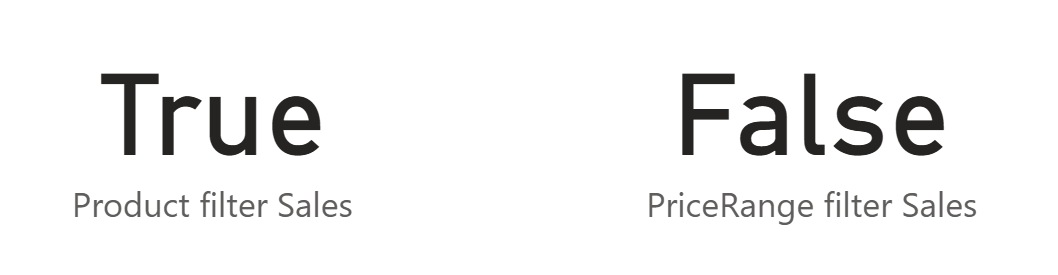
The example is merely educational. We suggest using TABLEOF whenever possible to reduce the number of parameters, and considering TABLE EXPR instead of TABLEREF to give more flexibility to the developers using a function.
CALENDARREF
A CALENDARREF parameter accepts only a reference to a calendar defined in the semantic model. CALENDARREF is designed for calendar-based time intelligence functions.
When a parameter is declared as CALENDARREF, we recommend using the suffix Calendar in the parameter name — for example, dateCalendar.
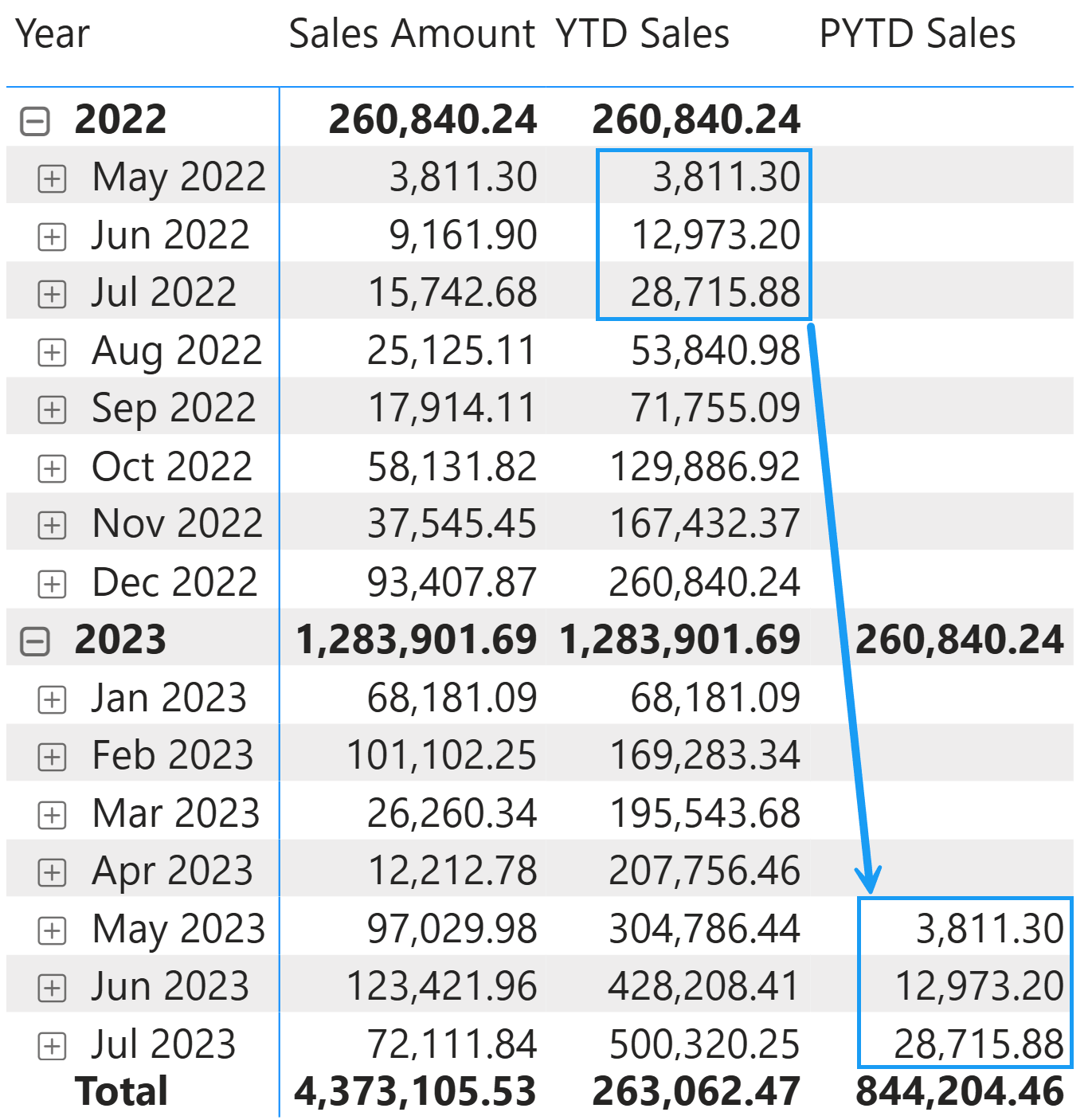
As an example, we create a DatesPYTD function that applies a previous year-to-date transformation by combining DATESYTD and SAMEPERIODLASTYEAR:
DatesPYTD = ( targetCalendar : CALENDARREF ) =>
    CALCULATETABLE (
        DATESYTD ( targetCalendar ),
        SAMEPERIODLASTYEAR ( targetCalendar )
    )
YTD Sales =
CALCULATE (
    [Sales Amount],
    DATESYTD ( 'Gregorian' )
)
PYTD Sales =
CALCULATE (
    [Sales Amount],
    DatesPYTD ( 'Gregorian' )
)
The result of PYTD Sales is like YTD Sales, shifted by one year.
Why use specific reference types instead of ANYREF
The new reference types are specializations of ANYREF: they share the same passing mode (EXPR), but they restrict the accepted expressions. A natural question is, “why should we bother with the restriction when ANYREF already works?”. There are two primary reasons.
The first reason is validation. When we use a specific reference type, the engine and IntelliSense can enforce constraints at the point of the function call. If a developer mistakenly passes a column reference to a MEASUREREF parameter, the error is reported immediately with a clear message. If a developer passes a FILTER expression to a TABLEREF parameter, the engine rejects it before the function body executes. With ANYREF, these mistakes would produce confusing errors deep inside the function body or, worse, incorrect results without any error at all.
The second reason is documentation. A function signature is the first thing a developer reads when deciding whether and how to use a function. A parameter declared as MEASUREREF immediately communicates that the function expects a measure, that context transition will occur, and that arbitrary expressions are not accepted. A parameter declared as COLUMNREF communicates that the caller must provide a column from a model table. A parameter declared as ANYREF communicates none of these things; the developer must read the function body to understand what is expected, even though adopting a consistent naming convention for the parameters helps clarify that.
These two reasons reinforce each other. Better documentation reduces the likelihood of mistakes, and stronger validation catches the mistakes that still occur. Together, they make functions easier to use, easier to maintain, and safer to share across models and libraries.
Conclusions
The parameter type system in DAX user-defined functions (UDFs) provides a spectrum from the most permissive type (ANYREF) to the most restrictive (MEASUREREF, COLUMNREF, TABLEREF, and CALENDARREF), which are specializations of ANYREF that restrict the accepted expressions to specific categories.
The rule is simple: use the most specific parameter type that satisfies your function’s requirements. If the function expects a measure, use MEASUREREF. If it expects a column, use COLUMNREF. If it expects a model table reference, use TABLEREF. If it expects a calendar, use CALENDARREF. Reserve ANYREF for those cases where the function genuinely needs to be able to accept any kind of expression. The more specific the type, the clearer the intent of the function, the stronger the validation, and the more helpful the development tools become for the developers who use your functions.

Evaluates an expression in a context modified by filters.
CALCULATE ( <Expression> [, <Filter> [, <Filter> [, … ] ] ] )
Adds all the numbers in a column.
SUM ( <ColumnName> )
Returns the table that the specified column, measure, or calendar belongs to.
TABLEOF ( <Reference> )
Returns the name of a table, column, measure, or calendar as a text string. Optional parameters control which component of the name is returned and how the result is escaped.
NAMEOF ( <Value> [, <Component>] [, <Escaped>] )
Returns the sum of an expression evaluated for each row in a table.
SUMX ( <Table>, <Expression> )
Returns a table that has been filtered.
FILTER ( <Table>, <FilterExpression> )
Returns a table with selected columns from the table and new columns specified by the DAX expressions.
SELECTCOLUMNS ( <Table> [[, <Name>], <Expression> [[, <Name>], <Expression> [, … ] ] ] )
Returns true when there are direct filters on the specified column.
ISFILTERED ( <TableNameOrColumnName> )
Returns true when the specified table or column is crossfiltered.
ISCROSSFILTERED ( <TableNameOrColumnName> )
Returns a set of dates in the year up to the last date visible in the filter context.
DATESYTD ( <Dates> [, <YearEndDate>] )
Returns a set of dates in the current selection from the previous year.
SAMEPERIODLASTYEAR ( <Dates> )