 Marco Russo & Alberto Ferrari
A very common request by Power BI newbies is, “How can I use a slicer to filter a measure rather than a regular model column?” The most common answer to this question is, “You cannot filter a measure through a slicer”. The answer is entirely correct because there is no such thing as “filtering a measure”. However, elaborating on the why gives us a good way to explain not only what is wrong with the question, but also how to further reason about the requirements needed to obtain a working solution.
Interpreting the question
Let us pretend the question is “I want to filter the sales amount greater than 100,000 USD.” The question is incomplete. One may want to filter products with sales greater than 100,000, or customers, or stores, or any other table/column. Indeed, a filter is always applied to a column, not to a measure. A measure cannot be used as a filter unless we define the granularity of the filter, that is, the column we will use to evaluate the measure in a given context.
Let us add some background information, as the misunderstanding stems from the fact that you can filter a visual with a measure in the Power BI user interface. Indeed, you can use a measure as a filter in a matrix, as in the following example, where the matrix on the right is filtered by the Sales Amount measure in the filter pane.
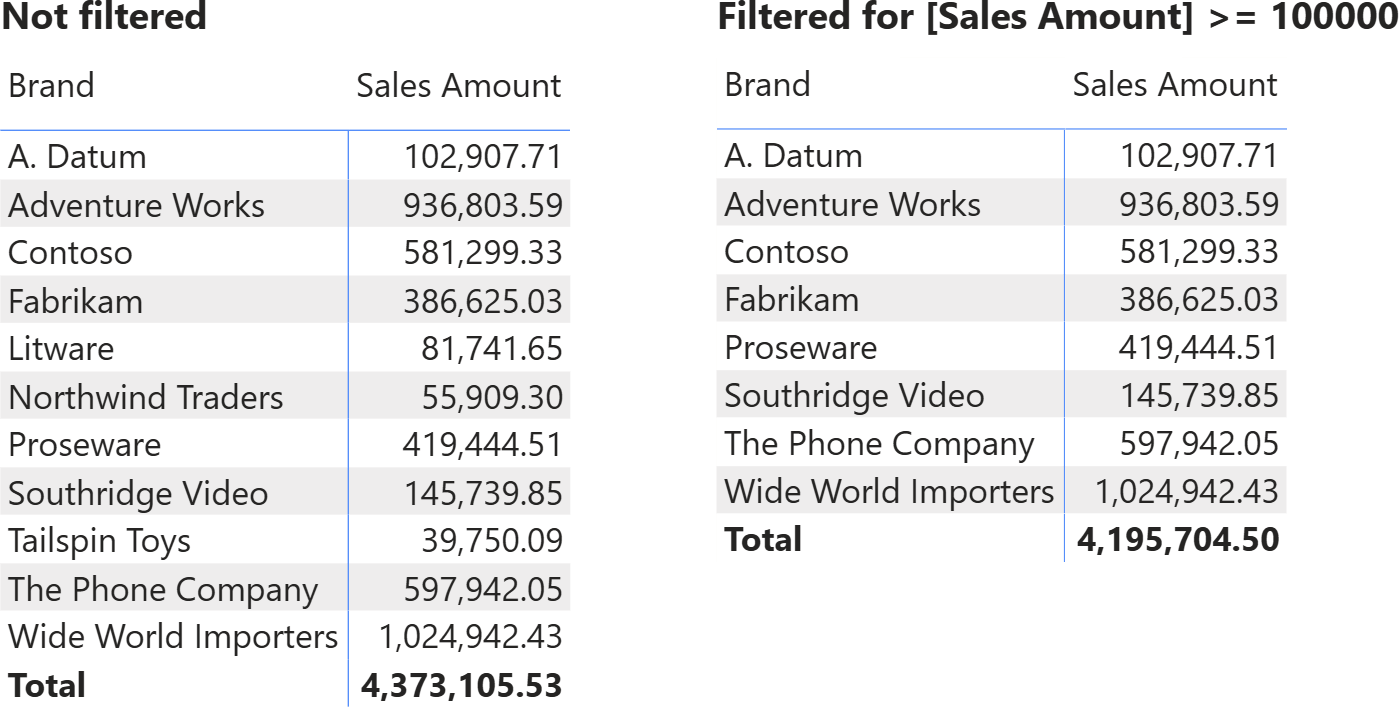
However, the filter is not on the measure itself. The matrix filters brands with Sales Amount greater than 100,000. The granularity of the filter is provided automatically by the matrix, which groups data by brand. Indeed, changing the column we slice by in the matrix, changes the result.
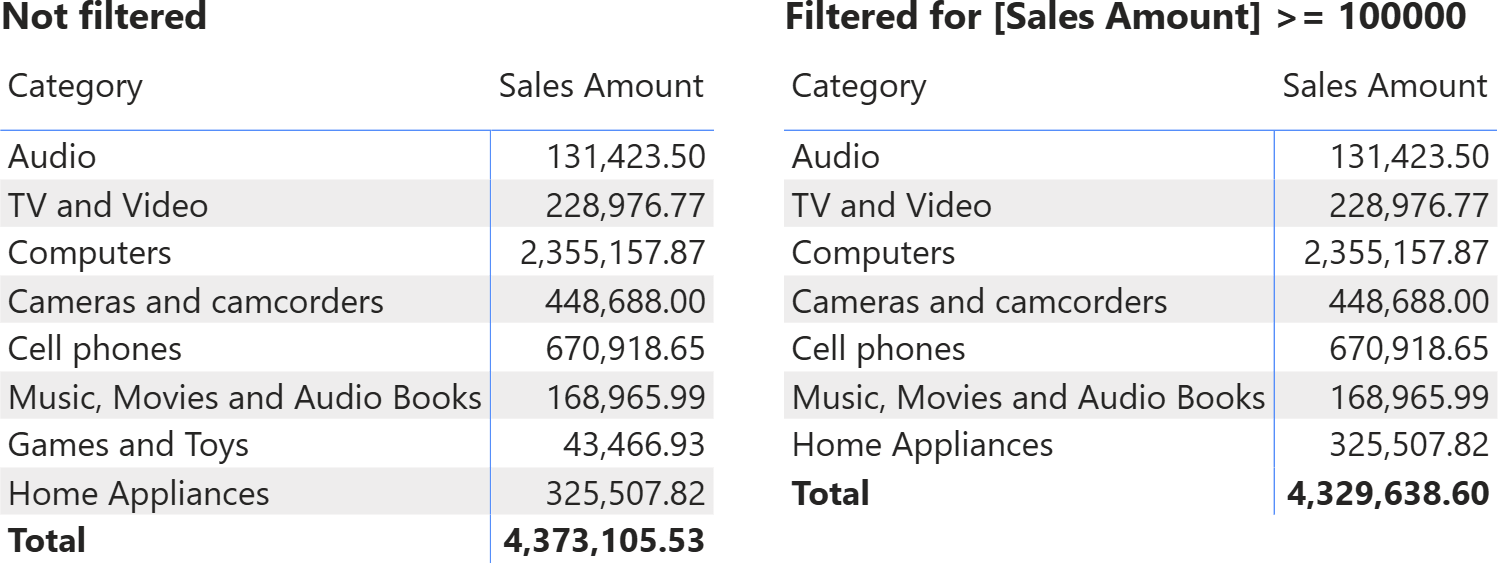
The total of the unfiltered matrix is the same as above, whereas the total of the filtered matrix is different, because the filter has a different granularity.
In other words, a measure can be a filter if you define its granularity. Filtering Sales Amount greater than 100,000 USD is nonsense. On the other hand, filtering customers (or products) with sales greater than 100,000 USD makes a lot of sense.
Implementing a slicer
If one wants to use a slicer to filter a measure, they can do so as long as they define the granularity of the filter. The slicer can be conveniently used to adjust the filter parameters; in our example, the Sales Amount value that should be used as the minimum.
As an example, one may want to produce a report like the following.
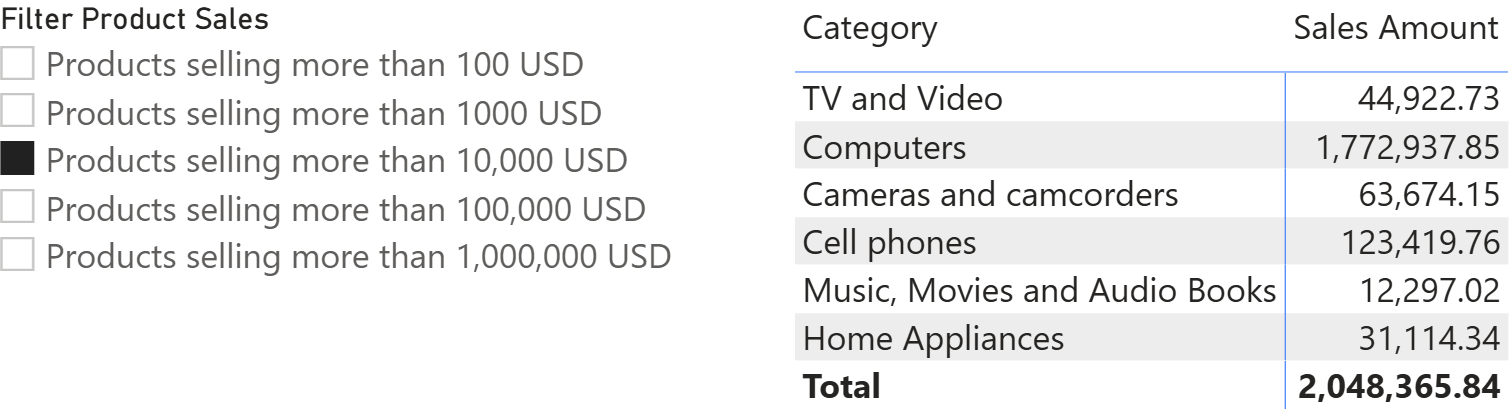
The slicer filters the Sales Amount measure, but it clearly states the granularity at which the filter is applied: products. Therefore, selecting an item in the slicer restricts the calculation to products with sales exceeding the specified limit.
There are multiple ways to produce such a report; a very convenient one is to rely on a function to embed the filtering logic and on a calculation group to serve as the user interface. Each calculation item in the calculation group invokes the function passing the correct parameters.
First, the function:
Local.FilterProductsBasedOnMeasure =
(
    resultExpression : EXPR,
    filterMeasure: MEASUREREF,
    filterLimit: SCALAR
) =>
    CALCULATE (
        resultExpression,
        KEEPFILTERS (
            FILTER ( Product, filterMeasure > filterLimit )
        )
    )
The function accepts three parameters: the result to produce, the measure to use as a filter, and the filter limit. The granularity of the filter is specified inside the function body, as the function filters Product, providing the product as the filter granularity.
Once the function is defined, one calculation group can contain all the items that produce the filtering, by invoking the function passing SELECTEDMEASURE as the value to compute, Sales Amount as the measure to use as a filter, and the limit as the third argument:
Products selling more than 100 USD =
Local.FilterProductsBasedOnMeasure ( SELECTEDMEASURE ( ), [Sales Amount], 100 )
Products selling more than 1,000 USD =
Local.FilterProductsBasedOnMeasure ( SELECTEDMEASURE ( ), [Sales Amount], 1000 )
Products selling more than 10,000 USD =
Local.FilterProductsBasedOnMeasure ( SELECTEDMEASURE ( ), [Sales Amount], 10000 )
Products selling more than 100,000 USD =
Local.FilterProductsBasedOnMeasure ( SELECTEDMEASURE ( ), [Sales Amount], 100000 )
Creating a more flexible solution
Depending on the user’s needs, the granularity of the filter can be passed as an additional parameter. This way, the calculation items can change not only the limit but also the granularity (or the measure) to use as a filter. Despite its simplicity, this pattern can easily be extended to accommodate rather complex user needs.
For example, we can create two slicers: one to define the granularity, and one to define the measure boundaries, like in the following example, where we first create a new disconnected table to let users select the filter granularity:
TableToFilter =
    SELECTCOLUMNS (
       { "Product", "Customer", "Store" },
       "Table to filter", [Value]
    )
A new function reads the content of the selected item in the slicer to direct the filter to the proper granularity:
Local.FilterTableBasedOnMeasure = (
        resultExpression : EXPR,
        filterMeasure : MEASUREREF,
        filterLimit : SCALAR
    ) =>
    VAR TableToFilter =
        SELECTEDVALUE ( TableToFilter[Table to filter] )
    VAR Result =
        SWITCH (
            TableToFilter,
            "Product",
                CALCULATE (
                    resultExpression,
                    FILTER (
                        Product,
                        filterMeasure > filterLimit
                    )
                ),
            "Customer",
                CALCULATE (
                    resultExpression,
                    FILTER (
                        Customer,
                        filterMeasure > filterLimit
                    )
                ),
            "Store",
                CALCULATE (
                    resultExpression,
                    FILTER (
                        Store,
                        filterMeasure > filterLimit
                    )
                )
        )
    RETURN
        Result
Finally, a new calculation group lets users choose the amount only, without defining the granularity – which is selected through the disconnected table:
    Sales amount more than 100 USD =
    Local.FilterTableBasedOnMeasure ( SELECTEDMEASURE (), [Sales Amount], 100 )
    Sales amount more than 1000 USD =
    Local.FilterTableBasedOnMeasure ( SELECTEDMEASURE (), [Sales Amount], 1000 )
    Sales amount more than 10,000 USD =
    Local.FilterTableBasedOnMeasure ( SELECTEDMEASURE (), [Sales Amount], 10000 )
    Sales amount more than 100,000 USD =
    Local.FilterTableBasedOnMeasure ( SELECTEDMEASURE (), [Sales Amount], 100000 )
    Sales amount more than 1,000,000 USD =
    Local.FilterTableBasedOnMeasure ( SELECTEDMEASURE (), [Sales Amount], 1000000 )
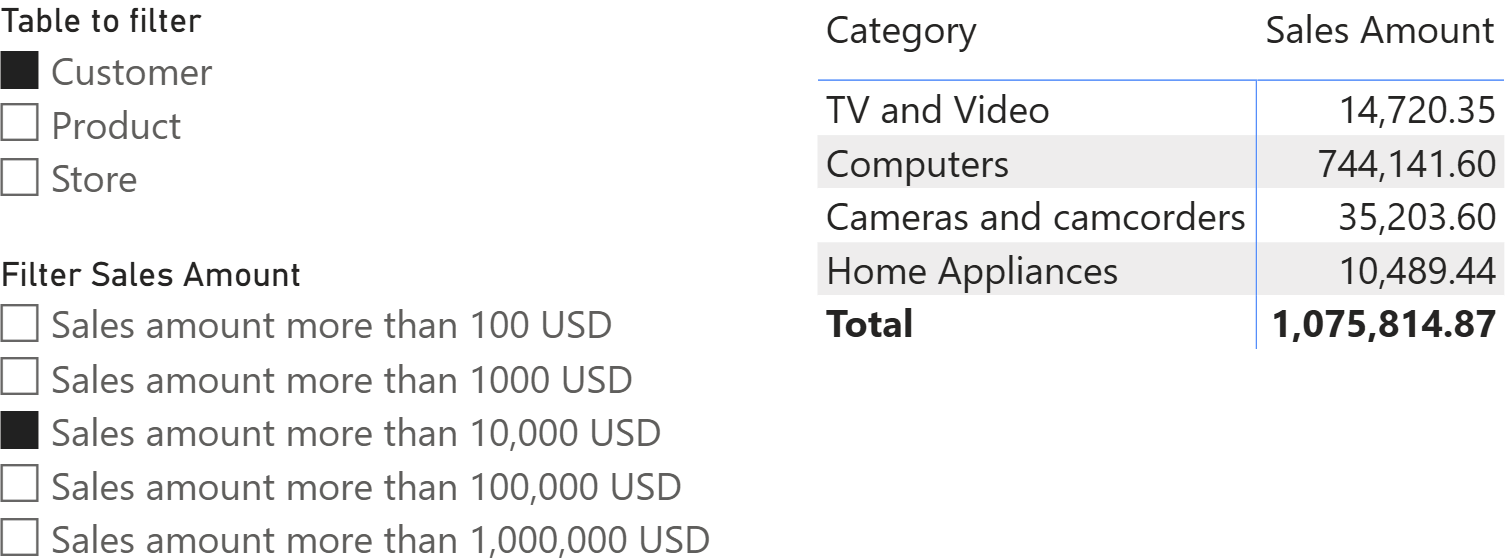
The result is a report where users can choose both the limit value and the granularity.
Conclusions
Sometimes, answering a newbie’s question with the most concise answer is the best option; sometimes it is not. A simple (wrong) requirement, like the one analyzed in this article, may require further investigation to explain why it is wrong and, ultimately, yield interesting solutions.
The key takeaway is that a slicer does not (and cannot) filter a measure directly; instead, it lets users tune the parameters of a filter that is applied to a business entity at a specific granularity (such as Product, Customer, or Store). Once you make that granularity explicit, you can deliver the “filter a measure” experience in a correct, flexible way: You can encapsulate the logic in a reusable function and expose choices through calculation groups.

Returns the measure that is currently being evaluated.
SELECTEDMEASURE ( )