 Marco Russo & Alberto Ferrari
A DAX measure is correct only when it produces the expected result in every situation of filter context and available data. A value being correct in a report for a particular product or customer does not prove that the measure works for other selections. This matters when the measure implements business logic that depends on the active filters.
We usually validate this logic by creating report pages that isolate a few customers and transactions. This is useful during development because we can see the data and we can reason about the result. However, manual validation is difficult to repeat after every change. It is also easy to forget a filter combination that previously exposed a problem.
AI can help with the repetitive part of this work. Once connected to the semantic model, the AI assistant can explore the data, find representative cases, and generate DAX queries that reproduce the required filter contexts. The expected results still require human validation. The role of AI is to find and automate the cases, not to define the business requirement.
Understanding the measure to test
We start from the New and returning customers pattern and, in particular, from the Dynamic relative implementation of the # New Customers measure. The pattern takes into account all the report filters. For example, if the report filters the Audio category, a customer is considered new on the first date when they purchase an Audio product. An earlier purchase in another category does not make the customer exist for the Audio category.
The same rule applies to brands. If the filter contains Contoso and Northwind Traders, the two brands form one selection. The customer is new on their first purchase date across the union of those brands. The measure must not compute a separate first purchase date for each brand.
This behavior makes the measure a good candidate for regression testing. A modification can preserve the result of a simple case while changing how the measure handles a category filter or a multiple-brand selection. Therefore, testing only a straightforward positive result is not enough.
Identifying four types of tests
We want tests that can detect both incorrect inclusions and incorrect exclusions. For this reason, we manually identify four types of cases before asking AI to automate them:
- A positive testchecks that a qualifying customer is counted. This is the simplest valid case and it confirms that the main path of the calculation works.
- A negative testchecks that a customer without a qualifying purchase in the selected context is not counted. This detects filters that are ignored or incorrectly removed.
- A prevent false positive testuses a case that looks valid under a narrower filter but is invalid under the filter being tested. This detects a measure that counts too many customers.
- A prevent false negative testuses a valid case with an earlier purchase outside the current selection. This detects a measure that counts too few customers because it evaluates the first purchase over the wrong set of products.
We manually created the following report pages, which isolate one case for each purpose. Read the details of each example to understand the type of tests implemented, which are intended to evaluate possible regressions in case of changes to the measure. You can skip the details of each case if you just want to see how to automate this process.
Testing a positive case
Customer 362, Cindy Ramos, purchased Audio products from both Contoso and Northwind Traders on April 9, 2007. This is the first purchase date in the selected two-brand Audio context. Therefore, # New Customers must return 1.
The report also shows later purchases when all brands and categories are visible. Those later transactions do not affect the expected result on April 9, 2007.
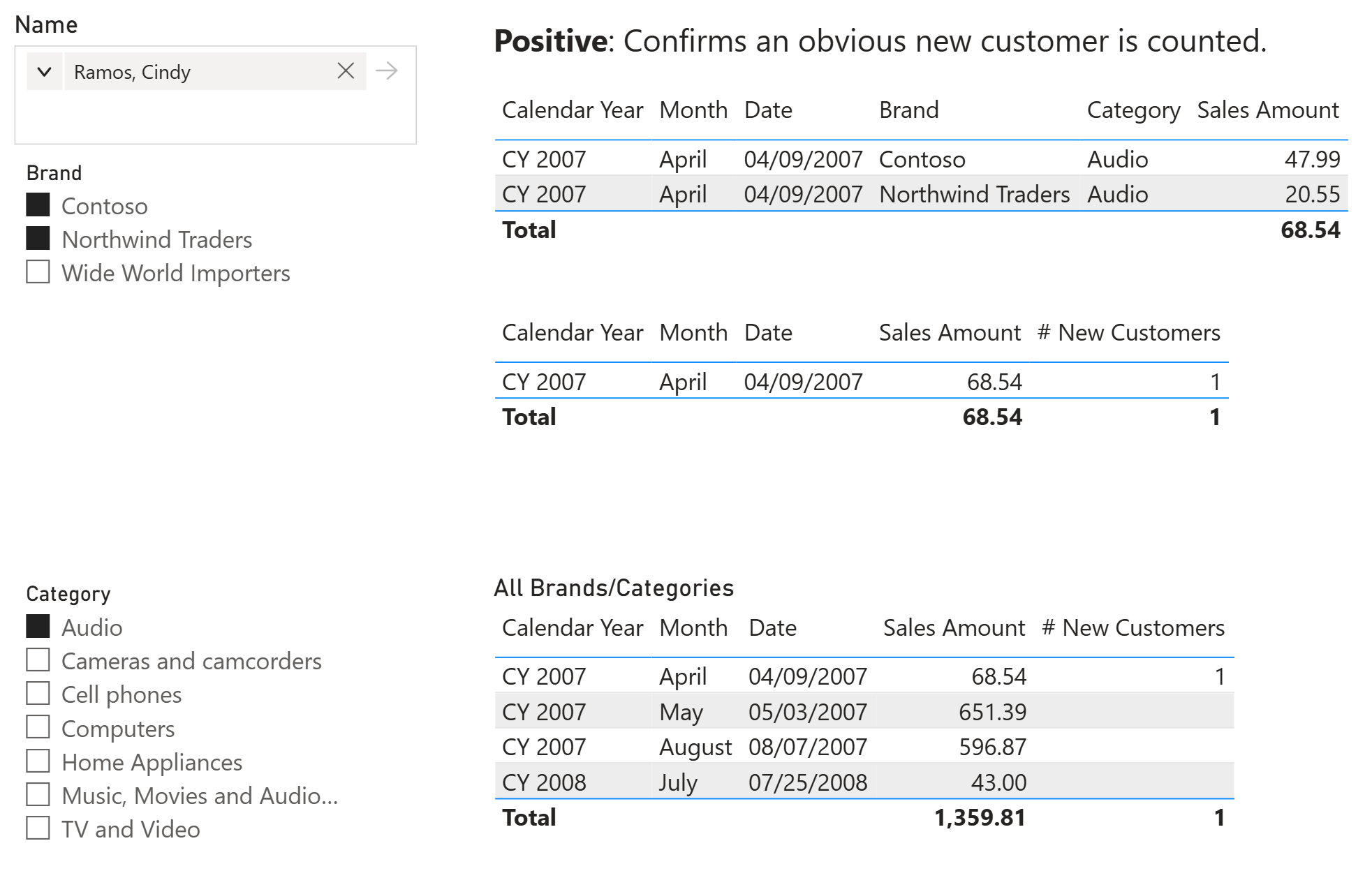
This test confirms that a customer with a qualifying first purchase is included. However, it does not prove that the measure excludes transactions outside the selection.
Testing a negative case
Customer 11317, Deanna Sara, made a purchase on July 9, 2007. That transaction was for Fabrikam in Cameras and camcorders, so it is outside the selected Contoso and Northwind Traders Audio context. The expected value of # New Customers for that date and selection is 0.
The same customer first purchased Audio from Northwind Traders on July 23, 2007. The report returns 1 on that later date under the two-brand Audio filter, but it must not return 1 on July 9.
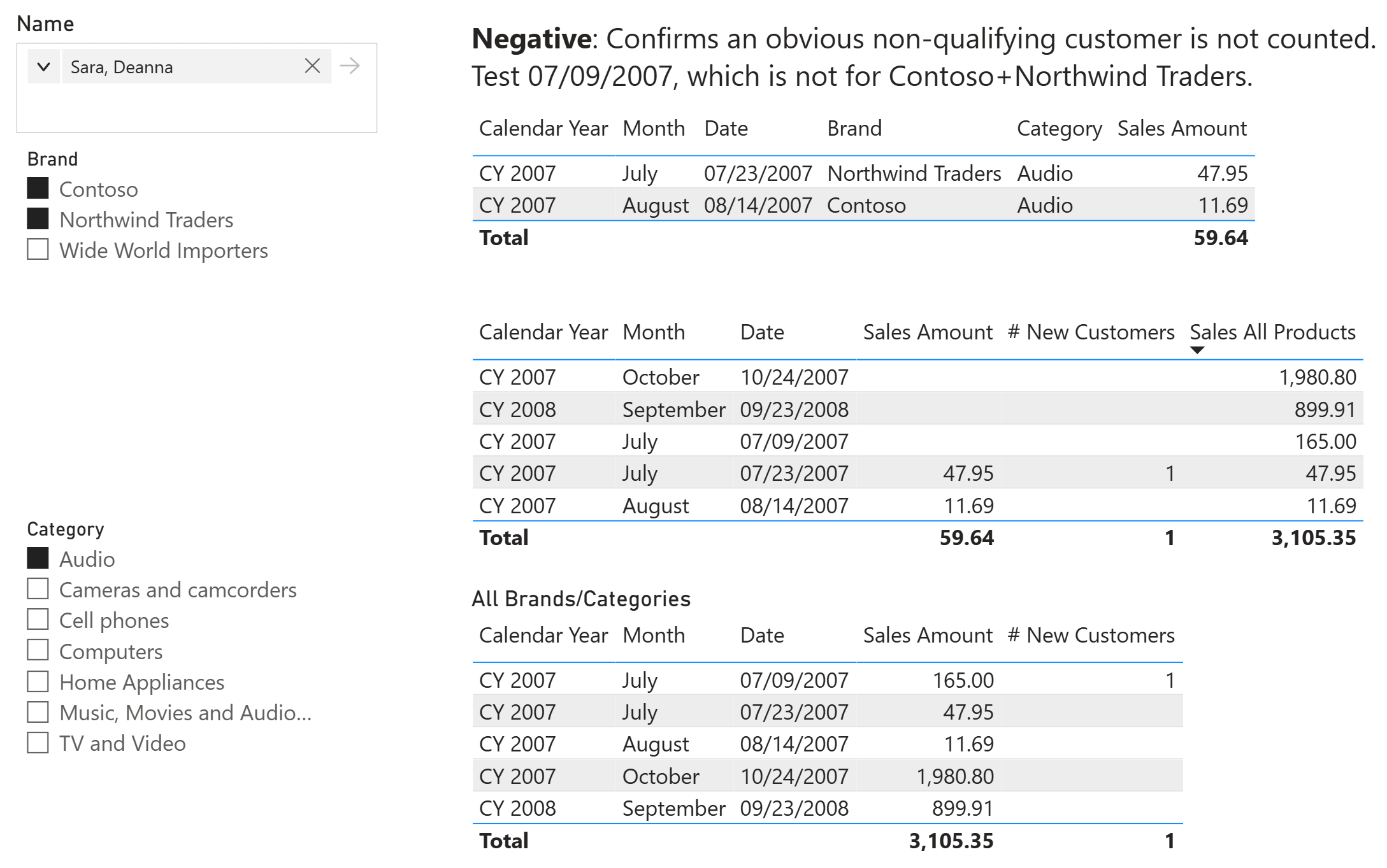
This test detects a measure that removes or ignores the category and brand filters while finding the first purchase.
Preventing a false positive
The same customer provides a more subtle case. Deanna Sara bought Audio from Northwind Traders on July 23, 2007, and from Contoso on August 14, 2007. If the report selects only Contoso, the customer is new on August 14 because that is her first Contoso Audio purchase.
The expected result changes when the report selects both Contoso and Northwind Traders. The first purchase in that union occurred on July 23. Therefore, the customer is not new on August 14, and # New Customers must return 0.
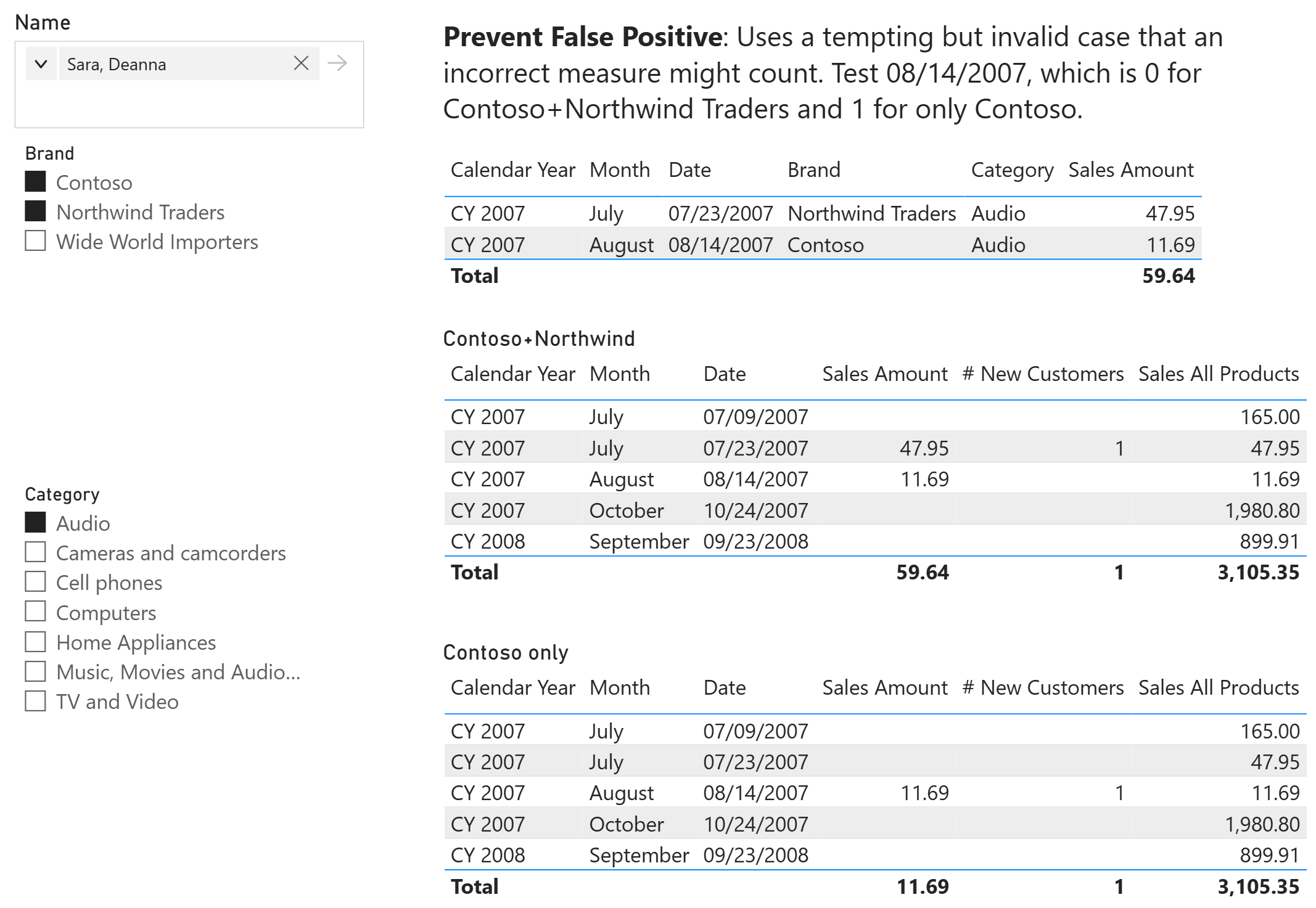
This case detects an implementation that evaluates the first purchase separately for every selected brand. This implementation could pass the positive and negative tests. However, it still counts the same customer as new more than once within a multiple-brand selection.
Preventing a false negative
Customer 175, Nicholas Robinson, made a purchase on January 18, 2007, outside the selected Audio context. The first purchase in the Contoso and Northwind Traders Audio selection occurred on October 27, 2007. Consequently, # New Customers must return 1 on October 27.
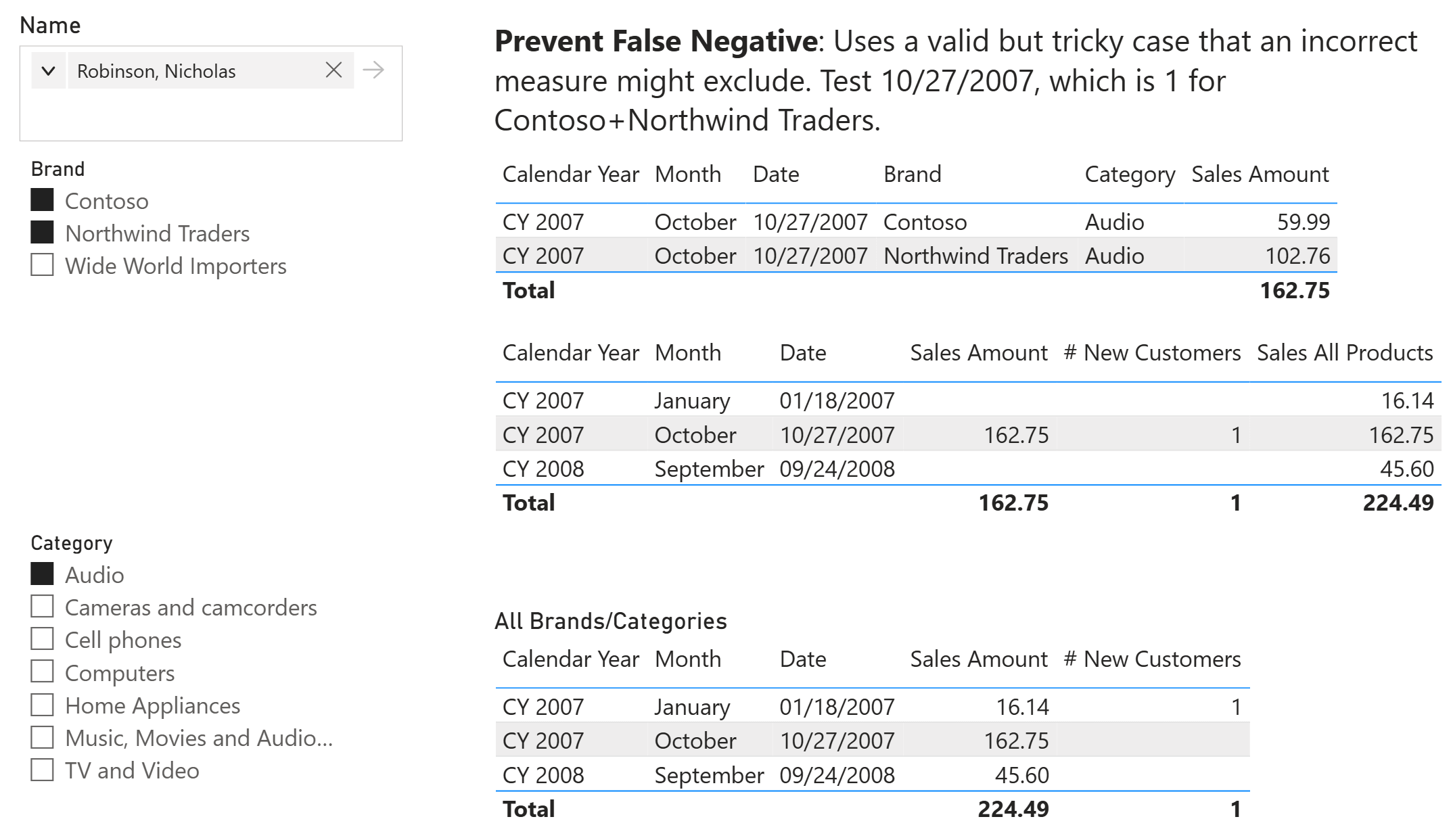
This case detects a measure that uses the first purchase across all products. That behavior would be correct for a dynamic absolute calculation, but it is incorrect for the dynamic relative measure we are testing.
Asking AI to create the tests
Manually finding these cases requires repeated filtering and inspection of transaction histories. We can automate the discovery and generation process by connecting an AI assistant to Power BI Desktop through the Power BI Modeling MCP server. The local server lets the assistant inspect the semantic model and execute or validate DAX queries against it.
We used the following prompt:
I want to create tests for the # New Customers measure. It is dynamic, which takes into account all the filters in the report for the calculation. Therefore, if the report filters one category (Audio, for example), a customer is reported as new the first time they buy a product of the Audio category. Find cases for one and two brands selected that show positive, negative, and prevent false positive and false negative. Create the DAX queries to validate the test. The query should return one or more row with the test name, the status, and a description of the test result (with an explanation of the issue found). We'll assign each query to a function and run one or more tests together by using UNION of their results.
The prompt provides the semantic rule, the dimensions that must vary, the four test purposes, and the required output contract. This information is important. A generic request to test the measure would leave the assistant free to choose cases that do not exercise the relevant filter behavior.
The assistant inspected the model and generated eight tests: four for a single selected brand and four for a two-brand selection. We manually verified the selected transactions before keeping their expected values. This step prevents a circular test in which the measure under test also determines the expected result.
Organizing tests with DAX functions
The generated query uses DAX user-defined functions to keep every test independent and give every result the same shape. DAX user-defined functions (UDF) can be defined and evaluated in DAX query view by using the FUNCTION keyword in a DEFINE block. They require compatibility level 1702 or higher and are generally available in Power BI Desktop and the Power BI service starting from the June 2026 release. A common TestResult function compares the actual and expected values and returns one row with the test name, status, and description.
Each test function applies filters for one customer, category, brand selection, and date. TREATAS reproduces the filter context of the report, whereas COALESCE converts a blank result to zero when the customer must not be counted.
The following extract shows the common result function and the two-brand false-positive test:
// Creates the standard one-row result returned by every test.
TestResult = (
    testName : STRING,
    actualValue : INT64,
    expectedValue : INT64,
    passDescription : STRING,
    failureExplanation : STRING
) =>
    ROW (
        "Test name", testName,
        "Status", IF ( actualValue = expectedValue, "PASS", "FAIL" ),
        "Description",
            IF (
                actualValue = expectedValue,
                passDescription,
                failureExplanation
                    & " Expected " & FORMAT ( expectedValue, "0" )
                    & ", got " & FORMAT ( actualValue, "0" ) & "."
            )
    )
// Guards against calculating the first purchase separately for each brand.
Test_NewCustomers_2Brands_NoFalsePositive = () =>
    VAR Actual =
        COALESCE (
            CALCULATE (
                [# New Customers],
                TREATAS ( { 11317 }, Customer[CustomerKey] ),
                TREATAS ( { "Audio" }, Product[Category] ),
                TREATAS (
                    { "Contoso", "Northwind Traders" },
                    Product[Brand]
                ),
                TREATAS ( { DATE ( 2007, 8, 14 ) }, 'Date'[Date] )
            ),
            0
        )
    RETURN
        TestResult (
            "2 brands - prevent false positive",
            Actual,
            0,
            "Customer 11317 is not counted because the first purchase "
                & "in the selected union was on 2007-07-23.",
            "The first date was evaluated per brand instead of across "
                & "the selected brand union."
        )
The final EVALUATE statement combines the selected functions with UNION. We can add or remove function calls to run the complete suite or only the tests related to a specific change:
EVALUATE
UNION (
    Test_NewCustomers_1Brand_Positive (),
    Test_NewCustomers_1Brand_Negative (),
    Test_NewCustomers_1Brand_NoFalsePositive (),
    Test_NewCustomers_1Brand_NoFalseNegative (),
    Test_NewCustomers_2Brands_Positive (),
    Test_NewCustomers_2Brands_Negative (),
    Test_NewCustomers_2Brands_NoFalsePositive (),
    Test_NewCustomers_2Brands_NoFalseNegative ()
)
The sample Power BI file you can download below, contains the helper function and all eight test functions.
Reading the test results
Running the query against the original measure produces one row for each test. All eight tests return PASS.
| Test name | Status | Validated behavior |
| 1 brand - positive | PASS | Customer 362 is counted on the first Contoso Audio purchase date. |
| 1 brand - negative | PASS | Customer 11317 is not counted on a date with only a Northwind Traders Audio purchase. |
| 1 brand - prevent false positive | PASS | Customer 4626 is not counted on a repeat Contoso Audio purchase. |
| 1 brand - prevent false negative | PASS | Customer 175 is counted despite an earlier purchase outside Contoso Audio. |
| 2 brands - positive | PASS | Customer 362 is counted on the first purchase date in the selected brand union. |
| 2 brands - negative | PASS | Customer 11317 is not counted for a purchase outside both selected Audio brands. |
| 2 brands - prevent false positive | PASS | The later Contoso purchase is not treated as an initial purchase. |
| 2 brands - prevent false negative | PASS | An earlier purchase outside the two-brand Audio selection does not suppress the valid result. |
A failing row reports the expected and actual values and includes an explanation of the likely issue. Therefore, the query provides the first piece of information required to investigate a regression when it detects one.
Keeping the tests useful
The test query is deterministic after we select the customers, dates, filters, and expected values. The AI discovery process does not need to be deterministic because it is only used to create the initial suite. Once the tests are reviewed, they become ordinary DAX code that we can store with the project and execute again.
These tests depend on the sample data. If transactions or dimension values change, we must review the cases or run them against a stable test model. To implement tests, we always need controlled input data, regardless of whether we use AI to create these tests.
Moreover, the measure passing all eight tests does not prove that the measure is correct for every possible context. The goal of this article was to provide a more efficient way to create tests, but the completeness of the test suite depends on the calculation implemented and the model complexity that could affect the DAX expression.
Conclusions
Testing a DAX measure requires more than comparing a few totals. We must reproduce the filter contexts that define the business rules and include cases that detect both false positives and false negatives.
AI connected to the semantic model can reduce the effort required to find those cases and write the corresponding DAX queries. However, we must verify the expected results independently before accepting the tests. Use AI to explore the model and generate the repetitive code; keep the definition of what is correct behavior under human control.

Returns the union of the tables whose columns match.
UNION ( <Table>, <Table> [, <Table> [, … ] ] )
Treats the columns of the input table as columns from other tables. For each column, filters out any values that are not present in its respective output column.
TREATAS ( <Expression>, <ColumnName> [, <ColumnName> [, … ] ] )
Returns the first argument that does not evaluate to a blank value. If all arguments evaluate to blank values, BLANK is returned.
COALESCE ( <Value1>, <Value2> [, <ValueN> [, … ] ] )