
 Marco Russo
 Alberto Ferrari
Companion content
Insert your email address and press Download for access to the files used in this book.Errata corrige
To ensure the ongoing accuracy of this book and its companion content, we have reviewed and confirmed the errors listed below. If you find a new oversight not included in both of the following sections, please report it to us.
Important issues
Corrections in this section are important to fully understand the concepts explained in the book.-
Page 476: Year is a bound column
In the paragraph after Figure 12-21, the description mention Year as an unbound column, while it is a bound column. The right sentence is:
The source table now contains three columns: Continent and Year are bound, whereas @Sales is unbound.
Feb 3, 2026
Minor issues
Corrections in this section do not affect the ability to learn the concepts explained in the book.-
Page 19: SUMX instead of SUM
The measure defined in the second line of the first code snipped should be SUMX instead of SUM. The correct first two lines are as follows:
DEFINE
    MEASURE Sales[Sales Amount] = SUMX ( Sales, Sales[Quantity] * Sales[Net Price] )
Dec 20, 2025 -
Page 39: Gross Margin Pct should reference Sales[LineMargin]
The measure preceding Figure 2-7 should reference Sales[LineMargin] instead of Sales[GrossMargin].
The definition of Gross Margin Pct should be the following:Measure in Sales tableGross Margin Pct = SUM ( Sales[LineMargin] ) / SUM ( Sales[LineAmount] )
Jan 20, 2026 -
Page 57: Inaccurate calculation in the Occurrences measure
The implementation of the # Occurrences measure counts the number of keywords, not the number of products that contain at least one of the keywords mentioned.
A correct version of the calculation is the following:
# Occurrences =
COUNTROWS (
    FILTER (
        'Product',
        COUNTROWS (
            FILTER (
                Keywords,
                CONTAINSSTRING ( 'Product'[Product Name], Keywords[Keyword] )
            )
        ) > 0
    )
)
The only difference in the result is the Total, which is 900 instead of 943 for # Occurrences and 35.76% instead of 37.47% for Perc.
However, for the purpose of this initial introduction, this is a minor issue. The goal was to expose the syntax of two nested iterations that will be explained later in the book.
Jan 2, 2026 -
Page 59: Column MonthNumber in Figure 2-18
The calculated column MonthNumber is missing in Figure 2-18. The correct figure is as follows.
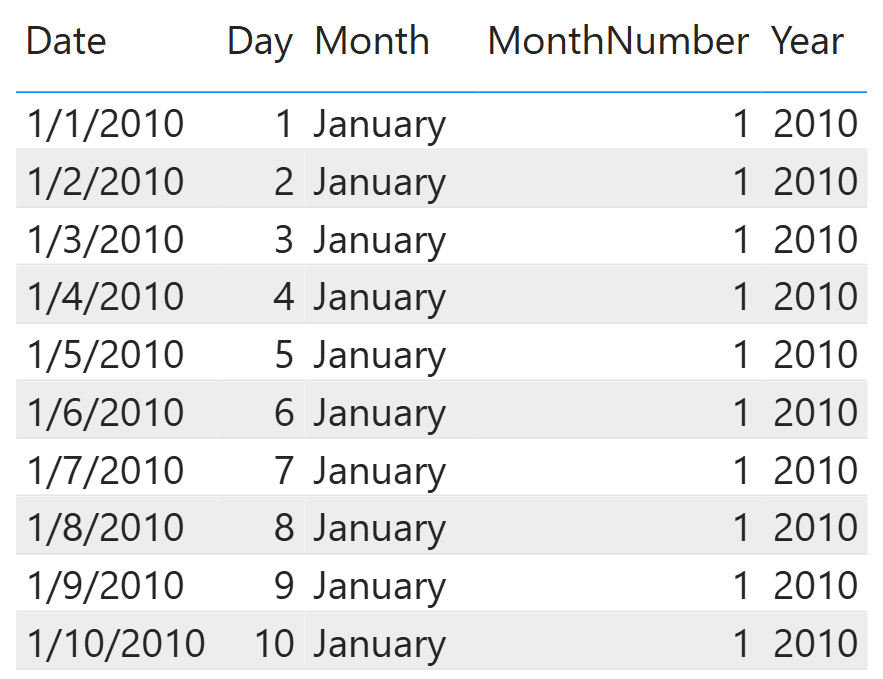 Jun 1, 2026
 -
Page 61: Figure 2-20 description
The description in Figure 2-20 should reference “category” instead of “brand”. The correct description of Figure 2-20 is the following:
RELATEDTABLE returns all the products for each category.
Mar 2, 2026 -
Page 83: Figure 3-3 marker 2 should be close to 2018
The marker (2) in Figure 3-3 is close to “Female”, but it should be close to “2018” on the highlighted row.
Jan 23, 2026 -
Page 118: Perc over Continent instead of Perc over Content
The measure name mentioned in the paragraph after the code snippet should reference Perc over Continent instead of Perc over Content.
Aug 14, 2026 -
Page 128: Sum instead of average
In the first paragraph of the page, immediately before Figure 4-15, the noun “average” should be “sum” in the second sentence, which should be read as follows:
Therefore, the value computed is the sum of all brands in the given year, …
Jan 8, 2026 -
Page 144: Measure for icon result
In the first paragraph of “Computing the icon” section, the result of the measure for the icon is -1, 0, or 1 instead of “1 or 2. Therefore, instead of:
We write a measure that returns 1 or 2 based on the sign…
The right sentence should be:
We write a measure that returns -1, 0, 0r 1 based on the sign…
Feb 3, 2026 -
Page 150: Missing “not”
The second sentence in the paragraph after the code snippet should read “If that is not the case, …” instead of “If that is not the case, …”,
Aug 14, 2026 -
Page 168: Figure 5-5 label correction
The Figure 5-5 label should say “two ore more products” instead of “more than two products”. The correct label is:
FIGURE 5-5 # Good Customers shows the customers who bought two or more products.Jan 4, 2026 -
Page 172: Net Price should be Unit Price column reference in code snippet
The code snippet iterates Product[Net Price] instead of Product[Unit Price]. The right code snippet should be as follows:
SUMX (
    VALUES ( 'Product'[Unit Price] ),
    IF (
        'Product'[Unit Price] >= 10,
        'Product'[Unit Price] * [Sales Amount]
    )
)
Jan 4, 2026 -
Page 174: Remove Sales[Quantity] from Amount variable assignment expression
The Amount variable in the code snippet should be assigned to Sales[Net Price] without being multiplied by Sales[Quantity].
The right code snippet is the following:Avg Amt per Kg = AVERAGEX ( Sales, VAR Amount = Sales[Net Price] VAR NormalizedWeight = SWITCH ( RELATED ( 'Product'[Weight Unit Measure] ), "ounces", 0.0283495, "grams", 0.001, "pounds", 0.453592 ) * RELATED ( 'Product'[Weight] ) VAR Result = DIVIDE ( Amount, NormalizedWeight ) RETURN Result )Jan 13, 2026 -
Page 182: Use ‘Product'[FirstSale] instead of ‘Product'[First Sale]
In the third line of the code snipped for the measure in the Sales table, use ‘Product'[FirstSale] instead of ‘Product'[First Sale]. The right code is as follows:
First Week Sales =
SUMX (
    VALUES ( 'Product'[FirstSale] ),
    VAR FirstSale = 'Product'[FirstSale]
    RETURN
        CALCULATE (
            [Sales Amount],
            Sales[Order Date] >= FirstSale
                && Sales[Order Date] < FirstSale + 7
        )
)
Jan 27, 2026 -
Page 187: Missing comma after RELATEDTABLE ( Sales )
There is a missing comma at the end of RELATEDTABLE ( Sales ) on the sixth row of the code example.
SUMX (
    'Product Category',                   -- Scans the Product Category table
    SUMX (                                -- For each category
        RELATEDTABLE ( 'Product' ),       -- Scans the products
        SUMX (                            -- For each product
            RELATEDTABLE ( Sales ),       -- Scans the sales of that product
            Sales[Quantity]               --
                * 'Product'[Unit Price]   -- Computes the sales amount of that sale
                * 'Product Category'[Discount]
        )
    )
)
Jan 27, 2026 -
Page 225: Inverted formula for Gross Margin %
The expression used for Gross Margin % in the query inverted the numerator and denominator. The right calculation for the Gross Margin % calculation should be the following:
Query... "Gross Margin %", DIVIDE ( [Gross Margin], [Sales Amount] ) ...The content of Figure 6-21 shows the result produced by the inverted formula. Using the correct formula yields a different result. However, this is unrelated to the topic discussed in this section of the book.
Mar 18, 2026 -
Page 226: SUMMARIZECOLUMNS instead of ADDCOLUMNS and SUMMARIZE
In the first paragraph of the “Computing the best store by product” section, use SUMMARIZECOLUMNS instead of “ADDCOLUMNS and SUMMARIZE working together”.
The right sentence is:[…] let us look at an example of SUMMARIZECOLUMNS to solve a non-trivial scenario. […]
Feb 3, 2026 -
Page 230: Use Product[Brand] instead of Product[Color] after Figure 6-26
In the paragraph after Figure 6-26, use Product[Brand] as a column reference instead of Product[Color]. The right sentence should be:
The Brand Name measure uses COUNTROWS to check whether Product[Brand] has only one value visible in the current filter context.
Jan 26, 2026 -
Page 235: Remove “expanded” from “of the same expanded table” sentence.
In the last sentence of the page, just before the Conclusions section of Chapter 6, the word “expanded” must be eliminated from “of the same expanded table,” resulting in “of the same table”. The right sentence is:
ALLSELECTED proves particularly useful. You can use as arguments of ALLSELECTED a table or a list of columns of the same table, or no parameters at all.
Jan 28, 2026 -
Page 240: Remove ‘)’ after Sales[CustomerKey]
In both code snippets of the page (first two code snippets of “The importance of variable names” section), there is a bracket ‘)’ after Sales[CustomerKey] that should be removed.
Instead of:
Sales[CustomerKey] ),The code should be:
Sales[CustomerKey],Feb 3, 2026 -
Page 256: Figure 8-1 filters Product[Color] instead of Sales[Net Price]
In Figure 8-1, the filter is on Product[Color] instead of Sales[Net Price].
The correct DAX Code is the following:CALCULATE ( [Sales Amount], 'Product'[Color] = "Red" )Feb 5, 2026 -
Page 270: Typos in Figure 8-14
Two typos in Figure 8-14:
- The Row result or “Row 2” should be 54.95 instead of 57.95.
- The formula in the DAX Code should use Sales[Net Price] instead of Sales[Unit Price].
Feb 7, 2026 -
Page 281: Outer row context instead of outer filter context before Figure 8-20
In the last paragraph of the page, the one preceding Figure 8-20 in the following page, the reference to the “outer filter context” should be to the “outer row context”. The correct sentence is:
[…] the value of Date[Year] is taken from the outer row context […]
Jan 30, 2026 -
Page 289: Clarification about context transition
At the end of the second paragraph in the section “Leveraging context transition in iterators” (which is the last sentence at page 289), the reference to the algorithm without context transition is inaccurate, because RELATEDTABLE internally is a CALCULATETABLE that works with a context transition. The following sentence:
We will first show the algorithm without using the context transition and then make it better by leveraging the context transition.
Should be rephrased as follows:
We will first show the algorithm using table stored in a variable and then make it better by leveraging the context transition.
Feb 7, 2026 -
Page 297: CROSSFILTER instead of USERELATIONSHIP
In the paragraph before Figure 8-28, instead of USERELATIONSHIP, the function should be CROSSFILTER (as correctly stated in the following paragraphs). The correct sentence is:
Despite the model’s unidirectional relationship between Product and Sales, as shown in Figure 8-28, USERELATIONSHIP can change the cross-filter direction and make it bidirectional.
Jan 24, 2026 -
Page 308: Use Sales[Net Price] instead of Sales[Unit Cost]
The two calculated columns MarginPct and Margin should reference Sales[Net Price] instead of Sales[Unit Cost].
The right definition is as follows:
Calculated columns in Sales tableMarginPct = DIVIDE ( Sales[Margin], Sales[Net Price] ) Margin = Sales[MarginPct] * Sales[Net Price]
Feb 16, 2026 -
Page 327: Ignore “to the same customer” after Figure 9-9
In the first paragraph after Figure 9-9, the fragment “to the same customer” should be removed. The right sentence is:
Because of the intersection of filters, rows from both Sales and Receipts remain visible only in the uncommon scenario where the same product is sold both online and in a physical store on the same date.
Apr 6, 2026 -
Page 376: Parameter name mismatch in RangeLookup function
The parameters used in the function RangeLookup have name different from the parameters: colMin, colMax, and colTarget should be minColumn, maxColumn, and targetColumn, respectively.
The correct complete definition is the following:Function definitionRangeLookup = ( search : SCALAR VAL, lookupTable : ANYREF EXPR, minColumn : ANYREF EXPR, maxColumn : ANYREF EXPR, targetColumn : ANYREF EXPR ) => SELECTCOLUMNS ( FILTER ( lookupTable, minColumn <= search && maxColumn > search ), "@Result", targetColumn )Feb 7, 2026 -
Page 393: Code to handle ties
The query in the book does not handle cases where there are products with the value of Sales Amount. By using ISONORAFTER the condition can use the Product Name in case of ties, returning a deterministic result with the same sort order.
EVALUATE
VAR TotalSales = [Sales Amount]
VAR ProdsWithSales =
    ADDCOLUMNS (
        VALUES ( 'Product'[Product Name] ),
        "ProductSales", [Sales Amount]
    )
VAR ProdsWithRT =
    ADDCOLUMNS (
        ProdsWithSales,
        "RunningTotal",
        VAR SalesOfCurrentProduct = [ProductSales]
        VAR CurrentProduct = 'Product'[Product Name]
        RETURN
            SUMX (
                FILTER (
                    ProdsWithSales,
                    ISONORAFTER (
                        [ProductSales], SalesOfCurrentProduct, ASC,
                        'Product'[Product Name], CurrentProduct, ASC
                    )
                ),
                [ProductSales]
            )
    )
VAR TopTenPercent =
    FILTER (
        ProdsWithRT,
        [RunningTotal] / TotalSales <= 0.10
    )
RETURN TopTenPercent
ORDER BY [ProductSales] DESC
Sep 17, 2026 -
Page 413: Replace “levers” with “levels”
In the third sentence of the first paragraph, replace “levers” with “levels”, so that it reads “… other levels to the rows, …”
Apr 6, 2026 -
Page 433: CROSS APPLY instead of OUTER APPLY
In the first sentence of the “Using GENERATE and GENERATEALL” section, the reference to OUTER APPLY should be replaced by CROSS APPLY, which describes the logic of GENERATE, while OUTER APPLY describes the logic of GENERATEALL. A better version of the first sentence is the following one:
GENERATE is a powerful function that implements the
OUTER APPLYCROSS APPLY logic from the SQL language, while GENERATEALL implements the OUTER APPLY logic.Feb 4, 2026 -
Page 470: Customer[Name] instead of Sales[Order Date]
In the paragraph before Figure 12-16, the column reference to Sales[Order Date] should be to Customer[Name]. The right sentence is:
OFFSET creates its source table using SUMMARIZE, which returns Customer[Name] and Sales[Order Number].
Feb 3, 2026 -
Page 471: Incorrect table headers in Figure 12-17
The Sales and Product table headers in Figure 12-17 should be removed from the figure, they are unrelated to the content displayed.
Nov 25, 2025 -
Page 487: Add “at most” before “one row”
Add “at most” before “one row” in the first paragraph of the “Understanding WINDOW and apply semantics” section. The fragment of the sentence should be:
… because both functions return at most one row for each row
in the evaluation context.Apr 6, 2026 -
Page 487: Reference to SUMX instead of CALCULATE
The first paragraph on the page, immediately after Figure 12-31 in the previous page, has a reference to SUMX that is not present in the code executed for Figure 12-31.
At the beginning of the paragraph, instead of:
This behavior occurs because the context transition executed by SUMX while iterating over the
result of WINDOW is not overriding the outer filter context generated by SUMMARIZECOLUMNS.The correct sentence should be the following:
This behavior occurs because the filter context applied by CALCULATE with WINDOW does not override the filter context generated by SUMMARIZECOLUMNS.
Feb 3, 2026 -
Page 491: Missing assignment operator in DAX measure
There is a missing “=” assignment operator after the line
VAR Resultin the 6 Months Avg measure. The correct code of the final part of the 6 Months Avg measure should be:VAR Result = IF ( [Sales Amount] > 0, MovingAverage ) RETURN ResultNov 25, 2025 -
Page 494: Use “can contain” instead of “contains”
In the second sentence of the second paragraph of the section “Understanding apply semantics”, there should be “can contains” instead of “contains”. The sentence should start this way:
The source table can contain both model columns … and local columns …
Similarly, in the last paragraph of the page, just after the Note,
This table does not contain local columns; therefore,
it can contain fewer columns than …Apr 6, 2026 -
Page 502: PARTITIONBY instead of ORDERBY in last sentence
In the last sentence of the last paragraph, which is the paragraph after prevExchange 2 calculated column definition, the function ORDERBY should be PARTITIONBY. The correct sentence is:
Two are specified in the PARTITIONBY section, and the third is specified in the
MATCHBY section.Feb 3, 2026 -
Page 515: In Figure 13-2, year is 2018
The filter for Date[Year] in Figure 13-2 should be 2018 instead of 2017 for both “Cell filter context” and “Active filters”.
Mar 1, 2026 -
Page 522: DateTime instead of DateType
In the third bullet point of “Building a date” table section, there is a reference to DateType that should be DateTime. The correct sentence is:
[…] (even though the physical column internally remains of type DateType). […]
Feb 3, 2026 -
Page 533: Examples and descriptions in Table 13-1
The examples and descriptions for partial category types in Table 13-1 are inaccurate. The partial category types depend on other categories of the calendar. The cardinality is correct, the columns examples and descriptions are correct in the following table.
Category Example Description Type Example of Cardinality Year 2025 The year Complete 1 per year Quarter Q1 2025 The quarter, including the year Complete 4 per year Month January 2025 The month, including the year Complete 12 per year Week 2025 Week 20 The week, including the year Complete 52/3 per year Date 01/05/2025 The individual date Complete 365/6 per year Quarter of Year Q1 The quarter of the year Partial 4 Month of Year January The month of the year Partial 12 Month of Quarter M1 The month of the quarter Partial 3 Week of Year Week 2 The week of the year Partial 53 Week of Quarter Week 2 The week of the quarter Partial 13 Week of Month Week 3 The week of the month Partial 5 Day of Year Day 39 The day of the year Partial 366 Day of Quarter Day 12 The day of the quarter Partial 92 Day of Month Day 12 The day of the month Partial 31 Day of Week Day 4 The day of the week Partial 7 Apr 5, 2026 -
Page 541: Fix caption Figure 13-17
The caption of Figure 13-17 is incorrect, the right one should be as follows:
FIGURE 13-17 The filters applied by DATEADD do not remove filters on lower level categories.
May 26, 2026 -
Page 546: PRECISE instead of EXTENDING
In the paragraph before Figure 13-21, replace EXTENDING with PRECISE. The correct paragraph should start this way:
In Figure 13-21, you can see that by using PRECISE, the value of Sales PM for February 28 is blank because there are no sales on January 28. […]
May 15, 2026 -
Page 556: DATESINPERIOD instead of PARALLELPERIOD
In the first line of the last paragraph of the page (before Figure 13-30), the sentence should reference DATESINPERIOD instead of PARALLELPERIOD.
The right version is: “The second argument of DATESINPERIOD is the reference date, …”Jan 7, 2026 -
Page 568: Comparison in FirstDateWithTransactions function
The FirstDateWithTransactions function defined in the “TMLD definition for function” snippet should use “>=” instead of “<=” as a comparison between dateColumn and FirstVisibleDate. The right assignment of the FirstDateWithData variable is the following:
VAR FirstDateWithData =
    CALCULATE (
    MIN ( dateTransaction ),
    KEEPFILTERS ( dateColumn >= FirstVisibleDate )
)
Feb 18, 2026 -
Page 608: Internal note to ignore in Figure 14-38
The note ** insert F14xx38 no crop on the top of Figure 14-38 should be ignored, it is an internal editing note that was left in production by mistake.
Jan 9, 2026 -
Page 619: Figure 14-50 description
The correct description for Figure 14-50 should be the following:
Figure 14-50 The Monthly Moving Average computes the average of the full month also at the day level.
Feb 3, 2026 -
Page 654: Misspelled ISINSCOPE before Figure 16-3
The third paragraph, just before “Measures in the Sales table” snippet, has a misspelled reference to INSINSCOPE that should be ISINSCOPE instead. The right sentence should be:
Moreover, with ISINSCOPE, you need to …
Mar 18, 2026 -
Page 684: Use ISINSCOPE instead of ISFILTERED
The definition of the ParentChild calculation item should use ISINSCOPE instead of ISFILTERED. The correct code is the following:
Calculation groupCALCULATIONGROUP ParentChild[Hide unwanted rows] CALCULATIONITEM "ParentChild" = VAR BrowseDepth = ISINSCOPE (Persons[Level1]) + ISINSCOPE (Persons[Level2]) + ISINSCOPE (Persons[Level3]) VAR MaxDepth = MAX ( Persons[NodeDepth] ) VAR Result = IF ( MaxDepth >= BrowseDepth, SELECTEDMEASURE () ) RETURN ResultFeb 3, 2026 -
Page 687: Updated link in Important note
The link in the “Important” note before the conclusions section of Chapter 16 changed after the book was published; use the following link instead:
https://www.microsoft.com/en-us/sql-server/blog/2017/10/02/analysis-services-innovations-in-sql-server-2017/Jun 2, 2026 -
Page 717: Year column in Figure 18-1
The table SalesDeliveryDate in Figure 18-1 should have 2018 instead of 2017 in the second and third row of the column Year (the year should correspond to the Date column).
Feb 22, 2026 -
Page 741: Figure 18-18 description
The description for Figure 18-18 references Date instead of Product. The correct description is the following:
FIGURE 18-18 When the bidirectional cross-filter is enabled between Sales and Product, the filter will now propagate from Customer to Product.
Feb 3, 2026 -
Page 744: Typo in filter path
In the second line of page 744, the paragraph before Figure 18-22, the text “Date > Sales > Product-Receipts” should be “Date > Sales > Product > Receipts”.
Jun 4, 2026 -
Page 746: Typo in Rec Amt CF REMOVEFILTERS measure name
In the first line of the paragraph before Figure 18-25, the measure referenced should be Rec Amt REMOVEFILTERS instead of Rec Amt CF REMOVEFILTERS. The right start of the paragraph is:
In the other measure, Rec Amt REMOVEFILTERS, we have a version […]
Feb 3, 2026 -
Page 748: Singular instead of plural in code snippet after Figure 18-26
The code snippet after Figure 18-26 has only one measure, so the description of the snippet should be “Measure in the Sales table” instead of “Measures in the Sales table”.
Jun 4, 2026 -
Page 764: Date instead of MonthlyBudget in one reference
The last paragraph of the page include a sentence with a reference to MonthlyBudget that should be Date. Here is the complete sentence, with the correction shown after the struck-through MonthlyBudget reference.
[..] MonthlyBudget depends on the presence of a blank row because it uses column values from
MonthlyBudgetDate, and BLANK is one of the many possible values. […]Feb 3, 2026 -
Page 768: Categories instead of brand and typo on Customer
The last sentence in the paragraph before Figure 19-6 references “brands” instead of “categories”. Here is the complete sentence, with the correction shown after the struck-through brands reference:
Summing the
brandscategories in Canada would produce a budget much larger than the total displayed for Canada.In the same paragraph, there is a typo in the name of the Customer table, which is mentioned in plural (Customers). The right sentence is:
Similarly, the relationship with Customer
sis at the Country level.Feb 3, 2026 -
Page 788: StoreStatus instead of StoresStatus in Chapter 19
In several pages of Chapter 19 (including in description of Figure 19-22) there is a reference to StoresStatus that must be corrected to StoreStatus (pages 788, 789, 790, and 795).
Jun 6, 2026 -
Page 794: Code in the book not aligned to the code in the sample file
The code of the Open Stores Amount 2 measure is inaccurate, the definition of the AllStoreStatuses variable does not include the correct column @OpenYears filtered in OpenStores; the sample file contains the correct code, which is the following:
Measure in Sales tableOpen Stores Amount 2 = VAR AllSelectedYears = CALCULATETABLE ( SUMMARIZECOLUMNS ( 'Date'[Year], "@", COUNTROWS ( StoreStatus ) ), ALLSELECTED ( 'Date' ), ALLSELECTED ( 'Product' ), ALLSELECTED ( Store ) ) VAR NumberOfYears = COUNTROWS ( AllSelectedYears ) VAR AllStoreStatuses = SUMMARIZECOLUMNS ( Store[StoreKey], 'Product'[Category], "@OpenYears", CALCULATE ( COUNTROWS ( StoreStatus ), ALLSELECTED ( 'Date' ), StoreStatus[Status] = "Open" ) ) VAR OpenStores = SELECTCOLUMNS ( FILTER ( AllStoreStatuses, [@OpenYears] == NumberOfYears ), Store[StoreKey], 'Product'[Category] ) VAR Result = CALCULATE ( [Sales Amount], KEEPFILTERS ( OpenStores ) ) RETURN ResultJan 14, 2026