 Marco Russo & Alberto Ferrari
DAX user-defined functions (UDFs) are a powerful tool for improving the quality of your semantic models. DAX authors with an IT background are accustomed to creating generic code using functions. However, many DAX creators came from different backgrounds of expertise, such as statistics, business, and marketing. They may not recognize the immense power that functions have brought to the Power BI community.
In this article, we want to practically show, through an example, how to wisely use functions to improve the generalization of code and to reduce the complexity of your semantic models, with the goal of raising curiosity towards user-defined functions and – in general – the world of code development.
We use the like-for-like comparison pattern as an example: https://www.daxpatterns.com/like-for-like-comparison/. We are neither going to describe the pattern code, nor going to evaluate its quality. The goal is to show how to transform a pattern that requires manual intervention into a set of generic functions that greatly simplify the creation of new semantic models.
Quick analysis of the like-for-like pattern
The goal of the pattern is to show the sales amount for only the stores that were open across all the years analyzed. In the next report, you will see that several stores (Connecticut, Hawaii, and Idaho) were not open in 2022; therefore, following the pattern, they should not participate in the comparison.
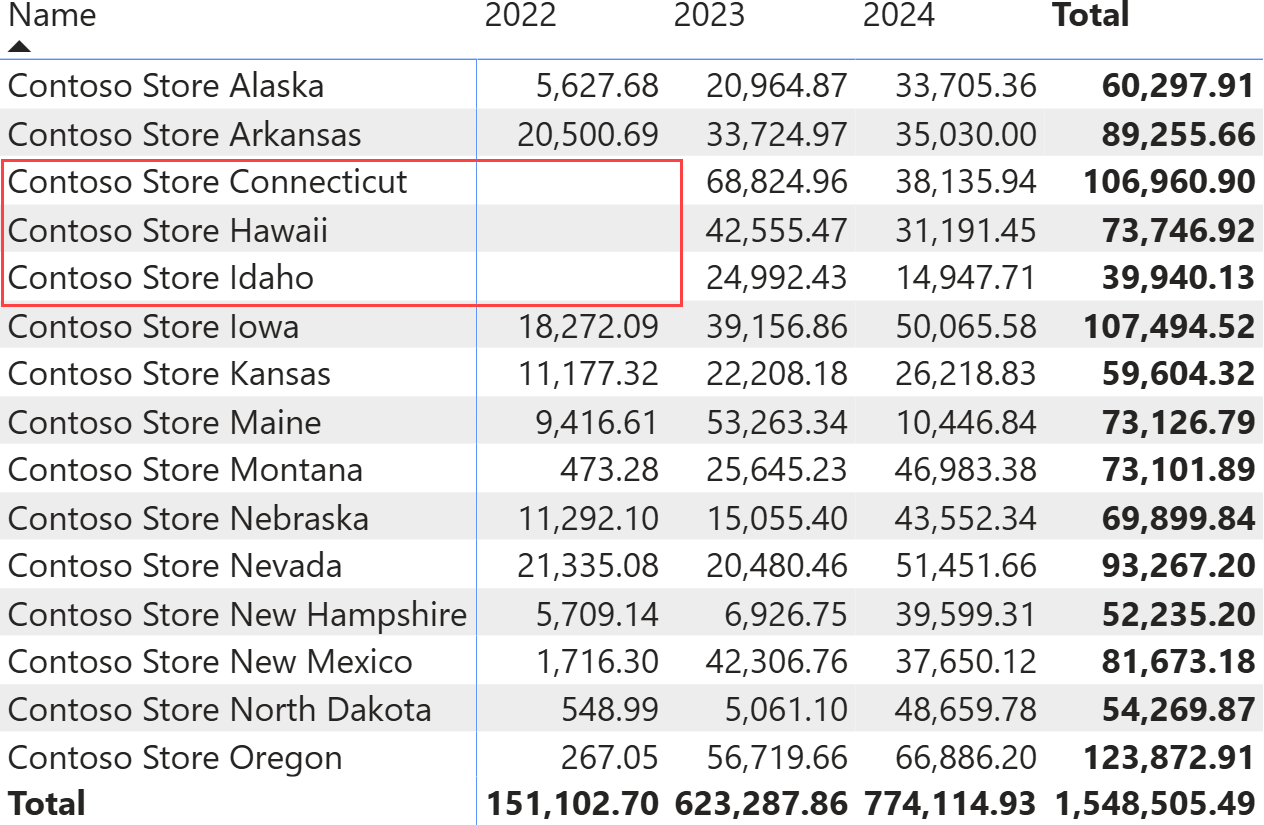
Using the code in the pattern, the report removes the stores that were not open during the entire selected period, from the calculation.
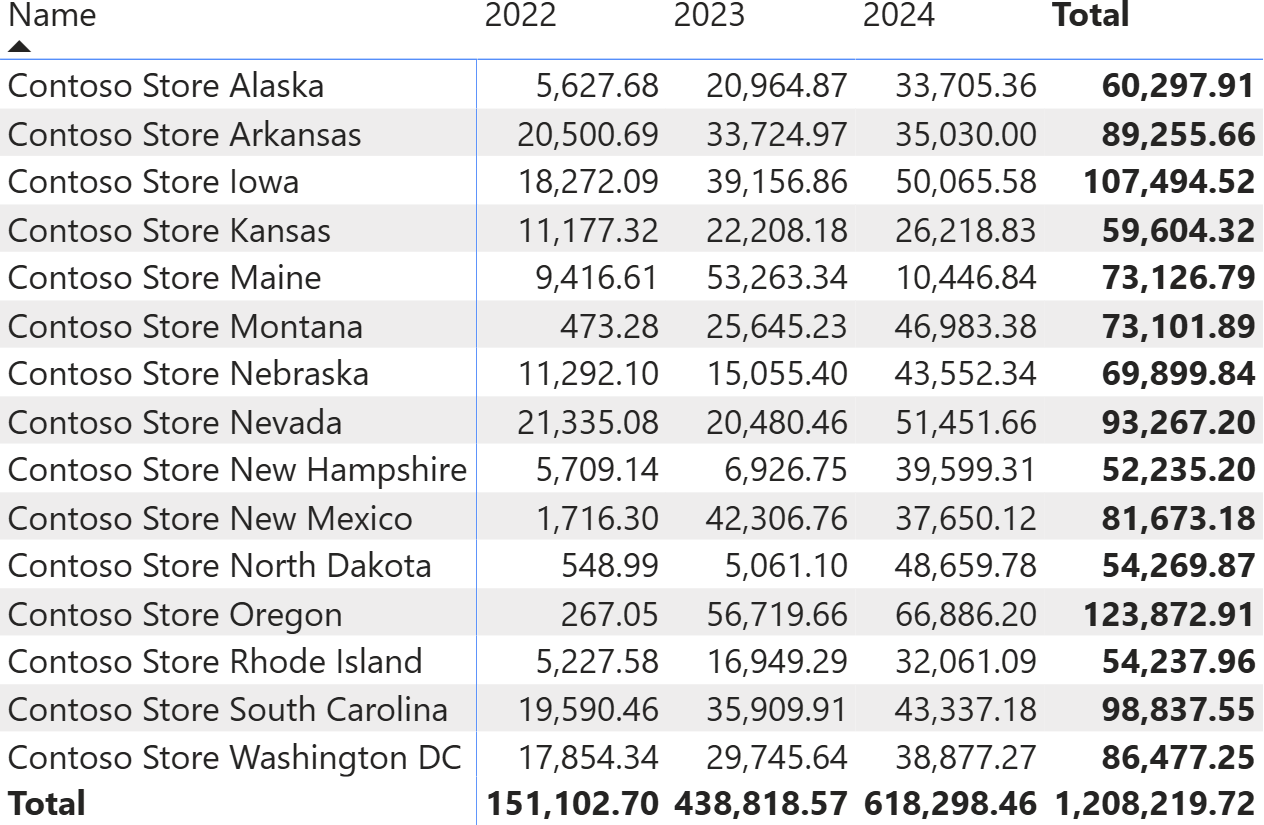
The pattern is based on two items: a table (StoreStatus) containing information on whether a store is open or closed each year, and the Same Store Sales measure, which uses the information in StoreStatus to limit the calculation to stores open for the entire period. Here is the code of the pattern:
StoreStatus =
VAR AllStores =
    CROSSJOIN (
        SUMMARIZE ( Sales, 'Date'[Year] ),
        ALLNOBLANKROW ( Store[StoreKey] )
    )
VAR OpenStores =
    SUMMARIZE (
        Sales,
        'Date'[Year],
        Sales[StoreKey]
    )
RETURN
    UNION (
        ADDCOLUMNS ( OpenStores, "Status", "Open" ),
        ADDCOLUMNS ( EXCEPT ( AllStores, OpenStores ), "Status", "Closed" )
    )
Same Store Sales =
VAR OpenStores =
    CALCULATETABLE (
        FILTER (
            ALLSELECTED ( StoreStatus[StoreKey] ),     -- Filter the stores
            CALCULATE (                                -- where the Status is
                SELECTEDVALUE ( StoreStatus[Status] )  -- always OPEN
            ) = "Open"                                 --
        ),                                             --
        ALLSELECTED ( 'Date' )                         -- Over all selected years
    )
VAR FilterOpenStores =
    TREATAS (                 -- Use OpenStores to filter
        OpenStores,           -- Store[StoreKey]
        Store[StoreKey]       -- by changing its data lineage
    )
VAR Result =
    CALCULATE (
        [Sales Amount],
        KEEPFILTERS ( FilterOpenStores )
    )
RETURN
    Result
If you want to implement the pattern in one of your models, you need to manually adapt the code to make it work with your specific table and column names. For example, it is likely that you want to perform a like-for-like comparison on other entities, like Product, Customer, or any other entity that is relevant to your business. Needless to say, adapting the code requires you to spend some time understanding how it works to avoid any mistakes.
The question is simple: Is there a better way to implement the pattern and reduce the implementation to simpler steps? Thanks to UDFs, the answer is yes.
The goals of using UDFs
By using UDFs, we strive to obtain several benefits:
- Creating functions that can be used in different semantic models with minimal effort.
- Centralizing the code, so that subsequent optimizations of the functions provide benefits to all the models using them.
- Sharing the functions with the community, to benefit from other people’s ideas, if any.
All these benefits can be achieved by simply converting the calculated table code and the measure code into functions, while paying close attention to the key distinction between model-dependent and model-independent functions. If you are not familiar with these terms, you can find more information in this article: Model-dependent and model-independent user-defined functions in DAX.
Basically, a model-dependent function knows about the structure of tables and columns in your model, whereas a model-independent function is completely agnostic about the structure of the model. A model-independent function needs to receive as parameters all the columns and tables required to perform its calculation.
At first glance, it may seem as though creating model-independent functions is a waste of time, a geeky thing with no real value. However, we are about to show you the opposite: thinking in terms of model-independent functions is the key to widening your view about functions and producing elegant and reusable code.
We could show the resulting code straight here. However, for educational purposes, it is more beneficial to show the process of moving from the original pattern to the generic UDF step by step.
Moving measures and calculated tables into functions
The first step is to replace the code in both the measure and the calculated table with functions. As you can see from the following code, we just moved the entire code from both the measure and the calculated table into two functions, with no parameters:
Local.StoreStatus =
    ( ) =>
    VAR AllStores =
        CROSSJOIN (
            SUMMARIZE ( Sales, 'Date'[Year] ),
            ALLNOBLANKROW ( Store[StoreKey] )
        )
    VAR OpenStores =
        SUMMARIZE (
            Sales,
            'Date'[Year],
            Sales[StoreKey]
        )
    RETURN
        UNION (
            ADDCOLUMNS ( OpenStores, "Status", "Open" ),
            ADDCOLUMNS ( EXCEPT ( AllStores, OpenStores ), "Status", "Closed" )
        )
Local.SameStoreSales =
    () =>
    VAR OpenStores =
        CALCULATETABLE (
            FILTER (
                ALLSELECTED ( StoreStatus[StoreKey] ),     -- Filter the stores
                CALCULATE (                                -- where the Status is
                    SELECTEDVALUE ( StoreStatus[Status] )  -- always OPEN
                ) = "Open"                                 --
            ),                                             --
            ALLSELECTED ( 'Date' )                         -- Over all selected years
        )
    VAR FilterOpenStores =
        TREATAS (                 -- Use OpenStores to filter
            OpenStores,           -- Store[StoreKey]
            Store[StoreKey]       -- by changing its data lineage
        )
    VAR Result =
        CALCULATE (
            [Sales Amount],
            KEEPFILTERS ( FilterOpenStores )
        )
    RETURN
        Result
The function names start with Local to identify them as model-dependent functions. They are model-dependent because throughout the DAX code, we use column and table names that are present in the model. If we did not do that, then moving this code to another model, where table and column names are likely to differ, would invalidate the DAX code.
Creating model-independent functions
The next step is to split each of the functions into two: a model-independent function that does not reference any object in the semantic model, and a model-dependent function that calls the model-independent function by passing the required parameters.
This step is highly relevant because it separates model details from business logic. We execute it by replacing each and every column and table name in the UDF with a parameter. The model-independent functions are prefixed with DaxPatterns.LikeForLike, because this is the name we want to use for the library.
Let us start with the OpenStores function, which computes the table with the stores open each year:
DaxPatterns.LikeForLike.StoreStatus =
    (
        dateYearNumberColumn : ANYREF,
        storeColumn : ANYREF,
        salesTable : ANYREF
    ) =>
    VAR AllStores =
        CROSSJOIN (
            SUMMARIZE ( salesTable, dateYearNumberColumn ),
            ALLNOBLANKROW ( storeColumn )
        )
    VAR OpenStores =
        SUMMARIZE (
            salesTable,
            dateYearNumberColumn,
            storeColumn
        )

    RETURN
        UNION (
            ADDCOLUMNS ( OpenStores, "Status", "Open" ),
            ADDCOLUMNS ( EXCEPT ( AllStores, OpenStores ), "Status", "Closed" )
        )
Local.StoreStatus = ( ) =>
    DaxPatterns.LikeForLike.EntityStatus ( 'Date'[Year], Sales[StoreKey], Sales )
The business logic is entirely included in the DaxPatterns.LikeForLike.StoreStatus function, which receives as parameters the columns and tables required to compute the table. This UDF would work in any model, because it is model-independent. However, for the function to be useful, it must be called with the right set of parameters. This step is accomplished by the Local.StoreStatus function, which just executes the mapping between the model and the model-independent function, without adding any business logic.
The calculated table definition just calls the model-dependent function:
StoreStatus = Local.StoreStatus ()
In a very similar way, we split the second function into two. The only additional detail is that the function accepts the measure to compute as an argument. Indeed, measure names such as Sales Amount are model-dependent details and cannot be part of a model-independent function.
DaxPatterns.LikeForLike.ComputeForSameStore =
    (
        storeStatusKeyColumn : ANYREF,
        storeStatusStatusColumn : ANYREF,
        storeKeyColumn : ANYREF,
        dateTable : ANYREF,
        formulaExpr : EXPR
    ) =>
    VAR OpenStores =
        CALCULATETABLE (
            FILTER (
                ALLSELECTED ( storeStatusKeyColumn ),          -- Filter the entities
                CALCULATE (                                    -- where the Status is
                    SELECTEDVALUE ( storeStatusStatusColumn )  -- always OPEN
                ) = "Open"                                     --
            ),                                                 --
            ALLSELECTED ( dateTable )                          -- Over all selected years
        )
    VAR FilterOpenStores =
        TREATAS (                  -- Use OpenEntities to filter
            OpenStores,            -- the dimension store key
            storeKeyColumn         -- by changing its data lineage
        )
    VAR Result =
        CALCULATE (
            formulaExpr,
            KEEPFILTERS ( FilterOpenStores )
        )
    RETURN
        Result
Local.ComputeForSameStore =
    (
        formulaExpr : ANYREF
    ) =>
    DaxPatterns.LikeForLike.ComputeForSameStore (
        StoreStatus[StoreKey],
        StoreStatus[Status],
        Store[StoreKey],
        'Date',
        formulaExpr
    )
The Same Store Sales measure becomes much simpler, because it just needs to call Local.ComputeForSameStore with the right parameter:
Same Store Sales = Local.ComputeForSameStore( [Sales Amount] )
The advantage of creating model-independent functions is that their business logic can now be copied to any model. In each model, you can create the Local function to map the corresponding columns and table names, but most of the work needs no refactoring.
Creating more generic model-independent functions
Now that we have the two model-independent functions, we can observe that the business logic of the like-for-like pattern could work not only for stores, but for any entity – for example, it could work for products. If you carefully think about it, the only differences in terms of business logic between products and stores are the column and table names. However, because these details are now parameters of the function, we can create a more generic function that accepts any entity rather than just stores.
While producing this new version of the functions, we also observe that products are neither open nor closed. Stores can be open or closed, but products can be active or inactive. Therefore, we change the terminology in the code, shifting from the semantically meaningful Open and Closed to the more generic terms Active and Inactive.
Despite this looking like a small detail, it is not. Choosing the correct names reflects the clear intention of moving from the particular to the generic. The more generic our functions are, the more reusable they will be.
DaxPatterns.LikeForLike.ComputeForSameEntity =
    (
        entityStatusKeyColumn : ANYREF,
        entityStatusStatusColumn : ANYREF,
        entityKeyColumn : ANYREF,
        dateTable : ANYREF,
        formulaExpr : EXPR
    ) =>
    VAR OpenEntities =
        CALCULATETABLE (
            FILTER (
                ALLSELECTED ( entityStatusKeyColumn ),          -- Filter the entities
                CALCULATE (                                     -- where the Status is
                    SELECTEDVALUE ( entityStatusStatusColumn )  -- always OPEN
                ) = "Active"                                    --
            ),                                                  --
            ALLSELECTED ( dateTable )                           -- Over all selected years
        )
    VAR FilterOpenEntities =
        TREATAS (                  -- Use OpenEntities to filter
            OpenEntities,          -- the dimension entity key
            entityKeyColumn        -- by changing its data lineage
        )
    VAR Result =
        CALCULATE (
            formulaExpr,
            KEEPFILTERS ( FilterOpenEntities )
        )
    RETURN
        Result
DaxPatterns.LikeForLike.EntityStatus =
    (
        dateYearNumberColumn : ANYREF,
        entityColumn : ANYREF,
        transactionTable : ANYREF
    ) =>
    VAR AllEntities =
        CROSSJOIN (
            SUMMARIZE ( transactionTable, dateYearNumberColumn ),
            ALLNOBLANKROW ( entityColumn )
        )
    VAR OpenEntities =
        SUMMARIZE (
            transactionTable,
            dateYearNumberColumn,
            entityColumn
        )

    RETURN
        UNION (
            ADDCOLUMNS ( OpenEntities, "Status", "Active" ),
            ADDCOLUMNS ( EXCEPT ( AllEntities, OpenEntities ), "Status", "Inactive" )
        )
Computing like-for-like at the Product level
Now that the model-independent functions are entirely agnostic about both the model details and the entity details, we can implement the like-for-like pattern at the Product level by just creating two local functions that instantiate the parameters of the model-independent functions appropriately:
ProductStatus = Local.ProductStatus ()
Local.ProductStatus =
    () =>
    DaxPatterns.LikeForLike.EntityStatus ( 'Date'[Year], Product[ProductKey], Sales )
Local.ComputeForSameProduct =
    (
        formulaExpr : ANYREF
    ) =>
    DaxPatterns.LikeForLike.ComputeForSameEntity (
        ProductStatus[ProductKey],
        ProductStatus[Status],
        Product[ProductKey],
        'Date',
        formulaExpr
    )
Same Product Sales = Local.ComputeForSameProduct ( [Sales Amount] )
Using the Same Product Sales measure, users can easily perform like-for-like comparison at the Product level rather than at the Store level.
The most relevant point is that there is no need to learn or understand the implementation details of the pattern. For a user or developer to implement the pattern, it is sufficient to know how to pass the correct parameters to model-independent functions, thereby minimizing friction in subsequent implementations.
Finally, if new optimizations or feature functions are introduced in DAX and a code review is needed, it suffices to update the model-independent functions, while ensuring that all measures that use the model-dependent functions benefit from the new features. The code is centralized in functions that are agnostic to model details, clearly separating the business logic from local details.
Conclusions
User-defined functions are a great feature in DAX. However, they must be used correctly to maximize benefits for developers. Whenever you develop code, you always start with a measure, because it is easy to modify and debug. However, once the code runs fine, you should always ask yourself whether it can be moved to a more generic measure so you can use the same logic elsewhere. During this process, try to think in terms of model-dependent and model-independent functions.
Not every measure or piece of DAX code will benefit from this method. Nonetheless, improving your ability to abstract from your context and to reason at a higher level will make your DAX code more elegant and easier to maintain.